
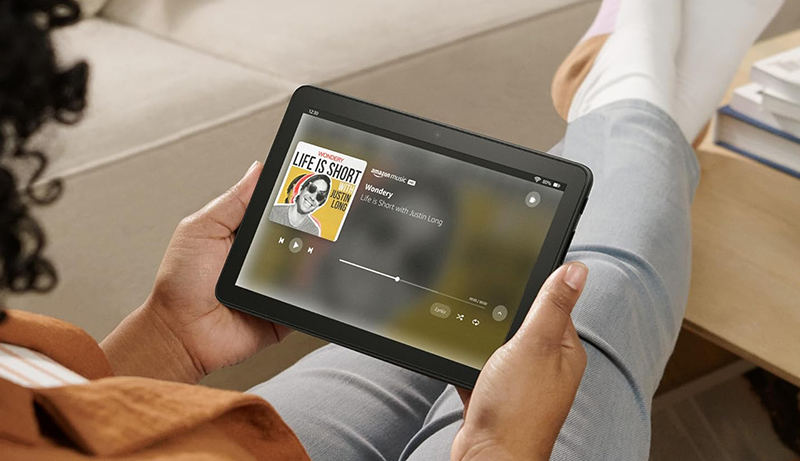
Finding the best 8 inch Android tablets can be surprisingly challenging, especially when the market is filled with options built for different types of users. Whether you need a compact device for travel, work in demanding environments, or simply want a lightweight tablet for reading and entertainment, the 8-inch category delivers an excellent balance between portability and functionality. These tablets are easier to hold for long periods, fit comfortably in bags, and remain versatile enough for browsing, streaming, productivity tasks, and even light gaming.
What sets today’s 8-inch tablets apart is the variety of features they offer. Some models are rugged and built to survive outdoor work, while others focus on entertainment with high-resolution displays and long battery life. Many tablets also integrate kid-friendly controls, intuitive software, and modern connectivity options to suit both families and professionals.
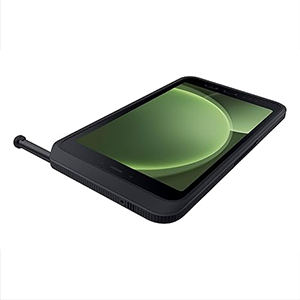
Galaxy Tab Active5
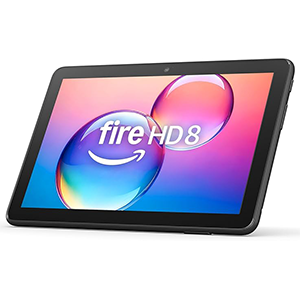
Amazon Fire HD 8 tablet
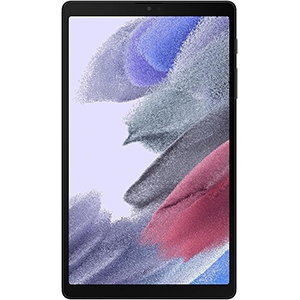
Galaxy Tab A7 Lite
From durable business tablets to sleek entertainment-focused models, choosing the right 8-inch tablet depends on how you plan to use it. In this guide, we review several top options across multiple categories—rugged work tablets, budget entertainment devices, kid-friendly designs, and modern Android models—to help you find the ideal fit for your lifestyle. Each review includes key strengths, weaknesses, and display size details to make your decision easier.
1. SAMSUNG Galaxy Tab Active5
The Samsung Galaxy Tab Active5 is an 8-inch rugged Android tablet designed for field work, industrial environments, and demanding outdoor tasks. Built with durability in mind, it features a tough exterior that resists water, dust, drops, and harsh conditions. The 8-inch display is optimized for visibility in various lighting environments and allows users to stay productive even while wearing gloves—making it ideal for professionals in construction, logistics, transportation, and maintenance.
This tablet emphasizes reliability and continuous workflow support. Its replaceable battery ensures extended productivity, and the device can also operate in No Battery Mode when connected to external power sources. The design maintains compatibility with previous accessories, making upgrading convenient for businesses that already use Galaxy Tab Active equipment.
Fast charging, strong connectivity, and support for advanced security options allow teams to work efficiently with minimized downtime. The rugged build doesn’t compromise usability; it delivers smooth navigation, stable performance, and the versatility expected from a compact Android tablet intended for tough environments.
Pros:
- Rugged and durable design suitable for harsh environments
- Replaceable battery and No Battery Mode for continuous use
- Optimized touchscreen that works with gloves
- Strong connectivity features
Cons:
- Not designed for casual entertainment use
- Slightly bulkier due to rugged construction
- Lacks phone call support
2. Amazon Fire HD 8
The Amazon Fire HD 8 is an 8-inch entertainment-focused tablet ideal for reading, streaming, browsing, and casual gaming. With its compact size, durable build, and user-friendly design, it delivers a well-rounded experience for individuals who want a lightweight home or travel companion. The 8-inch HD display offers clear visuals for movies, books, social media, and everyday tasks, while battery efficiency ensures long hours of uninterrupted use.
Its software experience emphasizes simplicity. The tablet integrates Amazon services, Alexa functions, and access to essential apps through the Amazon Appstore. Whether you want to stream shows, hold video calls, browse news, or enjoy family content, the device offers enough versatility for daily needs. The design is lightweight and comfortable to hold, making it suitable for extended reading sessions or portable entertainment on the go.
For productivity and creativity, the device includes helpful smart tools that assist with email drafting, content summarization, and personalization features. It is best suited for users who want a reliable and easy-to-use tablet mainly for home entertainment, reading, or basic communication.
Pros:
- Lightweight and comfortable for long reading sessions
- Easy access to entertainment apps and Alexa features
- Durable design ideal for travel
- Long battery endurance for daily use
Cons:
- Amazon Appstore ecosystem limits app availability
- Not ideal for heavy multitasking or advanced productivity
- Performance varies with certain apps
3. Samsung Galaxy Tab A7 Lite
The Samsung Galaxy Tab A7 Lite features an 8.7-inch display and a slim, lightweight frame designed for entertainment and portability. Its size makes it ideal for commuters, travelers, and users who enjoy a screen large enough for videos and reading without being bulky. The sturdy metal frame enhances durability, making it suitable for family use, including children who need a dependable tablet for learning and entertainment.
The 8.7-inch display offers vibrant colors with crisp visuals, creating a pleasant viewing experience for videos, browsing, and eBooks. Smooth performance supports everyday apps, while expandable storage options provide flexibility for storing additional media. The long-lasting battery adds convenience for extended use, whether watching content, browsing online, or switching between casual tasks.
Samsung’s ecosystem integration through One UI allows seamless connectivity with other Samsung devices. Parents benefit from Samsung Kids mode, which delivers curated, controlled digital environments for younger users. With its combination of portability, strong build quality, and user-friendly features, the Galaxy Tab A7 Lite is a great option for families, students, and budget-focused users.
Pros:
- Compact and lightweight design perfect for travel
- Sturdy metal frame enhances durability
- Smooth performance for everyday tasks
- Long battery life suitable for all-day use
Cons:
- Not intended for heavy productivity
- Display brightness may vary outdoors
- Audio clarity is adequate but not premium
4. Zuleisy Android 15 Tablet 8.7″
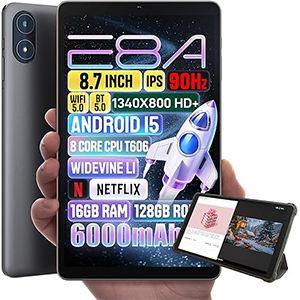
This 8.7-inch Android tablet pairs a modern operating system with a sleek, ultra-light design, making it an excellent choice for users who want portability, responsiveness, and long-lasting performance. The HD IPS display at 1340×800 resolution offers crisp visuals suitable for watching shows, browsing, reading, and attending video calls. With Widevine L1 certification, the tablet streams major platforms in true HD, a major advantage for entertainment users.
The device delivers smooth performance thanks to an efficient chipset designed for multitasking and everyday operations. Android 15 enhances overall responsiveness, offering smarter features, improved privacy management, and optimized battery use. The 6000mAh battery supports long hours of browsing or streaming, making it ideal for travel, online learning, and remote work.
The included leather case adds value and protection while maintaining a lightweight feel. With its combination of responsive display, fast operating system, and modern design, this tablet appeals to students, professionals, and families seeking an affordable yet capable Android device.
Pros:
- Crisp HD IPS display with Widevine L1 streaming
- Lightweight and slim design with protective case
- Smooth performance with efficient modern OS
- Long battery life suitable for all-day use
Cons:
- Camera quality is basic for photography
- Not intended for high-intensity gaming
- Speaker output is functional but not immersive
5. Lenovo Tab M8 (4th Gen)
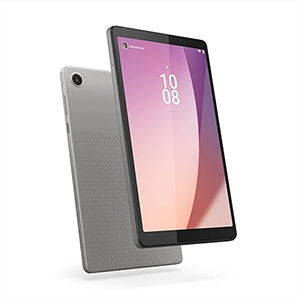
The Lenovo Tab M8 (4th Gen) is an 8-inch Android tablet built for simplicity, portability, and family-friendly use. Its slim and lightweight build makes it comfortable for one-handed reading, browsing, and entertainment. The HD display provides clear visuals for eBooks, web content, and videos, while the TÜV Eye Care certification ensures reduced eye strain during long usage sessions. This makes it great for students, kids, and adults who enjoy extended reading or multimedia time.
The tablet’s battery is designed for all-day activity, supporting long streaming sessions or road-trip entertainment. Dual speakers enhance the overall media experience, making movies and educational content more enjoyable. The camera system offers basic image quality suitable for video calls and daily communication needs.
Lenovo emphasizes safety and digital wellness, integrating Google Family Link for parental controls and offering privacy dashboard features for better management of permissions. While the device focuses on lightweight entertainment and learning, its performance is tailored for moderate daily use rather than heavy multitasking or demanding apps.
Overall, the Lenovo Tab M8 (4th Gen) is a practical and budget-friendly choice for families, casual users, and anyone wanting a simple, comfortable tablet for reading, streaming, and everyday browsing.
Pros:
- Lightweight and easy to hold for long periods
- Eye-friendly display with TÜV certification
- Long battery life ideal for travel and daily use
- Strong parental control features
Cons:
- Not suitable for heavy multitasking
- Slower app responsiveness
- Limited performance in advanced applications
How to choose the Best 8 inch Tablets Android for 2026
Choosing the right 8-inch Android tablet can make a big difference in your happiness with the device. Because these tablets are built for different purposes — from rugged field work to reading, casual streaming, travel or child-friendly use — knowing what to prioritize will help you match the tablet to your needs. Here are the key factors to consider.
Display size and portability
An 8-inch or similar-sized display strikes a balance between portability and usability. It’s large enough for reading, browsing, streaming, or light productivity, yet small enough to carry comfortably — slipping into a bag or even under an arm while commuting. Compact size is particularly useful if you travel frequently, use public transit, or prefer holding the tablet in one hand. If portability matters most, favour thinner, lighter models that won’t strain your arms or weigh you down.
Build quality and ruggedness
Your use-case influences how durable the tablet should be. If you plan to use the tablet outdoors, in dusty or muddy environments, or in industrial or field-work scenarios, build quality matters. Look for dust/water resistance, shock-absorbent construction, rugged or rubberized housing, and other durability features. For general indoor use, such ruggedness may not be critical — but if you expect rough handling (travel, children, busy households), sturdiness becomes a key factor.
Battery life and usability features
Battery performance is essential, especially if you use the tablet on the go, during travel, or for long sessions of reading or streaming. A tablet that can sustain many hours between charges will reduce disruptions. Some models offer replaceable batteries or power-saving modes; these are handy if you rely on your device for extended periods away from a power source. Other useful practicality features may include fast charging, ability to work while plugged in, and responsive touchscreen functionality (for example, usable even while wearing gloves — a plus for outdoor or field work).
Software and operating system support
Since the tablet runs Android, ensure it supports recent versions or can be updated. Better OS support means smoother performance, improved security, and access to a wider range of apps. Also consider support for wide streaming standards if you intend to use it for media — for example, for watching HD video from streaming services.
Performance and multitasking ability
Depending on your intended use, performance needs vary. For light tasks — reading, browsing, watching videos, social media — modest performance is fine. But if you want to multitask, run heavier apps, or use the tablet for work-related functions (document editing, video calls, basic editing), look for a tablet with stronger processors and responsive behavior. The right balance ensures smooth transitions between apps without lag, and steady performance even under load.
Expandability and additional features
Storage expandability, accessory compatibility, and special features can extend a tablet’s usefulness. If you plan to store large media libraries, documents, or apps — or share among family members — expandable storage slots help. Accessory support (protective cases, keyboards, styluses, rugged covers) increases flexibility. Other nice-to-have extras might include a headphone jack, decent camera (for video calls or scanning documents), or features to support parental controls if children will use it.
Usage scenario matters most
Finally, reflect on your primary usage scenario. Are you buying for travel and portability? Emphasis should be on weight, compactness, battery life. For outdoor work or demanding environments, ruggedness and battery flexibility matter. For home entertainment — reading, movies, web surfing — display quality, battery, and comfort matter. For children or casual family use, durability, ease of use, and parental controls may be the priority. Understanding how you intend to use the tablet helps you weigh trade-offs and pick a model that truly serves your needs.
Frequently Asked Questions (FAQ)
Q: Why choose an 8-inch Android tablet over a smartphone or larger tablet?
A: An 8-inch tablet offers a middle ground: larger than a phone for comfortable reading, browsing, media, and apps — but more portable and easier to carry than a large 10-inch+ tablet. It balances usability and convenience.
Q: What kinds of use are 8-inch tablets best for?
A: They are ideal for eBook reading, web browsing, video streaming, light productivity (email, notes, browsing), casual gaming, travel, commuting, kids’ use, and light document work.
Q: Are 8-inch tablets good for heavy work, like editing or large spreadsheets?
A: Usually not — the smaller screen and modest hardware limit heavy multitasking, video editing, or intensive graphic work. They’re best for light-to-moderate tasks.
Q: What features should I consider when buying an 8-inch Android tablet?
A: Key features include display quality, battery life, build durability (especially if you travel or use outdoors), portability/weight, touchscreen responsiveness, OS version, and any additional features like water or dust resistance, accessory support, or wide-format display.
Q: Can I use an 8-inch tablet for kids or families?
A: Yes — their compact size and portability make them suitable for kids and family use. Tablets with robust build quality, parental control options, and simple interface are often a good choice.
Q: Is there a trade-off when going for an 8-inch tablet rather than a larger tablet or laptop?
A: Yes — you trade screen size and processing power. While portability and convenience are advantages, larger tablets or laptops will better suit heavy productivity, multi-tasking, detailed work, or immersive gaming.
Which 8-inch tablet should I buy
When deciding which 8-inch tablet to buy, consider how you plan to use it. For everyday reading, browsing, streaming, and lightweight tasks, choose a compact, lightweight tablet with a good HD or IPS screen and long battery life.
If you travel frequently or want something easy to carry around, prioritize portability and slim design. For professional or field use — especially outdoors, on construction sites or rugged environments — opt for a more durable, ruggedized tablet that can handle dust, water, shocks, and rough handling.
If children, travel, or casual family use is the goal, pick a tablet with a robust build, manageable size, and simple, child-friendly software. In short: match the tablet’s strengths — portability, toughness, or entertainment-ready features — with how you intend to use it.
Are 8-inch tablets worth it
8-inch tablets hit a sweet spot between portability and usability, and often are very much worth it. They are large enough to comfortably read eBooks, browse webpages, watch videos, or use apps, but small and light enough to carry in a backpack or even hold in one hand.
For people who want a device more comfortable than a phone but more portable than a big tablet or laptop, they deliver excellent value. Their lower price and lighter weight make them especially attractive for travel, casual entertainment, reading, and everyday tasks.
While they won’t replace high-end laptops or large tablets for heavy work or professional editing, for many users — students, commuters, travelers, casual readers, or families — they provide a strong, useful balance of convenience, portability, and functionality.
Who should buy 8-inch tablets
8-inch tablets are ideal for several kinds of users. If you travel regularly or commute — and want a lightweight device for reading, browsing, streaming or quick tasks on the go — an 8-inch tablet is perfect. Students and learners who need a portable device for reading textbooks, watching lectures, or note-taking will appreciate its compactness.
Families or individuals looking for a tablet for kids, casual entertainment, or remote video calls and browsing will find it convenient and easy to handle. People needing a secondary device — for reading, media, quick tasks — in addition to a phone or laptop can benefit from an 8-inch tablet.
Even professionals needing a compact device for field work, quick reference tasks or minimal productivity could find value in such a tablet. Essentially, anyone who values portability, convenience, and a balance of screen size with compactness should consider an 8-inch tablet.
8-inch tablet comparison
When comparing 8-inch tablets, consider factors like build quality (rugged vs slim), display type (standard HD vs IPS or better), battery life, portability, and software ecosystem.
Some models are built tough — water- and dust-resistant, shock-proof, and suited for outdoor or field use — while others emphasize slimness, light weight, and comfort for reading, streaming, or travel. Display quality matters if you watch movies or read ebooks often; a higher-quality IPS panel or HD resolution offers clearer, more pleasant visuals. Battery longevity and charging options influence how convenient the tablet will be on the go.
Convenience features like touchscreen responsiveness (even with gloves), accessory compatibility, and software versatility vary between models. Thus, comparing across these categories — ruggedness, portability, display, battery, and intended usage — helps you choose an 8-inch tablet that best matches your personal needs.
Are 8-inch tablets good for gaming
8-inch tablets can be reasonably good for casual gaming, indie titles, puzzle games, and lighter 2D or 3D games — especially ones that don’t demand high graphics performance. Their compact form factor and manageable screen size make them easy to hold during gaming sessions, and they often handle simple games smoothly enough.
For casual or mobile-optimized games, an 8-inch tablet offers better visibility than a phone and is more portable than a large tablet or laptop. However, they are typically less suitable for graphically intensive games or high-performance gaming: the smaller screen limits immersion, and many 8-inch tablets may not offer powerful hardware needed for advanced gaming.
If you play casual games, indie titles, or simple mobile games, an 8-inch tablet is a fine choice — but for heavy, resource-intensive games or competitive games requiring high framerates, a more powerful device might serve you better.
Can you use an 8-inch tablet for work
Yes — you can definitely use an 8-inch tablet for certain kinds of work, especially tasks that don’t demand heavy computing.
For reading documents, browsing the web, checking emails, video calls, note-taking, and light editing — it can be very convenient. Its portability makes it great for meetings, travel, or working on the go. For field work or environments where carrying a laptop is impractical, a compact tablet offers impressive flexibility.
However, for heavy productivity — such as large spreadsheets, video editing, complex design, or multitasking many apps — the constrained screen size and modest processing power may be limiting.
For freelance work, remote teams, simple office tasks, or digital nomad lifestyles needing portability over raw power, 8-inch tablets remain a practical, efficient option.
Conclusion
8-inch Android tablets represent a sweet spot for many users — offering more screen real estate than a phone while remaining portable, easy to carry, and versatile. They work well for reading, streaming, browsing, light productivity, casual gaming, and travel.
While they may not replace a full-sized tablet or laptop for heavy work or intensive tasks, for everyday needs, entertainment, learning, or casual use, an 8-inch tablet can be an excellent, practical choice.


Leave a Reply