
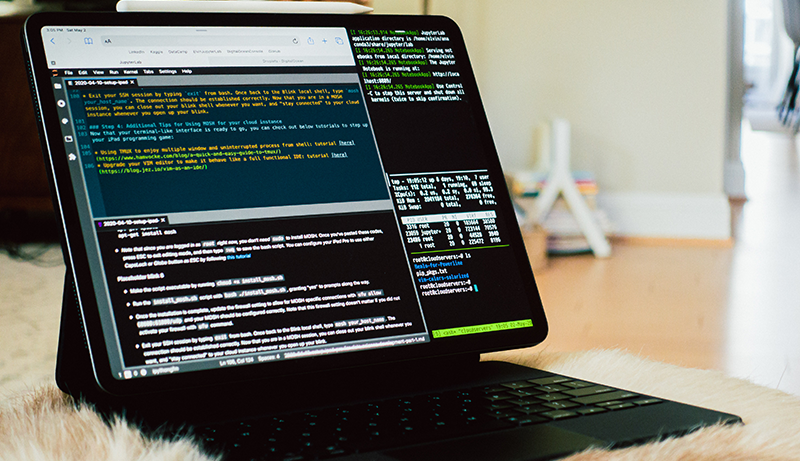
Choosing the best tablets for coding depends on finding the perfect balance between performance, portability, and user experience. Developers today need devices capable of running multiple apps smoothly, supporting external keyboards, and handling everything from writing scripts to managing full development workflows.
A great coding tablet should offer fast processing power, a bright and comfortable display for long sessions, and compatibility with essential developer tools. Whether you’re working with cloud IDEs, SSH terminals, or running lightweight local development environments, a reliable tablet can significantly boost productivity.
Features such as long battery life, low-latency stylus support, and multi-window multitasking make coding on the go more efficient. Additionally, seamless connectivity options and the ability to pair with accessories like keyboards or external monitors help replicate a laptop-like setup.
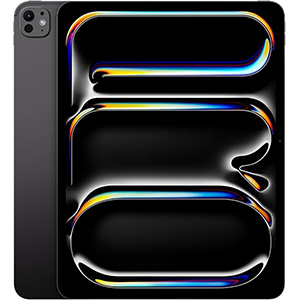
Apple iPad Pro (M4)
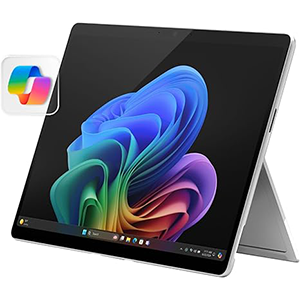
Surface Pro (2024)
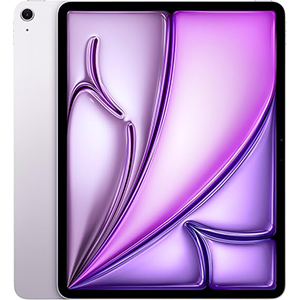
Apple iPad Air (M3)
For programmers seeking mobility without sacrificing capability, today’s top tablets deliver strong performance and versatility for both beginners and professional developers.
1. Apple iPad Pro 13-Inch (M4)
This tablet is equipped with the powerful M4 processor, making it a strong option for developers who need fluid multitasking, fast compilation speeds, and effortless navigation through complex codebases.
Its 13-inch Ultra Retina XDR display enhances readability by offering exceptional brightness, contrast, and color accuracy—ideal for coding outdoors, working with dark themes, or reviewing detailed UI elements. The large display also allows spacious split-screen multitasking, enabling developers to keep documentation, a terminal, and a coding environment open simultaneously.
Its thin and lightweight build enhances portability, making it convenient for on-the-go programming sessions, tech conferences, or remote development work. The operating system supports advanced multitasking features such as Stage Manager, allowing smoother transitions between tasks. Stylus compatibility adds versatility for diagramming workflows, annotating snippets, or sketching UI layouts. Support for external displays and Thunderbolt connectivity further expands its usefulness as a desktop-class coding workstation.
Combined with all-day battery life and fast wireless connectivity, this tablet provides a streamlined and responsive environment for cloud-based development, SSH access, and productivity workflows across various programming platforms.
2. Microsoft Surface Pro 2-in-1 (2024)
Powered by the Snapdragon X Plus processor, this versatile 2-in-1 device offers strong performance suitable for developers seeking a Windows environment with tablet-level portability. The 13-inch touchscreen display provides ample space for coding, debugging, and multitasking while maintaining excellent clarity, making long hours of work more comfortable. Its flexible kickstand and detachable keyboard support allow smooth transitions between tablet, laptop, and sketch modes, giving developers freedom to code in any setting.
The processor supports AI-accelerated features that enhance productivity through real-time assistance, improved search capabilities, and optimized background processes. This makes it especially useful for tasks like browsing documentation, reviewing code, or running lightweight development applications. With Windows 11, developers gain access to traditional desktop tools, compilers, and IDEs, making this tablet feel more like a full laptop replacement. Extended battery life and fast charging enable reliable mobile coding without constant recharging.
Additional features like enhanced video call optimization and real-time translation add professional value for remote collaboration. With modern connectivity options and strong on-the-go performance, this device is well-suited for coding workflows that rely on Windows-based tools and hybrid productivity environments.
3. Apple iPad Air 13-Inch (M3)
Built with the M3 processor, this 13-inch tablet offers impressive performance suited for students, developers, and professionals who need a reliable coding companion. The chip enables fast app launches, responsive multitasking, and smooth performance when working with cloud IDEs, SSH terminals, or web-based development tools. The 13-inch Liquid Retina display provides clarity and vivid color accuracy, making code easy to read while reducing eye strain during extended sessions.
Its lightweight design enhances mobility, making it a practical choice for commuting developers, classroom use, or café workflow setups. The device supports multitasking features such as Stage Manager, enabling multiple resizable windows for improved productivity. Developers who rely on stylus input for sketching UI wireframes or annotating project notes will appreciate its stylus compatibility.
External display support and USB-C connectivity add flexibility, allowing integration with desktop monitors and peripherals. Combined with its strong battery life and efficient performance, this tablet offers a stable platform for coding, studying technical material, or managing development projects across various environments. Its balance of portability and power makes it an excellent option for lightweight but capable development work.
4. Samsung Galaxy Tab S9 FE+ (12.4”)
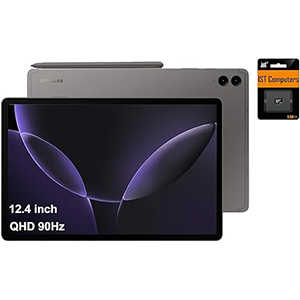
Featuring the Exynos 1380 processor, this tablet is built to deliver smooth performance for multitasking, coding, and creative tasks. Its 12.4-inch display offers a bright, immersive workspace with crisp resolution, making it ideal for reading code, analyzing UI layouts, and performing mobile productivity tasks. The 90Hz refresh rate adds fluidity to scrolling through long files or switching between windows during active development sessions.
Its durable design, supported by an IP68 rating, makes it reliable for developers who work outdoors or travel frequently. The included stylus enhances functionality for note-taking, diagram drawing, and marking code sections for review. The long-lasting battery provides enough power for extended coding sessions, lectures, or meetings without needing frequent recharging. With Android’s multitasking capabilities, developers can easily run terminals, documentation tabs, and IDE apps simultaneously.
Fast connectivity options ensure stable online development environments and reliable cloud-based workflows. Overall, this tablet combines practical durability, a vivid large display, and a capable processor to offer a dependable mobile development platform for Android-focused programmers, students, and professionals.
5. Lenovo Idea Tab Pro (12.7”)
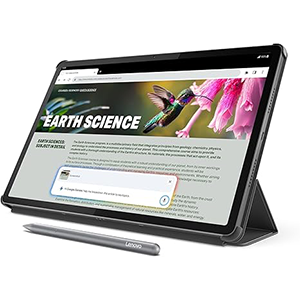
This tablet integrates the MediaTek Dimensity 8300 processor, delivering responsive and efficient performance suitable for coding, studying, and productivity tasks. Its 12.7-inch 3K LCD display provides excellent sharpness and vibrant color reproduction, making it ideal for reading documentation, writing code, or testing UI elements. The high-resolution display enhances clarity, helping reduce fatigue during extended work sessions.
The tablet’s lightweight design and included folio case make it a convenient tool for mobile developers and students. Its stylus support enables precise handwriting, sketching flowcharts, annotating assignments, and performing quick design mockups. T
he processor handles multitasking smoothly, allowing developers to switch between cloud IDEs, online resources, and productivity apps with minimal lag. Long battery life supports full-day usage, while fast charging ensures minimal downtime.
Additional AI-enhanced features help streamline studying and task management, offering helpful tools for research, writing assistance, and project planning. With modern connectivity options and a robust display, this tablet serves as a dependable companion for on-the-go coding, academic work, and general digital productivity.
How to Choose the Best Tablet for Coding

Choosing the right tablet for coding involves evaluating several key aspects to ensure that your device supports efficient development workflows while providing comfort and convenience. Coding on a tablet can offer flexibility, mobility, and a more portable alternative to traditional laptops — but not all tablets are created equal for programming tasks. Below are the most important factors to consider when selecting a tablet tailored for coding.
Performance and Processor
The heart of any coding device is its processing power. A strong processor ensures that your code editors, terminals, compilers, and multitasking environments run smoothly without lag. Developers working with cloud-based environments or remote servers still benefit from responsive local performance, especially when handling large files, simultaneous apps, and complex scripts. A tablet with a capable processor enables faster execution of tasks and a more seamless coding experience.
Display Quality and Size
Screen size and quality significantly impact comfort and productivity. A larger display provides more screen real estate for split views, such as code on one side and documentation on the other. High resolution and good color accuracy reduce eye strain during long sessions. A bright screen with wide viewing angles ensures you can work comfortably indoors and outdoors.
Operating System and App Support
The operating system determines the type of development tools you can run. Some environments offer full desktop-class IDE support, while others rely on cloud-based editors and mobile-friendly code applications. Choose a tablet whose platform aligns with your preferred coding tools. Integration with external keypads, file managers, and terminal apps can expand functionality and enhance workflow efficiency.
Accessory Compatibility
Coding without a keyboard is challenging. Look for tablets that support physical keyboards, trackpads, styluses, or external displays. A detachable keyboard or Bluetooth option enables faster, more accurate typing. Stylus support can be useful for note-taking, sketching diagrams, and annotating code.
Battery Life and Portability
Long-lasting battery life is essential if you plan to code while traveling, at cafes, or during long work sessions without access to power. Tablets that balance performance with efficient battery usage allow for extended productivity on the go. Lightweight designs also contribute to easier mobility.
Connectivity and Expansion
Fast wireless connectivity (Wi-Fi 6 or better) ensures reliable access to cloud services, remote servers, and online documentation. A tablet with versatile ports (like USB-C or Thunderbolt) expands your ability to connect external SSDs, monitors, or peripherals.
By carefully considering these factors — performance, display quality, software support, accessories, battery life, and connectivity — you can choose a tablet that fits your specific coding needs.
Frequently Asked Questions (FAQ)
1. Can I code effectively on a tablet?
Yes. With the right hardware and apps, tablets can handle coding tasks, especially when paired with external keyboards and support for development environments.
2. What should I look for in a tablet’s processor for coding?
Look for a powerful, modern processor that can support multitasking and development tools without lag. Faster CPUs improve responsiveness during coding sessions.
3. Do tablets support full development environments?
Some tablets support full IDEs through app stores or web-based platforms, while others rely on cloud IDEs or remote desktop apps to deliver desktop-like coding experiences.
4. Is screen size important for coding?
Absolutely. Larger screens allow more space for code editors, terminals, and documentation side by side, reducing the need for constant scrolling.
5. Can I use external keyboards and mice with a tablet?
Yes. Many tablets support Bluetooth or USB keyboards and mice, making them more practical for extended coding sessions.
6. Is battery life a crucial factor for coders?
Yes. Long battery life is important if you plan to code on the go, in transit, or in places without easy access to power.
7. Should I consider stylus support for coding?
While not essential, stylus support can enhance productivity by allowing handwriting, diagram sketching, and annotation of code.
8. What operating system is best for coding on a tablet?
It depends on tools you use; choose a platform that supports your favorite code editors and cloud services.
Conclusion
Choosing the best tablet for coding requires thoughtful attention to performance, display size, operating system, and accessory support.
A capable processor ensures smooth multitasking and responsive development, while a spacious, high-quality display reduces eye strain and enhances productivity. Support for external keyboards, reliable connectivity, and long-lasting battery life further improves the coding experience.
By assessing your workflow needs — such as cloud-based development, remote server access, or local coding environments — you can narrow down tablets that offer mobility without compromising capability. With the right features, a tablet can become a powerful, flexible tool for modern coding workflows.


Leave a Reply