

Tablets with stylus pen support have become essential tools for students, professionals, artists, and anyone who values precision and creativity. Whether you’re sketching ideas, taking handwritten notes, editing photos, or multitasking between apps, a stylus-enabled tablet offers a more natural and intuitive way to interact with your screen. The combination of touch input and pen accuracy bridges the gap between traditional notebooks and modern digital workflows.
Today’s stylus-compatible tablets are more powerful than ever, featuring vibrant displays, fast processors, and advanced software designed for productivity and creativity. From digital art and graphic design to classroom learning and remote work, these devices adapt to a wide range of use cases with ease. Improved palm rejection, pressure sensitivity, and low-latency input make writing and drawing feel smooth and responsive.
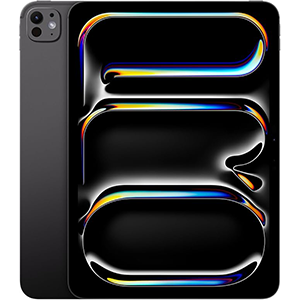
iPad Pro (M4)
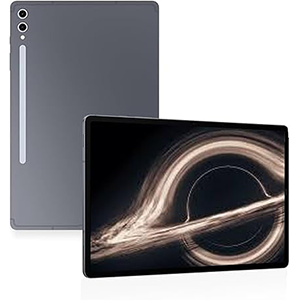
Galaxy Tab S10 Ultra
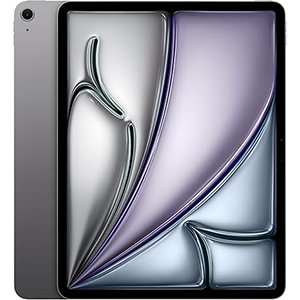
iPad Air (M3)
Choosing the right tablet depends on display quality, performance, operating system, and how well the stylus integrates into everyday tasks. Below, we review some of the top options available today.
1. Apple iPad Pro 11-Inch (M4)
The Apple iPad Pro 11-inch stands out as a premium tablet built for high-end creative and professional work. It features an 11-inch Ultra Retina XDR display that delivers exceptional brightness, deep contrast, and highly accurate colors. The smooth refresh rate enhances both stylus input and everyday navigation, making writing and drawing feel incredibly fluid.
Powered by Apple’s M4 processor, this tablet offers outstanding performance for demanding tasks such as digital illustration, video editing, and advanced multitasking. Apps launch instantly, and complex workflows remain smooth even under heavy loads. The processor also ensures responsive stylus performance with minimal latency, which is crucial for precise note-taking and sketching.
The tablet integrates seamlessly with a stylus, transforming it into a powerful digital canvas. Features like handwriting recognition, creative apps, and advanced multitasking tools make it suitable for professionals and students alike. The lightweight design adds to its portability without compromising performance.
Pros:
- Exceptional display quality
- Extremely powerful processor
- Smooth and accurate stylus experience
Cons:
- Battery performance varies by usage
- Limited flexibility compared to full desktop systems
2. Samsung Galaxy Tab S10 Ultra 14.6-Inch
The Samsung Galaxy Tab S10 Ultra is designed for users who want a large, immersive screen paired with stylus functionality. Its massive 14.6-inch AMOLED display delivers rich colors, deep blacks, and excellent clarity, making it ideal for drawing, media consumption, and multitasking with multiple windows open at once.
At its core, the tablet is powered by a high-performance processor optimized for smooth multitasking and demanding applications. Whether you’re sketching, gaming, or working across several apps, the device maintains consistent speed and responsiveness. Stylus input remains accurate and fluid, even during extended creative sessions.
The included S-Pen enhances productivity by allowing precise note-taking, drawing, and quick navigation. Combined with the large screen, it feels especially comfortable for artists and users who prefer more workspace. The Android operating system also offers flexibility with split-screen and customization options.
Pros:
- Large, vibrant AMOLED display
- Smooth performance for multitasking
- Stylus included and highly responsive
Cons:
- Size may feel bulky for some users
- Software experience varies by app optimization
3. Apple iPad Air 13-Inch (M3)
The Apple iPad Air 13-inch offers a balanced mix of performance, portability, and stylus support. Its 13-inch Liquid Retina display provides sharp visuals, accurate colors, and a comfortable size for both creative work and everyday tasks. The screen is well-suited for note-taking, drawing, and reading for extended periods.
Driven by the M3 processor, the tablet delivers fast and reliable performance across productivity and creative applications. Multitasking feels smooth, and stylus input remains responsive with minimal lag. This makes it a strong choice for students, professionals, and casual creators who need consistent speed without stepping into ultra-high-end territory.
Stylus compatibility allows for natural handwriting and detailed sketches, while the operating system supports advanced multitasking features. The larger screen size compared to smaller tablets makes it easier to work on documents, presentations, and creative projects on the go.
Pros:
- Large, sharp display
- Strong and efficient processor
- Excellent stylus integration
Cons:
- Heavier than smaller tablets
- Fewer advanced display features than flagship models
4. Microsoft Surface Pro (2024)
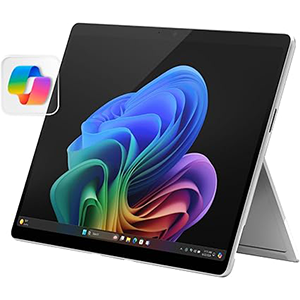
The Microsoft Surface Pro is a versatile 2-in-1 device that combines tablet portability with laptop-like functionality. It features a 13-inch OLED touchscreen display that offers excellent contrast, vibrant colors, and sharp text, making it ideal for both stylus use and productivity tasks.
Powered by the Snapdragon X Elite processor, this device delivers impressive performance while maintaining energy efficiency. Everyday tasks, note-taking, and creative work feel fast and responsive, and stylus input is smooth and precise. The processor also enables AI-powered features that enhance workflow and multitasking.
What sets this tablet apart is its flexibility. With a detachable keyboard and built-in kickstand, it easily shifts between tablet, sketchbook, and laptop modes. This makes it particularly appealing for professionals who rely on handwritten notes, drawing, and full desktop applications.
Pros:
- High-quality OLED display
- Strong performance with modern processor
- Excellent versatility for work and creativity
Cons:
- App compatibility can be inconsistent
- Stylus and keyboard ecosystem varies by use case
5. Lenovo Tab P12 (2024)
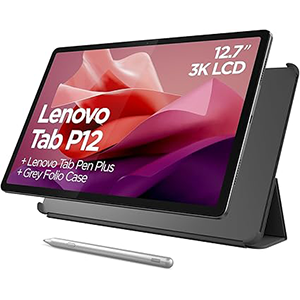
The Lenovo Tab P12 is a value-focused tablet that still delivers solid stylus functionality. It comes with a large 12.7-inch 3K display, offering crisp visuals and ample screen space for note-taking, reading, and media consumption. The wide aspect ratio is especially useful for split-screen productivity.
The tablet is powered by a MediaTek Dimensity 7050 processor, which provides reliable performance for everyday tasks like browsing, studying, streaming, and light creative work. While it’s not built for heavy workloads, stylus input remains responsive for writing and basic drawing.
An included stylus enhances its appeal for students and casual users, offering features like palm rejection and tilt detection. Combined with the large display, it works well for digital notes, annotations, and simple sketches.
Pros:
- Large, high-resolution display
- Stylus included in the box
- Good balance for study and entertainment
Cons:
- Performance not suited for heavy creative workloads
- Speed may vary with demanding apps
Conclusion
Choosing the best tablet with a stylus pen depends on how you plan to use it. Premium options deliver top-tier displays and desktop-level performance for professionals, while mid-range models focus on value, portability, and everyday productivity.
Large-screen devices are excellent for artists and multitaskers, while lighter models suit students and travelers. A good stylus experience should feel accurate, responsive, and comfortable for writing or drawing.
Display quality, battery life, software features, and accessory support also matter when making your decision. No matter your budget or purpose, today’s tablets offer impressive versatility that can replace notebooks, sketchpads, and even laptops.


Leave a Reply