
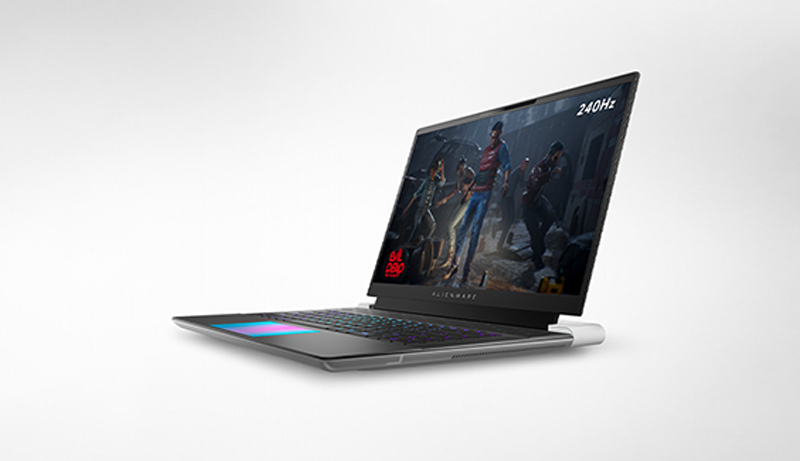
Unlike standard desktop PCs, which are built with easy part-swapping in mind, laptops prioritize portability—often at the expense of modularity. Still, if you’re hunting for a laptop in 2025 that doesn’t lock you out of future upgrades, you’re in the right place.
Upgrading laptops can be tricky due to their compact design, but some models stand out for making the process a whole lot simpler. We’ve scoured the web to bring you the top upgradeable laptops you can buy right now.
Looking to start with something budget-friendly? A more affordable base model leaves room in your budget for future upgrades to boost performance when you need it.
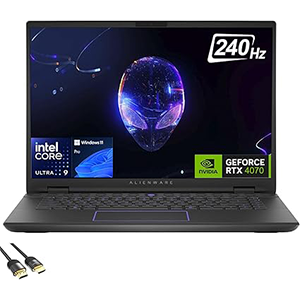
Alienware m16 R2
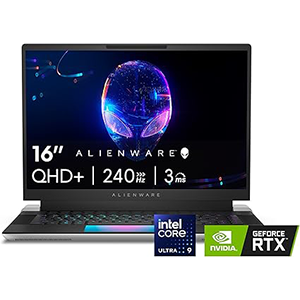
Alienware X16 R2
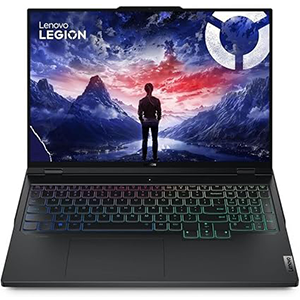
Legion Pro 7i
Sound good? Let’s explore the best upgradeable laptops you can get your hands on this year!
1. Dell Alienware m16 R2
AI laptops are defined by their inclusion of a Neural Processing Unit (NPU), designed to handle local AI tasks efficiently. While Intel’s Core Ultra CPUs—like those found in the Alienware m16 R2—don’t quite match the NPU performance (measured in TOPS) of chips like Qualcomm’s Snapdragon X or AMD’s Ryzen AI 300, they still meet the criteria for AI acceleration and earn the m16 R2 a spot among the top AI-capable laptops in 2025.
The Alienware m16 R2 isn’t just great for AI—it’s also our top pick for gaming. With powerful hardware, a sharp design featuring customizable RGB lighting, a strong selection of ports, and impressive battery life (when not gaming), it checks a lot of boxes.
The display could be a bit brighter—our tests showed a max brightness of around 308 nits—but otherwise, it’s solid. You’re getting a 16-inch QHD+ IPS panel with a 240Hz refresh rate, 3ms response time, NVIDIA G-Sync support, and near full sRGB coverage (99%).
When it comes to upgrades, the m16 R2 offers flexibility with two SODIMM DDR5 RAM slots, two M.2 PCIe 4.0 NVMe SSD slots, and an M.2 WLAN slot—all easily accessible by removing the bottom panel.
Pros
- Powerful gaming performance with Intel Core Ultra and NVIDIA RTX
- Sleek, more compact design than previous models
- Long battery life for non-gaming use
- Upgradeable RAM, SSD, and WLAN modules
Cons
- Fans can get quite loud during intensive tasks
- Display brightness is on the lower side
2. Alienware X16 R2
Looking for a powerful gaming laptop that combines a slim design with upgradeable components? The Alienware x16 R2 delivers on both fronts. You can easily swap out the SSDs and WLAN module, all while enjoying a premium build packed with RGB lighting, a high-end gaming display, and a variety of configuration options.
Part of Dell’s elite gaming lineup, the Alienware x16 R2 stands out with its sleek profile—just 0.73 inches (18.57mm) thin and weighing up to six pounds. It’s slimmer and lighter than the already impressive m16, making it a more travel-friendly option. While the new m16 R2 edges ahead in portability, the x16 R2’s advanced cooling system gives it the upper hand in sustained performance, as highlighted in our hands-on review.
The 16-inch display comes in three flavors, starting with an FHD+ panel at a blazing 480Hz refresh rate and topping out with a QHD+ option at 240Hz. Vibrant color reproduction also makes it suitable for creative professionals, though it’s clearly built with gamers in mind.
The x16 R2’s aluminum chassis is decked out in RGB lighting—yes, even the touchpad glows—complementing the illuminated keyboard and body for a full-on gamer aesthetic.
Pros
- High-performance Intel CPUs and NVIDIA graphics
- Slim, compact design for a gaming laptop
- Vivid display options up to QHD+ at 240Hz
- Extensive RGB lighting, including the touchpad
- Upgradeable SSD and WLAN chip
Cons
- Premium price tag
- Keyboard can be a bit noisy
- RAM is soldered and not upgradeable
3. Lenovo Legion Pro 7i
If you’re a gamer chasing top-tier performance, the Lenovo Legion Pro 7i (Gen 9) should be high on your list. This powerhouse delivers exceptional performance, a robust cooling system, and the kind of upgradeability that future-proofs your setup—with access to both RAM and SSD slots. Add in a splash of RGB lighting, and it’s a dream machine for gamers who want power and personality.
As one of the best gaming laptops available in 2025, the Legion Pro 7i stands out thanks to its impressive performance with minimal thermal throttling, clean and premium design, and a high-end display that’s now color-accurate—fixing one of the main complaints from the previous generation.
In our review, we didn’t hold back: “This laptop is a powerhouse.” Whether you’re gaming or tackling demanding creative workloads, the Legion Pro 7i handles it all with ease.
It’s not the most budget-friendly option, and it’s a bit hefty, but if you want elite gaming performance in a laptop that’s built to last, this is a top-tier pick.
Pros
- Upgradeable RAM and SSD
- Eye-catching RGB accents
- Premium design and excellent build quality
- Outstanding performance with efficient cooling
Cons
- Pricey
- Heavier than average
4. Lenovo ThinkPad T14
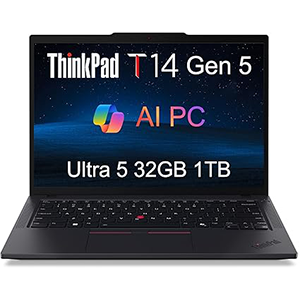
The Lenovo ThinkPad T14 Gen 5 remains one of the most popular business laptops on the market—and for good reason. It combines durable, professional design with powerful internals, upgradeable components, and hallmark ThinkPad features like the iconic red TrackPoint.
Available in both AMD and Intel configurations, the T14 Gen 5 is built with flexibility in mind. Business laptops often shine when it comes to repairability, and this model is no exception. You’ll find two SODIMM slots for RAM and one M.2 slot for storage, making future upgrades straightforward and accessible.
While performance in our testing wasn’t quite at the top of the pack, the T14 Gen 5 made up for it with excellent battery life—something business users will definitely appreciate. The base display can appear a bit lackluster, but higher-end configurations offer a stunning 2.8K OLED panel that elevates the overall experience.
With its premium 5MP webcam, excellent build quality, and solid upgrade potential, the ThinkPad T14 Gen 5 is a top choice for professionals who want long-term reliability and flexibility.
Pros
- AMD and Intel versions with modern CPU options
- Clean, professional design with durable build
- Upgradeable RAM, storage, and wireless modules
Cons
- Not the strongest performer in its class
- Base display can be dim compared to competitors
5. Acer Nitro 5

Looking for a laptop with solid graphical power and easy upgrade options? The Acer Nitro 5 should be at the top of your list.
If modularity and long-term value are your priorities, the Nitro 5 series hits the sweet spot. It’s built with upgrades in mind, making it a favorite among budget-conscious gamers and DIY enthusiasts alike.
Starting with a lower-end configuration can save you a significant chunk of change—and thanks to its super accessible internals, you can upgrade later with ease. There’s just one screw to remove to access the RAM slots, and another single screw unlocks the SSD compartment. It really doesn’t get much easier than this.
Equipped with a capable mid-range GPU, the Nitro 5 offers a well-balanced experience. It’s powerful enough for gaming and productivity today, and with a few upgrades, it’ll continue to perform well for years.
While users love the affordable pricing and dedicated graphics card, the design can be divisive. Its angular, “industrial” aesthetic may look cool, but it can make the keyboard and touchpad a bit less comfortable for extended use.
Pros
- Easily upgradeable RAM and SSD
- Great price-to-performance ratio
- Solid mid-range GPU for gaming and multitasking
Cons
- Sharp, angular design isn’t for everyone
- Keyboard and touchpad comfort could be better
What to Look for in a Modular Laptop in 2025
If you’re aiming to buy a laptop with future upgrades in mind, start by adjusting your expectations—begin with modest specs now so you can upgrade later. The goal isn’t to get the most powerful machine out of the box, but one that offers room to grow.
The key is to get something good enough for now, that can evolve into a powerhouse—or at least stay relevant—as minimum system requirements rise over the next few years.
Key Upgrade Features to Look For
Beyond basic specs, keep an eye out for:
- SODIMM slots for adding or replacing RAM
- M.2 slots for SSD upgrades
- User-accessible compartments (bonus points for single-screw panels)
If you’re someone with a growing collection of media files, upgrading storage later can be a game-changer.
What to Avoid
Certain laptop designs are notoriously unfriendly to upgrades:
- Ultra-thin or ruggedized models often sacrifice modularity for portability or durability.
- Touchscreen laptops may allow either RAM or SSD upgrades—but rarely both.
Can You Upgrade a Laptop’s GPU or CPU?
Short answer: Almost never.
Most laptops aren’t designed to support GPU or processor upgrades. To fit powerful components into a compact chassis, manufacturers typically solder the CPU and GPU directly to the motherboard. These components use different form factors than desktop parts and are not meant to be swapped out.
There are a few niche exceptions (which we mention below), but for the average user, RAM, storage, thermal paste, and external add-ons are going to be your primary upgrade paths.
Watch Out for These Upgrade Pitfalls
Before buying an upgradeable laptop, there are some crucial steps to take:
- Double-check system specs—especially max supported RAM and how it’s installed out of the box. For example, if a laptop has two 8GB sticks instead of a single 16GB, upgrading to 32GB will cost more since you’ll need two 16GB replacements.
- Verify upgrade paths with the manufacturer. Reseller sites like Amazon or Newegg don’t always list upgrade details accurately. Visit the manufacturer’s website to view manuals or teardown guides.
- Know the process. Some laptops offer tool-free upgrades; others may require removing the entire keyboard or other major components to reach the RAM or SSD.
Are There Laptops Specifically Designed to Be Modular?
Most mainstream laptops from brands like Dell, HP, and Lenovo are built with compactness in mind, not upgradeability.
However, there are companies that specialize in modular laptops—like Eurocom—that use standard desktop socketed CPUs and allow near-total hardware replacement. These machines don’t have flashy designs, but they’re built for long-term performance and customization.
That said, these laptops aren’t always easy to find through big-box retailers. You’re more likely to find them directly from the manufacturer or through niche PC builders.
Final Tip: Do Your Research
Regardless of the brand or model, always consult the manufacturer’s support resources before making a purchase. Knowing in advance how easy (or hard) it is to access the internal components can save you time, frustration, and money.
Save Money with a Modular Mindset
Whether you’re a gamer, student, creative, or remote worker, a modular laptop can stretch your budget further. Buy the basics now and scale up as your needs grow.
What did you think of our top picks for upgradeable laptops in 2025? Drop your thoughts in the comments—we’d love to hear from you!


Leave a Reply