
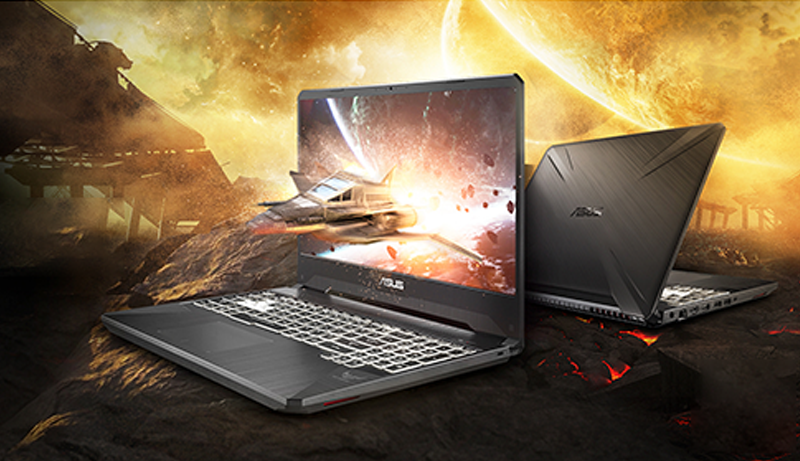
Dota 2 was released back in 2013, yet it remains one of the most competitive titles in the world of eSports. If you’re looking to dive into the action, you’ll want a laptop that can keep up with the game’s demands.
We understand how challenging it can be to find the perfect gaming laptop — one that offers powerful performance while still giving you the freedom to play anywhere.
That’s why we dedicated hours to researching and testing, compiling a list of the 5 best laptops for playing Dota 2. Our detailed reviews cover top picks across different categories, whether you’re after a stunning 4K display, a budget-friendly option, or the most premium gaming machine available.
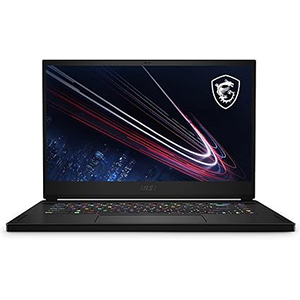
MSI GS66 Stealth
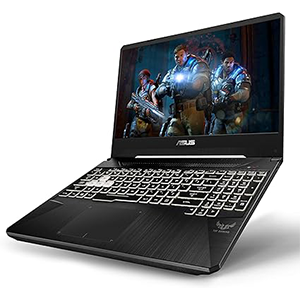
ASUS FX505DV-ES74
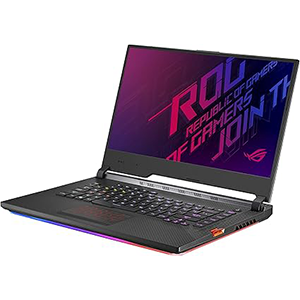
ROG Strix SCAR III
Our goal is to make your search easier and help you find a laptop that fits your needs perfectly. Read on — by the end of this guide, you’ll be well on your way to choosing a laptop you’ll love!
1. MSI GS66 Stealth
If budget isn’t a concern and you’re looking for a laptop that can run any game at maximum settings and resolution, the MSI GS66 Stealth is an excellent choice.
It’s one of the most powerful gaming laptops available, featuring an impressive IPS display and top-tier components packed into a sleek, attractive chassis.
The GS66 Stealth boasts a 300Hz IPS display with an ultra-low 3ms response time, delivering incredibly smooth visuals and minimal latency. Powered by a 10th Gen Intel i9 processor, this laptop is more than capable of handling Dota 2 — and frankly, it’s overkill.
Still, having that much power at your fingertips ensures competitive performance, giving you the edge to dominate the battlefield and rack up killing sprees with ease.
One standout feature is the razor-thin bezel, which not only offers a wide viewing angle but also keeps the laptop compact and portable.
The MSI GS66 Stealth also includes a generously sized trackpad made from silky glass, offering a premium feel and an incredibly smooth touch experience. With support for 10+ multi-touch gestures, every swipe and tap feels natural and effortless. We especially loved the extra space, which made navigation comfortable and intuitive.
To top it off, every key on the GS66 comes with customizable RGB lighting, allowing you to personalize the look to match your style perfectly.
2. ASUS TUF FX505DV
If you’re a passionate Dota 2 fan, you’ll be happy to know you can still find a great, affordable laptop — like the ASUS TUF. It’s a sleek, stylish machine packed with a solid Ryzen setup, offering countless hours of smooth gameplay, even with the latest titles.
Although it falls into the “affordable gaming laptop” category, the ASUS TUF has a lot to offer. One of its standout features is the impressive NanoEdge display.
With ultra-narrow bezels that boost the screen-to-body ratio to 77%, and an IPS panel that delivers bright, vivid visuals, you’ll enjoy an immersive experience whether you’re battling it out in Dota 2 or exploring new games.
While the TUF isn’t the slimmest laptop around, it makes up for it with extensive connectivity options, including all the essential and universal ports. You’ll never have to worry about plugging in your favorite peripherals or running out of space for extra devices.
Although it doesn’t feature a high-end Intel processor, ASUS smartly opted for an AMD configuration — a more affordable, compact choice that rivals Intel in performance.
Under the hood, you’ll find an AMD Ryzen 7 3750H processor paired with an NVIDIA GeForce RTX 2060 graphics card, delivering more than enough power to run the latest games smoothly and without lag.
3. ASUS ROG Strix SCAR III
The ASUS ROG Strix SCAR III is built for serious gamers who want power, performance, and plenty of connectivity options.
While it’s not the slimmest gaming laptop on the market, it more than makes up for it with incredible specs and smart design features that enhance your gaming experience.
The ROG Strix SCAR III sports a sleek, minimalistic design that stays low-profile, yet manages to pack in up to 7 ports on the left side and 4 ports on the right side — giving you all the connectivity you need for gaming peripherals, external displays, and more.
Under the hood, it’s powered by a 9th Gen Intel Core i7 processor paired with a NVIDIA GeForce RTX 2070 graphics card. This powerful combination ensures high frame rates in Dota 2 and can easily handle the latest AAA titles at ultra settings — all without lag or performance drops.
One of the standout features is ASUS’s own Aura Sync RGB technology. With it, you can fully customize the keyboard lighting, even adjusting each key individually to match your setup or personal style.
The 15.6″ Full HD display with a blazing 240Hz refresh rate and IPS panel delivers stunning visuals with smooth, responsive gameplay — a must-have for competitive gaming.
To keep everything cool during intense sessions, the ROG Strix SCAR III features the ROG Intelligent Cooling system, which includes dual 12V fans, triple radiators, anti-dust technology, and adjustable fan modes. This ensures optimal thermal performance and prolongs the life of your hardware.
If you’re looking for a powerhouse laptop that blends style, power, and next-level customization, the ASUS ROG Strix SCAR III is an outstanding choice.
4. Acer Nitro 5
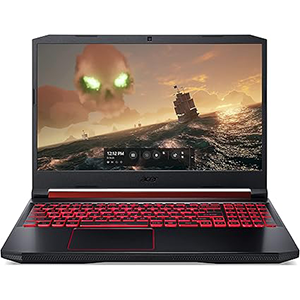
Gaming laptops don’t always have to break the bank — and the Acer Nitro 5 proves it.
If you’re looking for an affordable, functional gaming laptop that can handle both modern titles and classics like Dota 2, the Nitro 5 is a fantastic option.
Perfect for gamers on a budget, the Acer Nitro 5 delivers impressive performance for its price. Powered by a 9th Gen Intel Core i5-9300H processor and a dedicated NVIDIA GeForce GTX 1650 graphics card, this entry-level gaming laptop can run most AAA games smoothly — and it easily handles older titles like Dota 2 without any issues.
Key features include a backlit keyboard for gaming in any lighting conditions, and Acer’s CoolBoost technology with twin fans and dual exhaust ports to keep the system cool during intense sessions.
Additionally, the Nitro 5 is equipped with Intel Wireless Wi-Fi 6 for faster, more reliable online gaming, and even comes with Alexa built-in for added convenience when multitasking or managing your smart home devices.
If you’re searching for an affordable gaming laptop that still packs serious performance, the Acer Nitro 5 is a smart, wallet-friendly choice.
5. Alienware New M15
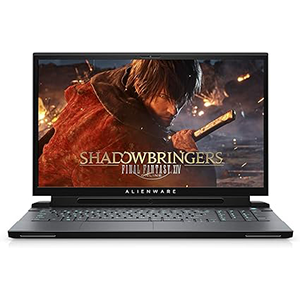
If you’re looking for a gaming laptop that stays cool and runs quietly, the Alienware M15 is a fantastic choice.
Designed with serious gamers in mind, the M15 features Alienware Cryo-Tech v3.0, an advanced cooling system that dramatically lowers internal temperatures, ensuring smooth, uninterrupted gameplay even during intense sessions.
Beyond its impressive thermal management, the Alienware M15 packs serious power under the hood. Equipped with a 9th Gen Intel Core i7 processor and an NVIDIA GeForce RTX 2060 graphics card, it’s more than capable of running Dota 2 and other AAA games at high settings with ease.
This model is also known as Alienware’s thinnest gaming notebook ever, delivering incredible performance without sacrificing design or portability. Built with high-end materials like magnesium alloy, copper, and steel, the M15 offers a premium, lightweight feel while maintaining outstanding durability.
The advanced cooling system not only optimizes component temperatures but also keeps the laptop cool to the touch, enhancing overall comfort during long gaming marathons.
A 76Whr lithium-ion battery ensures longer playtime without needing frequent recharges, and the hexagonal honeycomb design maximizes airflow while reinforcing the laptop’s structural integrity.
If you want a high-performance, stylish, and cool-running gaming laptop, the Alienware M15 is an excellent investment.
How to Choose a Laptop for Dota 2 in 2025
When picking the best laptop for Dota 2, you don’t need the most expensive machine on the market — but there are a few important features you’ll want to look for:
Performance
To run Dota 2 smoothly, your laptop should have at least a dual-core processor clocked at 2.8 GHz, 4 GB of RAM, and a dedicated graphics card from either AMD or NVIDIA.
Also, make sure your laptop supports DirectX 9.0 — although most modern laptops already do by default.
Size & Display Resolution
While Dota 2 doesn’t have strict graphic demands beyond the GPU, a good display can dramatically enhance your gaming experience.
Look for laptops with displays designed for gaming, which often feature:
- High refresh rates (120Hz or higher)
- Low latency
- IPS panels for vivid colors, sharp details, and wide viewing angles
A high-quality screen can make Dota 2 look even better and help you react faster during gameplay.
Keyboard
Since you’ll be playing a lot of Dota 2, pay close attention to the laptop’s keyboard.
Many gaming laptops now feature mechanical-style keyboards or high-travel membrane keys that feel similar to standalone gaming keyboards. Responsive keys can make a big difference in competitive matches.
RGB lighting and customizable key mapping are great bonuses too!
Connectivity
Gaming laptops tend to be thicker than regular laptops — and that’s actually an advantage.
Look for models that offer:
- Multiple USB ports (for mouse, headset, and external drives)
- HDMI ports (to connect to an external monitor)
- Ethernet ports (for a stable internet connection)
Also, make sure your laptop has a headphone jack unless you plan to use Bluetooth headsets.
Storage
Storage space is essential for games, software, and media files.
We highly recommend choosing a laptop with an SSD (Solid State Drive) instead of just an HDD. SSDs are much faster, meaning quicker load times for Dota 2 and overall better system performance.
Some laptops even combine a SSD + HDD setup, giving you both speed and plenty of space to work with.
Frequently Asked Questions
What are the system requirements for Dota 2?
Dota 2 is not a demanding game. You’ll need at least:
- A processor from Intel or AMD running at 2.8 GHz or higher
- 4 GB of RAM
- A dedicated graphics card like an NVIDIA GeForce 8600 or Radeon HD 2600
- Around 15 GB of free storage space
Any decent modern gaming laptop should meet these requirements easily.
Is a graphics card important for playing Dota 2?
While Dota 2 is more CPU-dependent, having a good graphics card ensures smoother gameplay and higher frame rates.
We recommend a GeForce 8600 or Radeon HD2600 at minimum — but modern GPUs will perform much better.
Should I install Dota 2 on an SSD or HDD?
If you have the option, install Dota 2 on your SSD. It will load faster, and you might notice a slight improvement in overall performance.
However, since Dota 2 is relatively lightweight (around 10-15 GB), installing it on an HDD is perfectly fine if SSD space is limited.


Leave a Reply