
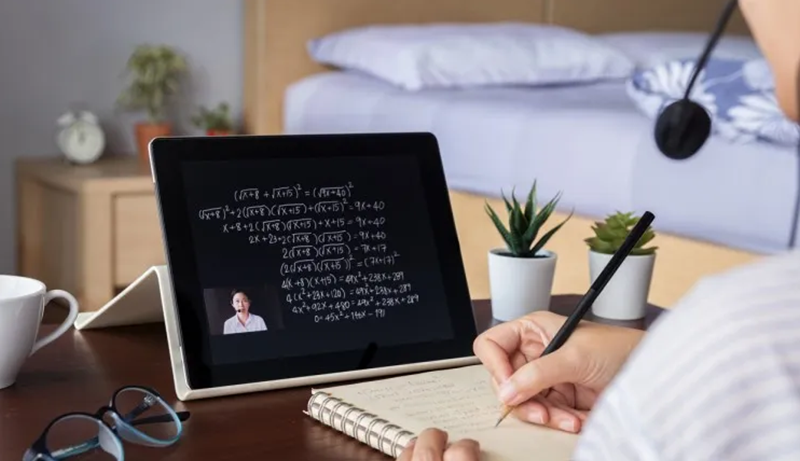
Teaching mathematics has evolved far beyond chalk and blackboards. In today’s classrooms, educators rely heavily on digital technology to create a more interactive, visual, and personalized learning experience. Among the tools reshaping education, tablets stand out as one of the most effective for teaching math. These powerful devices combine precision, flexibility, and creativity — allowing teachers to write equations, visualize graphs, and demonstrate problem-solving techniques in real-time.
Whether it’s simplifying algebraic concepts, illustrating geometry figures, or engaging students with dynamic math apps, a tablet helps bridge the gap between theory and understanding. Modern tablets come equipped with stylus support, multitasking capabilities, and advanced software ecosystems designed specifically for learning environments. They enable teachers to annotate digital textbooks, record video tutorials, or collaborate with students during live sessions.
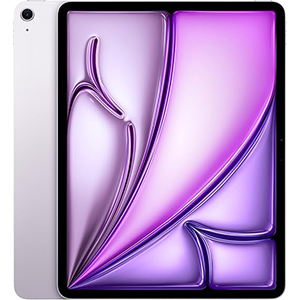
iPad Air M3 chip

Galaxy S10 FE+
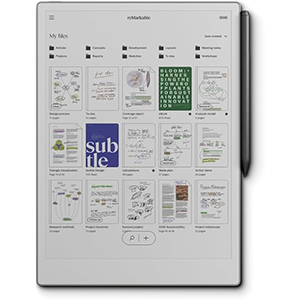
Paper Pro
In this comprehensive guide, we’ll explore the best tablets for teaching math — each offering unique strengths for educational settings. From ultra-responsive stylus systems to powerful AI-driven productivity tools, these devices empower educators to transform math lessons into engaging, hands-on learning experiences. Let’s dive into the top-performing tablets that make teaching math not just easier, but smarter.
1. Apple iPad Air 13-inch with M3 Chip
The Apple iPad Air 13-inch is a powerhouse designed for creativity, precision, and professional teaching. Its stunning 13-inch Liquid Retina display delivers vivid, color-accurate visuals — perfect for drawing geometric shapes, demonstrating algebraic functions, or showcasing high-resolution math visuals. The wide P3 color gamut and True Tone technology make text, equations, and charts pop with clarity in any lighting condition.
Powered by the new M3 chip, this tablet handles demanding multitasking effortlessly. Math teachers can simultaneously run interactive graphing apps, digital whiteboards, and online classrooms without lag. The chip also enhances AI-driven features under Apple Intelligence, allowing users to summarize notes, generate quiz questions, or organize lesson plans automatically — a true productivity boost for educators.
The Apple Pencil Pro (sold separately) offers precise, pressure-sensitive control ideal for writing equations or sketching diagrams naturally. iPadOS enhances usability with Stage Manager, enabling split-screen multitasking to display lessons, reference materials, and student work all at once.
Its 12MP Center Stage front camera ensures professional video quality for online classes, while the Touch ID sensor secures files and quick access. With all-day battery life and Wi-Fi 6E support, it’s built for uninterrupted teaching anywhere.
Pros:
- Exceptional 13-inch Liquid Retina display with lifelike color accuracy
- Lightning-fast M3 chip supports multitasking and teaching apps
- Seamless Apple Pencil integration for precise equation writing
- iPadOS optimized for education and note-taking workflows
- Long-lasting battery with secure Touch ID access
Cons:
- Apple Pencil and keyboard not included by default
- Slightly heavier than smaller tablets
- File sharing can be restrictive outside Apple’s ecosystem
2. Samsung Galaxy Tab S10 FE+
The Samsung Galaxy Tab S10 FE+ strikes an ideal balance between power, productivity, and practicality for math educators. Its large 13.1-inch 1440p display offers excellent resolution and smooth 90Hz refresh rate performance — ideal for displaying crisp graphs, number charts, and detailed lesson visuals. Whether you’re presenting a geometry figure or working through algebra problems, everything looks fluid and engaging.
The S Pen is included, offering a realistic pen-on-paper experience. It’s highly responsive, making it easy to write formulas or annotate PDFs without latency. For educators, the standout feature is Math Solver, which allows teachers to handwrite equations on-screen and have them automatically converted to digital text. This function also provides step-by-step solutions, making it perfect for demonstrations or quick explanations during lessons.
Samsung’s Handwriting Assist refines messy notes, aligns text, and cleans up handwritten annotations instantly. AI-powered tools like Circle to Search streamline teaching — simply circle a formula or concept, and the tablet fetches explanations and examples online in seconds.
The device is IP68 water-resistant, ensuring durability against accidental spills in classroom settings. With strong battery performance and fast charging, teachers can power through an entire day’s lessons without downtime.
Pros:
- Built-in Math Solver and Handwriting Assist simplify lesson preparation
- Bright, high-resolution display ideal for math visuals
- Responsive S Pen included for natural handwriting
- Water-resistant design suitable for classroom use
- Excellent battery life and quick charging
Cons:
- Large size may be less portable for travel
- Some may find Samsung’s interface feature-heavy
- Slight learning curve for first-time Android users
3. reMarkable Paper Pro Bundle
For educators who value the simplicity and tactile feel of writing on paper, the reMarkable Paper Pro offers an unmatched, distraction-free digital writing experience. Unlike traditional tablets filled with apps and notifications, this device is designed to replicate pen and paper while offering the organizational advantages of digital note-taking.
Its 11.8-inch Canvas Color display delivers a subtle, realistic writing surface that mimics paper friction, making it ideal for writing equations, drawing geometric figures, or solving math problems. The Marker Plus Pen, which comes with an eraser and extra tips, provides smooth, precise control that feels natural in hand — perfect for teachers who prefer traditional writing methods.
The tablet’s color display, while not as vibrant as an OLED screen, is calibrated for low glare and high legibility. Teachers can comfortably read or annotate PDFs under any lighting conditions without eye strain, even outdoors.
Another major advantage is its handwriting-to-text conversion, allowing educators to digitize handwritten lesson notes instantly. Files can be organized by subjects, tagged for easy access, and synced across devices.
Pros:
- Realistic paper-like feel for precise equation writing
- Distraction-free interface ideal for focused work
- Converts handwritten math notes into text instantly
- Lightweight and portable for on-the-go teaching
- Excellent for lesson organization and PDF annotation
Cons:
- Limited app support (no video or external teaching apps)
- Display color range less vibrant than LCD/OLED tablets
- Pen tips wear faster than traditional styluses
4. Lenovo Idea Tab Pro with Google Gemini
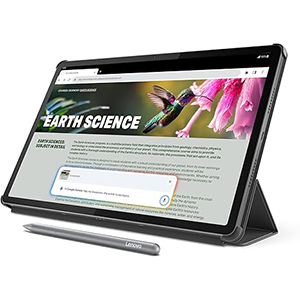
The Lenovo Idea Tab Pro is an excellent all-around choice for educators who prioritize a balance between performance, innovation, and value. Its 12.7-inch 3K LCD display offers nearly 4K clarity, providing crisp visuals ideal for demonstrating equations, statistical charts, and interactive geometry. The screen’s Low Blue Light certification makes it comfortable for extended reading or online teaching sessions.
Lenovo integrates Google Gemini AI, a smart assistant that enhances productivity. Teachers can quickly summarize complex materials, generate practice questions, or get AI support for grading and lesson planning. The Circle to Search feature lets educators research concepts or definitions directly on-screen using a simple pen gesture — a massive timesaver for classroom prep.
The included Tab Pen Plus stylus ensures accuracy when writing formulas or graphing. Combined with responsive touch sampling and a 90Hz refresh rate, it delivers an intuitive and lag-free teaching experience. Its quad JBL Dolby Atmos speakers make it suitable for multimedia lessons, providing clear sound for video tutorials.
Battery life exceeds 11 hours, and 45W fast charging ensures quick power-ups between classes. Its sturdy, slim build also makes it ideal for both classroom and remote settings.
Pros:
- 3K high-resolution display with low eye strain
- Google Gemini AI helps automate lesson creation
- Pen included, with accurate and comfortable writing experience
- Excellent sound and long battery performance
- Great value for educators seeking performance and price balance
Cons:
- Slightly heavier than smaller tablets
- Camera performance could be better for online classes
- Some Android educational apps not optimized for large displays
5. OnePlus Pad 2
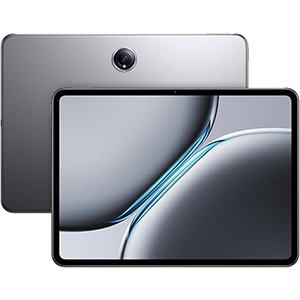
The OnePlus Pad 2 combines high-end performance and elegant design, making it a solid choice for math teachers seeking speed, clarity, and AI integration. Its 12.1-inch display offers a superb 144Hz refresh rate and 900 nits brightness, providing sharp visuals and smooth transitions perfect for dynamic teaching environments.
The user interface feels incredibly fluid, ideal for multitasking — running calculators, note apps, and video lessons side by side. The AI Eraser 2.0 lets teachers quickly remove unwanted marks or objects from written notes, while AI Writer assists in creating lesson materials and summaries.
Audio quality is outstanding, with six speakers delivering rich sound for instructional videos or virtual lessons. The OnePlus Stylo (sold separately) provides precision for mathematical diagrams and formula writing, ensuring every stroke feels smooth and accurate.
With super-fast 67W charging and long-lasting battery life, it’s reliable for day-long use. Its lightweight aluminum body and curved edges make it comfortable to hold during lectures.
Pros:
- Bright, ultra-smooth display ideal for interactive math teaching
- Strong AI tools for editing, summarizing, and productivity
- Exceptional battery life and fast charging
- Premium build with excellent sound quality
- Great multitasking for teaching and grading
Cons:
- No expandable storage option
- Stylus and keyboard accessories not included
- Slightly fewer education-optimized apps than Apple or Samsung ecosystems
How to Choose the Best Tablet for Teaching Math
Selecting the right tablet for math education requires careful consideration of performance, usability, and learning tools. Here are the most important factors to guide your decision:
Display Size and Quality:
Larger screens (12–13 inches) are ideal for math teachers who frequently demonstrate complex equations or graphs. A high-resolution display ensures that symbols, fractions, and fine details are crisp and legible. Look for features like True Tone or Low Blue Light to reduce eye fatigue.
Stylus Precision and Responsiveness:
For math instruction, a responsive stylus with low latency and palm rejection is essential. It allows teachers to write formulas naturally and annotate documents just like on paper. Advanced pens like the Apple Pencil or S Pen offer pressure sensitivity for a realistic writing experience.
Software Compatibility:
Ensure the tablet supports key educational tools like GeoGebra, Microsoft OneNote, Desmos, Wolfram Alpha, and Google Classroom. Compatibility with popular video conferencing apps (Zoom, Meet, Teams) is also crucial for remote lessons.
Performance:
Choose a device that can multitask effortlessly — switching between math apps, digital textbooks, and whiteboard software without lag. Look for modern processors and efficient thermal performance.
Battery Life:
A minimum of 10–12 hours of battery ensures uninterrupted lessons. Fast charging capability is an added advantage for teachers with back-to-back classes.
Connectivity and Ecosystem:
Wi-Fi 6/6E ensures stable online teaching sessions, while USB-C or Thunderbolt ports make data transfers fast. Compatibility with keyboards and external displays also enhances versatility.
AI and Smart Tools:
Modern tablets integrate AI assistants that can summarize notes, check equations, and even automate repetitive tasks like grading or converting handwriting to text.
By balancing these factors, educators can select a tablet that enhances teaching efficiency and fosters interactive, engaging learning experiences for students.
Is a Tablet Good for Math?
Absolutely — tablets have revolutionized how math is taught and learned. Unlike traditional teaching tools, tablets merge digital convenience with the natural fluidity of handwriting. Teachers can solve equations step-by-step in real time, draw graphs interactively, or visualize geometric shapes using dynamic software.
Students benefit too. Interactive apps transform abstract formulas into visual, hands-on exercises that are easier to grasp. Whether exploring coordinate geometry or algebraic functions, tablets allow instant visualization and experimentation, which deepens understanding.
For teachers, the ability to save, share, and organize digital notes simplifies lesson planning and record-keeping. Features like handwriting recognition, AI-powered math solvers, and PDF annotation tools streamline workflow significantly.
Moreover, tablets support screen-sharing for hybrid or online classes, letting educators engage students no matter where they are. With the right apps, teachers can assess progress instantly, provide digital feedback, and personalize instruction.
From dynamic visualization to productivity gains, tablets are more than good for math — they’re a game-changer that empowers both teaching and learning.
Key Features for Math Teachers
When selecting a tablet for math teaching, certain features determine its effectiveness in daily use:
- Precise Stylus Input: Enables accurate writing for equations, shapes, and annotations. Look for palm rejection and tilt sensitivity.
- High-Resolution Display: Ensures clarity for complex mathematical notation and graph visuals.
- Fast Refresh Rate: Smooth scrolling and writing make lessons feel natural and uninterrupted.
- Battery Endurance: Long-lasting power supports multiple sessions without constant recharging.
- App Ecosystem: Access to GeoGebra, Desmos, Notability, OneNote, and Khan Academy enhances interactivity.
- AI Integration: AI tools automate lesson planning, equation solving, and handwriting conversion.
- Multitasking Support: Split-screen features allow teachers to reference materials while teaching.
- Portability & Durability: Lightweight build and solid casing make it classroom-friendly.
These combined elements make a tablet not just a digital notebook, but a complete teaching assistant.
6 Mathematics Apps or Tools Every Teacher Must Use
- GeoGebra: An essential app for teaching geometry, algebra, and calculus. It lets users create interactive diagrams, graphs, and simulations, making mathematical concepts visual and engaging. Teachers can demonstrate transformations, slopes, and vector calculations dynamically.
- Desmos: This advanced graphing calculator app helps visualize equations in real time. It’s ideal for explaining linear, quadratic, and trigonometric functions. Teachers can share graphs with students or embed them in presentations.
- Microsoft OneNote: A digital notebook that allows seamless note-taking, drawing, and file organization. Teachers can annotate PDFs, record lectures, and share collaborative math notebooks with students.
- Wolfram Alpha: A computational powerhouse that provides detailed step-by-step solutions to complex equations, calculus problems, and statistics. It’s an invaluable reference tool for educators and students alike.
- Khan Academy: Offers comprehensive math lessons through structured modules and videos. Teachers can assign topics, monitor student progress, and integrate exercises directly into lesson plans.
- Mathway: Perfect for quick problem verification. Teachers can use it to demonstrate multiple solving methods and help students understand different approaches to the same equation.
By combining these tools with a capable tablet, math teachers can create a more visual, interactive, and adaptive learning experience for every student.
Is Android, Fire OS, or iPadOS Better?
Each platform has unique strengths suited to different teaching styles:
iPadOS: Offers a premium experience with exceptional stylus accuracy and seamless integration of apps like Notability, GoodNotes, and GeoGebra. The Apple Pencil’s precision is unmatched, making iPads the top choice for math educators who rely heavily on handwritten notes and advanced educational tools.
Android: Known for flexibility and affordability, Android tablets like Samsung and Lenovo support a wide range of teaching apps, Google Classroom integration, and stylus options. They’re great for teachers who prefer customization and open access to different platforms.
Fire OS: Amazon’s Fire tablets are budget-friendly options for basic teaching tasks. They handle note-taking and light math apps but lack the stylus precision and processing power of higher-end tablets.
In summary, iPadOS is best for professional-level teaching, Android for flexibility and value, and Fire OS for entry-level needs or younger students.
FAQs – Best Tablet for Teaching Math
1. Can tablets replace whiteboards in classrooms?
Yes. Tablets paired with a stylus and screen-sharing tools can serve as digital whiteboards, offering interactive writing and instant erasing.
2. What’s the ideal display size for math teaching?
A 12–13 inch screen offers enough space for formulas, diagrams, and split-screen multitasking.
3. Do I need a stylus to teach math?
Absolutely. Styluses enable precision for writing equations, sketching, and annotating materials naturally.
4. Are tablets suitable for online math classes?
Yes. Tablets integrate with video platforms like Zoom, Google Meet, or Teams and allow real-time annotation and screen sharing.
5. Which math apps should teachers install?
GeoGebra, Desmos, OneNote, Wolfram Alpha, and Khan Academy are top recommendations.
Conclusion
Mathematics teaching has entered a new digital era — one where visualization, precision, and engagement define the learning experience. Tablets empower educators to make math dynamic and accessible, combining handwritten clarity with modern interactivity.
The best tablets for teaching math deliver high performance, crisp visuals, responsive stylus support, and intelligent software ecosystems. Whether you’re sketching geometry diagrams, solving algebraic functions, or guiding students through digital problem sets, these devices ensure efficiency and creativity in every lesson.
Choosing the right tablet isn’t just a tech upgrade — it’s a step toward transforming how students experience mathematics. With the right combination of performance, portability, and intuitive design, a good tablet turns complex equations into meaningful exploration and learning.


Leave a Reply