
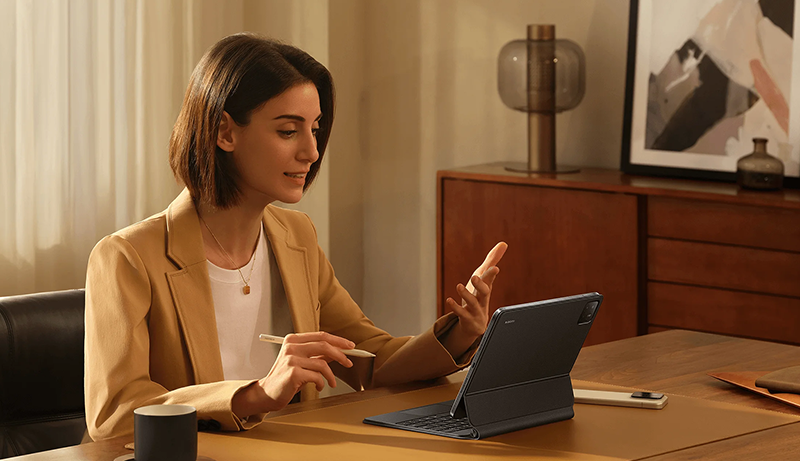
A productivity tablet is designed to help you work smarter, not harder. Whether you’re managing tasks, attending virtual meetings, editing documents, sketching ideas, or multitasking across apps, the right tablet can significantly boost efficiency.
Modern productivity tablets combine powerful processors, large high-resolution displays, long battery life, and advanced software features that support seamless workflows. Many also support stylus input and keyboard accessories, making them versatile tools for students, professionals, and creators alike. From note-taking and presentations to content creation and collaboration, today’s tablets can replace or complement traditional laptops.
Choosing the best productivity tablets means focusing on display quality, processing power, multitasking capabilities, and overall usability throughout a busy day.
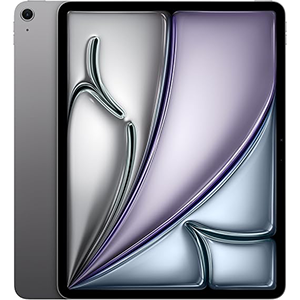
iPad Air (M3 Chip)
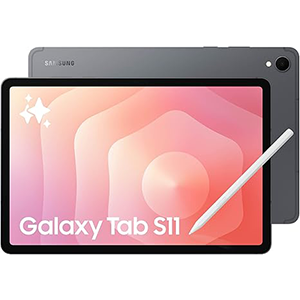
Galaxy Tab S11
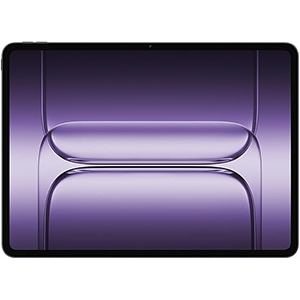
OnePlus Pad 3
In this guide, we explore top productivity-focused tablets that excel in performance, display clarity, and smart features, helping you find a device that keeps up with your work, creativity, and daily demands—wherever you are.
1. Apple iPad Air 13-inch (M3 Chip)
This tablet is built for users who demand speed, visual clarity, and smooth multitasking in a slim, portable form. It features a 13-inch Liquid Retina display that delivers sharp details, accurate colors, and excellent brightness for productivity tasks like document editing, design work, and note-taking. The large screen size makes split-screen workflows comfortable, allowing multiple apps to run side by side without feeling cramped.
At its core is the Apple M3 processor, designed to handle demanding workloads with ease. Whether switching between productivity apps, editing high-resolution content, or managing complex tasks, the performance remains fluid and responsive. The processor also supports advanced on-device intelligence features that enhance writing, organization, and creative workflows.
The tablet runs on a productivity-focused operating system that supports advanced multitasking tools, external display connectivity, and precise stylus input. The slim design and all-day battery performance make it practical for both desk use and mobility.
With fast wireless connectivity and secure biometric authentication, it delivers a balanced experience for professionals, students, and creatives who want a powerful yet refined productivity device.
2. Samsung Galaxy Tab S11
Designed for productivity on the move, this tablet combines durability with high-end performance in a slim profile. It features an 11-inch Dynamic AMOLED 2X display, offering vivid colors, deep contrast, and excellent visibility for work, entertainment, and creative tasks. The display size strikes a balance between portability and workspace, making it ideal for note-taking, multitasking, and media-heavy workflows.
Powering the device is a 3nm MediaTek processor, built to deliver fast performance while maintaining efficiency. It handles multitasking smoothly, allowing users to switch between productivity apps, video calls, and creative tools without lag. The processor is also optimized for AI-driven features that assist with summarizing notes, organizing ideas, and enhancing productivity.
The tablet supports precise pen input, offering a natural writing and sketching experience suitable for meetings, brainstorming, and design work. Its rugged build includes resistance against dust and water, making it reliable for varied environments.
With long battery endurance and fast wireless connectivity, this tablet is well-suited for professionals and students who need a dependable, high-performance productivity companion throughout the day.
3. OnePlus Pad 3 Storm Blue
This tablet focuses on delivering flagship-level performance with a large, immersive display. It comes equipped with a 13.2-inch 3.4K LCD display featuring a high refresh rate, providing smooth scrolling, crisp visuals, and ample screen space for multitasking. The large display makes it ideal for working with documents, spreadsheets, creative software, and split-screen applications.
At the heart of the device is the Snapdragon 8 Elite processor, which delivers fast, responsive performance across demanding productivity and creative tasks. Whether managing multiple apps, editing media, or running advanced workflows, the processor ensures consistent speed and efficiency. The operating system includes enhanced multitasking features that allow multiple apps to run side by side with flexible window management.
The tablet’s slim aluminum body keeps it lightweight despite its large screen, making it comfortable for extended use. Audio performance is enhanced with a multi-speaker system that adapts to orientation, supporting video calls and media playback.
Fast charging and strong battery capacity help maintain productivity throughout long work sessions, making this tablet a strong option for power users seeking speed and screen real estate.
4. Microsoft Surface Pro (2024)
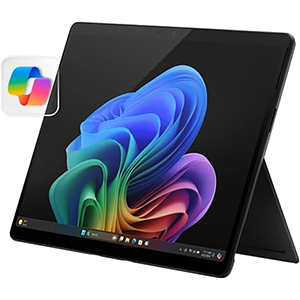
This 2-in-1 device bridges the gap between tablet flexibility and laptop productivity. It features a 13-inch OLED touchscreen display, delivering deep contrast, vibrant colors, and sharp visuals that enhance document work, presentations, and creative tasks. The touchscreen supports pen input, making it suitable for note-taking, sketching, and precise navigation.
The device is powered by the Snapdragon X Elite processor, designed for high performance and energy efficiency. It handles productivity software, multitasking, and AI-assisted workflows smoothly, offering a responsive experience throughout the day. Built-in AI features assist with organization, communication, and system optimization.
Running a full desktop operating system, this tablet supports professional applications commonly used for work and productivity. The adjustable kickstand allows flexible positioning, while optional keyboard support transforms it into a laptop-style workstation when needed.
Strong battery life and fast charging enhance mobility, making it ideal for professionals who need a versatile device that adapts seamlessly between tablet and laptop use in modern work environments.
5. Xiaomi Pad 7 Pro
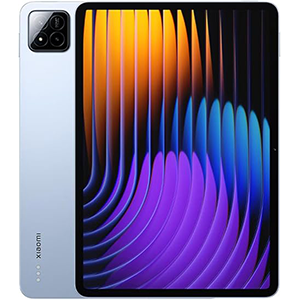
This tablet delivers high-end specifications focused on visual clarity and performance. It features an 11.2-inch 3.2K display with a high refresh rate, offering sharp details, smooth motion, and accurate colors. The screen is well-suited for productivity tasks such as reading, note-taking, editing, and multitasking across apps.
Driving the device is the Snapdragon 8s Gen 3 processor, built on an advanced manufacturing process for strong performance and efficiency. The processor handles multitasking smoothly, allowing users to switch between productivity tools, creative apps, and media without slowdowns. Integrated AI features enhance image processing and system responsiveness.
The tablet runs on a modern, optimized interface designed for large screens, improving split-screen use and app organization. A powerful battery supports long work sessions, while fast charging minimizes downtime.
Additional features such as advanced connectivity options, high-quality speakers, and precise sensor support contribute to a well-rounded productivity experience. Overall, this tablet is a strong option for users seeking high performance, a smooth display, and reliable productivity features in a sleek form factor.
Choosing from the Best Productivity Tablet – How to Choose
Selecting the best productivity tablet requires a careful balance between performance, usability, and long-term comfort. Unlike casual tablets, productivity-focused devices are designed to handle multitasking, professional applications, and extended work sessions without compromise.
Display size and quality should be a top priority. A larger screen provides more workspace for split-screen multitasking, document editing, and creative tasks. High resolution improves text clarity, while features like high refresh rates and accurate color reproduction reduce eye strain and enhance visual precision during long hours of use.
Processor performance plays a critical role in productivity. A powerful chipset ensures smooth app switching, faster file handling, and reliable performance when running demanding workloads such as content creation, data analysis, or multitasking across multiple apps. Efficiency is just as important, as it directly impacts battery life and thermal management.
Multitasking capabilities are essential. Look for tablets that support running multiple apps simultaneously, flexible window management, and external display connectivity. Advanced operating systems designed for large screens significantly improve workflow efficiency by allowing seamless transitions between tasks.
Input options can greatly enhance productivity. Stylus support is valuable for note-taking, sketching, and precise navigation, while keyboard compatibility transforms a tablet into a laptop-like workstation. Responsive touch input and low-latency pen performance make a noticeable difference in daily use.
Battery life and charging speed matter for uninterrupted productivity. A tablet that lasts a full workday without frequent charging allows greater flexibility, especially for mobile professionals. Fast charging ensures minimal downtime when power is low.
Connectivity and ports should not be overlooked. Modern wireless standards improve file transfers and cloud collaboration, while USB-C or similar ports enable connections to accessories, external displays, and storage devices.
Lastly, consider software ecosystem and long-term support. A mature app ecosystem, regular updates, and built-in productivity tools ensure your tablet remains useful and secure for years. By focusing on these key factors, you can confidently choose a productivity tablet that supports your workflow, creativity, and professional goals.
Best Productivity Tablet – FAQs
1. What makes a tablet suitable for productivity?
A productivity tablet offers a powerful processor, a large high-quality display, multitasking support, and compatibility with keyboards and stylus input for efficient work.
2. Is a larger display better for productivity tasks?
Yes, larger displays make multitasking easier by providing more screen space for split-screen apps, document editing, and creative workflows.
3. Can a productivity tablet replace a laptop?
For many users, yes. With proper multitasking features, keyboard support, and desktop-class software, a productivity tablet can handle most daily work tasks.
4. Are stylus pens important for productivity tablets?
Stylus support is especially useful for note-taking, drawing, document annotation, and precise control, making it valuable for students and creative professionals.
5. How important is battery life in a productivity tablet?
Battery life is crucial, as productivity tablets are often used for long work sessions. All-day battery performance ensures uninterrupted workflow.
6. Do productivity tablets support external displays?
Many modern productivity tablets allow external display connections, expanding workspace and improving efficiency for professional use.
Conclusion
A productivity tablet is a powerful tool that blends performance, flexibility, and portability into a single device. With the right combination of a large, clear display, a capable processor, efficient multitasking features, and reliable input options, it can handle everything from professional work to creative projects.
Battery life, connectivity, and software support further define how practical a tablet will be for everyday productivity. By focusing on your specific workflow needs and usage habits, you can choose a productivity tablet that enhances efficiency, supports creativity, and adapts seamlessly to modern work demands.


Leave a Reply