

Choosing the Best Laptop For Medical Students is essential for handling demanding coursework, intensive study sessions, and clinical responsibilities. Medical programs require devices that can manage virtual lectures, anatomy software, research databases, and detailed note-taking without slowing down. A dependable laptop should offer fast processing power, smooth multitasking, and quick responsiveness to keep up with packed academic schedules.
Portability is equally important for students constantly moving between classrooms, libraries, labs, and hospitals. A lightweight yet durable design makes daily commuting easier, while long battery life ensures uninterrupted productivity during back-to-back lectures. A high-resolution display also plays a vital role, helping students clearly read digital textbooks, analyze medical images, and review recorded sessions for extended hours without excessive eye strain.
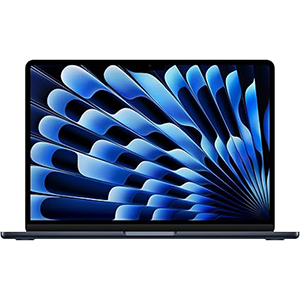
2025 MacBook Air
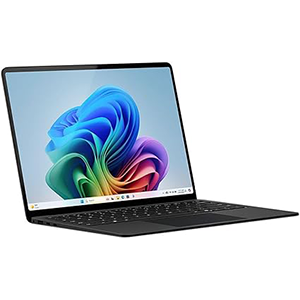
Surface Laptop (2024)
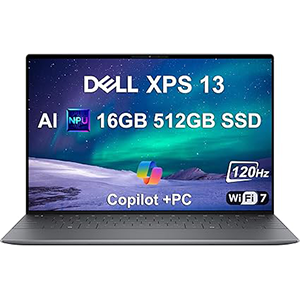
Dell XPS 13 9345
Ultimately, the best choice is a laptop that balances power, efficiency, and durability. It should feel responsive under pressure, stay cool during extended use, and provide enough endurance to last through back-to-back lectures without constantly searching for a charging outlet.
1. Apple 2025 MacBook Air
This model stands out as an ultra-portable option tailored for intensive academic workflows. The 13.6-inch Liquid Retina display delivers sharp text and vibrant visuals, making it comfortable to read medical journals, review presentations, and analyze detailed diagrams for extended periods. Its slim and lightweight build supports constant movement between lecture halls, labs, and hospital rotations without adding strain.
Powered by the Apple M4 chip processor, the system handles multitasking with impressive fluidity. Switching between note-taking apps, video lectures, browser tabs, and creative tools feels seamless, which is essential for students managing dense course loads. The device also maintains consistent performance whether it is plugged in or running on battery, supporting long study sessions and full days on campus.
The integrated camera and advanced audio setup enhance online classes, group discussions, and telehealth simulations with clear visuals and balanced sound. macOS provides fast access to productivity and creative applications commonly used in academic environments, while the tight ecosystem integration allows smooth interaction with other devices for file sharing, messaging, and continuity tasks.
Connectivity through modern high-speed ports and wireless standards ensures compatibility with external displays and accessories. Overall, this laptop offers a refined combination of endurance, responsiveness, and portability suited to the rigorous routine of medical education.
2. Microsoft Surface Laptop (2024)
Designed for modern AI-enhanced workflows, this laptop offers a large 15-inch touchscreen display that provides ample space for reading digital textbooks, annotating lecture slides, and viewing split-screen content. The tall, bright panel improves comfort during long research sessions and makes handwriting or navigation more intuitive for students who prefer interactive input.
At its core is the Snapdragon X Elite processor, which delivers strong performance for multitasking across productivity tools, web-based learning platforms, and AI-driven features integrated into the operating system. The system remains responsive when handling multiple academic tasks simultaneously, helping users move quickly between clinical documentation, video calls, and study materials.
The thin and durable build supports daily travel across campus while maintaining a premium feel. Advanced video call enhancements improve clarity during virtual lectures and group discussions, while built-in AI tools assist with organization, content retrieval, and real-time transcription or translation tasks.
Battery endurance is optimized for full-day use, reducing the need to carry a charger during long schedules. The device also focuses on security and privacy, which is important when handling sensitive academic or clinical data. With its combination of touchscreen versatility, efficient processing power, and intelligent software integration, it fits well into the dynamic workflow of medical students.
3. Dell XPS 13 9345
This compact premium laptop is engineered for students who need performance in an extremely portable form. The 13.4-inch FHD+ display features a high refresh rate and slim bezels, creating an immersive viewing experience that is ideal for reading dense medical content, reviewing imaging, and working in multiple windows without distraction.
It runs on the Snapdragon X Plus processor, enabling fast navigation through complex multitasking workloads such as simultaneous research, note-taking, streaming lectures, and cloud-based collaboration. The system wakes instantly and remains highly responsive, allowing quick access to information during time-sensitive academic tasks.
Its thin and lightweight chassis makes it easy to carry throughout long clinical days, while the thermal efficiency helps maintain steady performance during extended study sessions. The laptop also supports multiple high-resolution external displays through modern USB-C connectivity, which is useful for students who prefer a larger workstation setup in their dorm or study area.
Security features such as biometric authentication and advanced software protection add an extra layer of safety for academic files and personal data. Combined with next-generation wireless connectivity and AI-assisted productivity tools within the operating system, this device delivers a balanced mix of mobility, endurance, and speed for demanding medical programs.
4. ASUS ZenBook 13
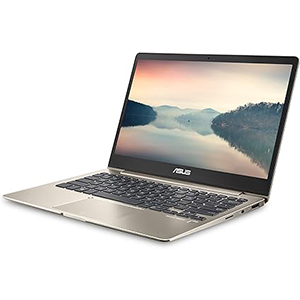
This ultra-slim device focuses on portability while still providing the essentials required for academic workloads. The 13.3-inch Full HD display offers clear visuals and accurate colors, making it suitable for reading e-books, preparing assignments, and watching recorded lectures without eye strain. Its compact footprint allows it to fit easily into small bags, which is convenient for students constantly on the move.
The system is powered by the Intel Core i5-8250U processor, delivering dependable performance for everyday productivity tasks such as document creation, web research, presentation work, and online learning platforms. It handles routine multitasking smoothly, supporting a consistent workflow for lecture preparation and note organization.
Its lightweight aluminum body contributes to comfortable daily transport between classrooms and study spaces. A backlit keyboard helps maintain productivity during late-night study sessions, while the wide range of connectivity options allows quick attachment of external displays or storage devices.
Wireless connectivity ensures stable access to online resources, cloud-based materials, and virtual classrooms. The overall design emphasizes efficiency and mobility, which aligns well with the needs of students who prioritize a simple, travel-friendly system for continuous academic use. This laptop provides a practical balance between performance, screen clarity, and portability for structured medical study routines.
5. Acer Swift 3 OLED

This laptop combines performance and visual quality in a thin, travel-ready design. The 14-inch OLED display with high resolution delivers deep contrast, vivid colors, and sharp detail, which is particularly useful for viewing complex charts, anatomy visuals, and high-definition lecture recordings. The taller aspect ratio also provides more vertical space for reading long documents and research papers.
It is equipped with the Intel Core i7-12700H processor, offering strong computing power for intensive multitasking, data analysis, content creation, and running multiple academic applications simultaneously. The system responds quickly to demanding workloads, helping students maintain efficiency during packed study schedules.
Despite its powerful internals, the chassis remains lightweight and easy to carry across campus. Fast charging support allows quick top-ups between classes, while modern wireless connectivity ensures stable access to digital learning platforms and cloud resources.
The laptop includes biometric security for quick and secure logins, along with a high-quality front camera designed to improve clarity in online meetings and virtual clinical discussions. Multiple high-speed ports make it simple to connect external monitors, storage devices, and other accessories for a full study setup.
With its combination of a premium OLED screen, high-performance processor, and mobile-friendly design, this device supports both intensive coursework and everyday academic productivity for medical students.
Why Medical Students Need a Specialized Laptop
Handling Medical Software & Apps
Medical education relies heavily on specialized software such as anatomy simulators, 3D visualization tools, virtual labs, and hospital training platforms. These programs are more demanding than standard productivity apps and require a powerful processor, fast storage access, and a reliable graphics solution to run smoothly. A capable laptop ensures that complex medical images load quickly, simulations run without lag, and clinical databases remain responsive during study or practice sessions.
Multitasking (Lecture Videos + Notes + PDFs)
A typical study routine often involves streaming recorded lectures while taking notes and keeping multiple PDFs or research articles open at the same time. This workflow demands consistent performance and intelligent resource management so that switching between applications feels instant. A high-resolution display also helps when viewing split screens, allowing students to read, write, and watch simultaneously without losing clarity or focus.
Long Study Hours & Portability
Medical students spend extended hours in classrooms, libraries, labs, and hospitals, so battery endurance and lightweight design are essential. A portable laptop reduces physical strain during daily travel, while long battery life supports uninterrupted study sessions without constantly searching for a power outlet. A durable build also ensures the device can handle the demands of a rigorous academic and clinical schedule.
Minimum & Recommended System Requirements
Choosing the right system specifications is essential for medical students who depend on their laptops for lectures, clinical resources, research, and exam preparation. From running simulation software to managing large medical textbooks, each hardware component plays a direct role in performance, comfort, and long-term usability. Understanding the minimum and recommended requirements helps ensure smooth multitasking, faster load times, and a distraction-free study environment throughout medical school.
Processor (CPU)
The processor determines how efficiently a laptop can handle demanding academic workloads. A minimum-level CPU is capable of running basic productivity tools, web-based learning platforms, and standard note-taking applications. It allows students to attend online lectures, prepare assignments, and access cloud resources without major slowdowns. However, when heavier medical applications are introduced, entry-level processors can struggle with responsiveness, especially during multitasking.
An ideal processor significantly improves workflow by reducing lag when switching between applications. Medical students often run lecture recordings while reviewing slides, opening multiple browser tabs, and using reference tools simultaneously. A modern multi-core processor ensures these tasks operate smoothly without freezing or delayed input. Faster processing also helps when working with diagnostic images, 3D anatomy software, or data analysis tools.
Power efficiency is another key advantage of newer CPUs. Efficient processors generate less heat and consume less energy, which supports longer battery life during extended study sessions. This becomes particularly important for students moving between lecture halls, libraries, and hospital environments.
In the long term, a stronger processor extends the usable lifespan of the laptop. Medical programs typically span several years, and a capable CPU ensures the device remains responsive as software requirements evolve and workloads become more complex.
RAM
Memory plays a critical role in multitasking, which is a daily requirement in medical school. An 8GB configuration is considered the minimum because it can handle essential academic activities such as video streaming, document editing, and moderate web browsing. It allows students to keep lecture notes, PDFs, and communication platforms open at the same time without constant application reloads.
However, modern medical education frequently involves heavier digital workflows. Running virtual labs, anatomy platforms, and multiple research articles simultaneously quickly consumes available memory. With only the minimum capacity, the system may slow down when switching between tasks, interrupting concentration and reducing productivity during study sessions.
A 16GB configuration provides a smoother and more stable experience. It allows large files to remain open in the background while maintaining fast response times. Students can watch recorded lectures, annotate slides, use flashcard software, and keep reference materials active without performance drops.
Additional memory also supports future academic needs. As course content becomes more advanced, applications tend to require more resources. Having higher RAM capacity ensures consistent performance over several years and reduces the likelihood of needing an early upgrade.
Storage
Storage affects how quickly files open, how fast applications launch, and how much academic material can be stored locally. Traditional hard drives are slower because they rely on mechanical movement to read and write data. This results in longer boot times, delayed software launches, and slower access to large medical textbooks or imaging files.
Solid-state drives offer a major improvement in speed and reliability. They allow the system to start almost instantly and open applications without noticeable delay. This is especially useful when accessing time-sensitive materials during lectures or clinical rounds. Faster storage also improves the experience of searching large PDF libraries and switching between multiple resources.
Capacity is equally important for medical students. Course materials often include high-resolution images, recorded lectures, research databases, and offline reference tools. A smaller drive fills up quickly, forcing students to rely on external storage or cloud access, which may not always be convenient in hospital environments.
An ideal storage size provides enough space for several years of academic content while maintaining high performance. It also leaves room for software updates and future coursework without requiring constant file management or cleanup.
Display
The display directly affects reading comfort and learning efficiency. A properly sized screen makes it easier to view detailed diagrams, pathology slides, and long research papers without excessive scrolling. Smaller displays can feel cramped when working with split-screen layouts, while a slightly larger panel improves visibility for multitasking.
Resolution and panel quality also influence clarity. Medical students spend hours reviewing dense text and complex visuals, so sharp rendering reduces eye strain and helps maintain focus. Accurate colors and good brightness levels are useful when studying clinical images or watching recorded demonstrations.
Eye comfort becomes a priority during long study sessions. Features such as reduced blue light, anti-glare coatings, and stable brightness levels help minimize fatigue. A comfortable viewing experience allows students to study longer without discomfort, which is important during exam preparation periods.
Screen aspect ratio can also enhance productivity. Taller displays show more vertical content, making it easier to read lengthy documents and review slides without constant zooming or scrolling.
Battery Life
Battery performance determines how freely a student can move throughout the day without depending on charging points. Medical schedules often include back-to-back lectures, lab sessions, and hospital rotations, where access to power outlets may be limited. A long-lasting battery supports uninterrupted learning in any environment.
Consistent battery output is just as important as total duration. A reliable system maintains performance even when unplugged, ensuring that applications run smoothly during note-taking, research, and online assessments. This stability prevents workflow disruptions in critical academic moments.
Fast charging capability adds flexibility to busy routines. Short breaks between classes can provide enough power for several more hours of use, reducing anxiety about battery levels. This is especially helpful during long clinical days when study time is spread across multiple locations.
Efficient power management also contributes to device longevity. Systems that consume less energy generate less heat, which helps maintain internal component health over years of continuous academic use.
Weight & Portability
Medical students carry their laptops across campuses, libraries, and hospitals every day, often along with textbooks and clinical tools. A lightweight device reduces physical strain and makes daily travel more comfortable. Compact designs also fit easily into backpacks without adding bulk.
Portability is not only about weight but also about overall form factor. Slim laptops are easier to use in tight lecture seating, small study desks, and clinical environments where space is limited. Quick setup and easy handling allow students to start working immediately without inconvenience.
A balanced build ensures durability without making the device heavy. Strong materials help the laptop withstand frequent movement and long hours of use while maintaining a manageable carrying load.
An ideal travel weight supports mobility throughout long academic days. When a laptop feels effortless to carry, students are more likely to keep it with them at all times, ensuring instant access to notes, references, and learning tools whenever needed.
Mac vs Windows for Medical School
Choosing between macOS and Windows is an important decision for medical students because it affects software compatibility, workflow flexibility, and long-term usability. Both platforms are powerful enough for everyday academic tasks such as note-taking, video lectures, research, and exam preparation, but their differences become more noticeable when specialized medical applications and hospital systems are involved.
macOS is often appreciated for its smooth performance, optimized hardware–software integration, and long battery efficiency. It provides a clean and distraction-free environment that works well for students who rely on cloud-based tools, digital textbooks, and productivity apps. The ecosystem advantage is also significant for those who use other devices from the same platform, allowing seamless file sharing, synchronization, and continuity across multiple screens.
Windows, on the other hand, offers broader compatibility with medical and institutional software. Many hospital systems, laboratory programs, and exam-related applications are designed primarily for Windows environments. This makes it a practical choice for students who want to avoid running virtual machines or searching for alternative versions of required tools. The platform also supports a wider variety of hardware options, display types, and touchscreen or 2-in-1 designs.
Customization and upgrade flexibility are additional strengths of Windows laptops. Students can choose from different performance levels, screen sizes, and form factors that match their study style and budget. This variety makes it easier to find a device tailored to specific academic needs, whether the focus is portability, multitasking, or stylus-based note-taking.
In terms of longevity and stability, both systems can last throughout medical school when equipped with suitable specifications. The better choice often depends on the required software, preferred user interface, and whether integration with other personal devices is a priority for daily study routines.
| Feature | Mac | Windows |
|---|---|---|
| Software Compatibility | Supports most general productivity and study apps; some specialized medical or hospital software may require workarounds | Broad compatibility with medical, lab, and institutional software; commonly used in clinical environments |
| Performance Optimization | Highly optimized hardware–software integration for smooth and consistent performance | Performance varies by model; wide range from basic to high-end configurations |
| Battery Life | Typically very efficient, ideal for long lectures and study sessions | Good battery life on modern devices, but depends on manufacturer and hardware |
| User Experience | Clean interface with minimal system maintenance and stable operation | Familiar interface with extensive customization and flexibility |
| Device Ecosystem | Seamless integration with other devices for file sharing, syncing, and continuity | Strong integration with Microsoft services and cross-device workflows |
| Hardware Variety | Limited model selection with consistent build quality | Large selection of sizes, form factors, and touchscreen or 2-in-1 options |
| Upgrade Flexibility | Limited hardware upgrades after purchase | Some models allow upgrades or more configuration choices at purchase |
| Touch & Stylus Support | Limited touch functionality | Widely available touchscreens and pen input for handwritten notes and diagrams |
| Clinical & Hospital Use | May require remote access to Windows systems in some settings | Commonly used in hospitals and universities, ensuring smoother compatibility |
| Longevity for Medical School | Reliable long-term performance with proper specifications | Equally long-lasting when configured with adequate hardware |
Key Features to Consider Before Buying
Choosing a laptop for medical school goes far beyond processor speed and storage. Daily academic workflows involve long typing sessions, frequent video calls, constant travel between classes and hospitals, and connecting multiple peripherals. Comfort, durability, and practical usability directly affect productivity and device lifespan. Focusing on the right physical and functional features ensures the laptop remains reliable throughout years of intensive study and clinical use.
Keyboard & Trackpad Quality
A high-quality keyboard is essential for medical students who spend hours taking lecture notes, preparing assignments, and writing reports. Comfortable key travel and proper spacing reduce finger fatigue during extended typing sessions. Backlit keyboards are particularly useful for late-night study sessions or dim lecture halls. A poorly designed keyboard can slow typing speed and increase errors, ultimately affecting academic efficiency. Reliable key responsiveness is considered vital for smooth daily interaction and productivity.
The trackpad plays an equally important role, especially for students who often work without an external mouse. A large, accurate, and responsive surface allows quick navigation between PDFs, anatomy apps, and browser tabs. Precision gesture support helps with multitasking, such as switching desktops or zooming into detailed medical diagrams. According to laptop buying guides, a responsive trackpad significantly improves workflow and overall comfort during long sessions.
Ergonomics also matter. Proper palm rejection, firm click feedback, and smooth surface texture reduce strain during prolonged use. These small details become critical when the laptop is used for 8–10 hours daily. Over time, a well-designed keyboard and trackpad combination contributes to better posture, faster note-taking, and a more seamless study experience.
Build Quality & Durability
Medical students carry their laptops between lecture halls, libraries, hostels, and hospitals, making durability a top priority. A strong chassis—preferably aluminum or magnesium alloy—offers better resistance to pressure, accidental drops, and daily wear compared to plastic builds. Premium materials also help maintain structural integrity after years of heavy use. Sturdy hinge construction is another critical factor, as frequent opening and closing can weaken poorly built designs.
Long study hours also mean the laptop will be used in varied environments, from bedside learning to crowded classrooms. A solid build minimizes screen flex, protects internal components, and ensures consistent performance. Devices with poor construction often develop issues such as loose ports, keyboard flex, or overheating due to compromised internal alignment.
Durability is not just about physical strength—it also affects long-term value. A well-built laptop is more likely to last through the entire medical program without requiring costly repairs or replacement. This reliability is crucial when the device stores important notes, patient case materials, and research data.
Webcam for Online Classes
Online lectures, virtual ward discussions, and telemedicine training have made webcam quality more important than ever. A clear camera ensures better communication with professors and classmates, especially during clinical case presentations or viva sessions. Higher-resolution webcams provide sharper images, which helps maintain a professional appearance in academic settings.
Low-quality cameras often struggle in indoor lighting, producing grainy visuals that can reduce engagement during interactive sessions. Good low-light performance and proper color balance make long online classes more effective and less tiring for viewers. Built-in microphones with noise reduction further improve clarity during discussions.
Privacy features such as physical shutters add an extra layer of security when the camera is not in use. For medical students who attend frequent virtual meetings and group study sessions, a reliable webcam becomes a daily necessity rather than an optional feature.
Connectivity & Ports
Medical workflows frequently involve connecting external storage, projectors for presentations, diagnostic devices, and additional monitors. Having a variety of ports—USB-A, USB-C, HDMI, and audio jack—eliminates the need for carrying multiple adapters. Ensuring the laptop supports modern wireless standards like fast Wi-Fi and Bluetooth also improves performance with online learning platforms and wireless accessories.
Limited ports can disrupt productivity, especially during presentations or when transferring large medical imaging files. Direct connectivity allows quick access to flash drives, external SSDs, and lab equipment. For students working in environments with unstable wireless networks, the option to use wired connections through compatible solutions can be extremely useful.
Future-ready connectivity also matters. Newer standards provide faster data transfer and better compatibility with upcoming devices, ensuring the laptop remains relevant throughout the entire course duration.
Upgradeability
Medical software and digital resources grow heavier over time, making upgradeability an important long-term consideration. Laptops that allow RAM and storage upgrades can adapt to increasing academic demands without needing a full replacement. This flexibility is especially valuable when handling large anatomy atlases, simulation software, and extensive research databases.
Upgradeable components extend the usable life of the device and make it more cost-effective. Instead of purchasing a new system after a few years, students can simply add more memory or a larger SSD. This also helps maintain smooth multitasking performance as workloads increase in clinical years.
Access to internal components should be straightforward, with removable panels and standard hardware configurations. Devices that are completely sealed limit future improvements and can become outdated quickly. For a long academic journey like medical school, the ability to upgrade ensures consistent performance and better value over time.
Accessories Medical Students Should Consider
The right accessories can significantly improve productivity, comfort, and workflow for medical students. Beyond the laptop itself, a few practical additions help with note-taking efficiency, data storage, device protection, and creating a flexible study setup. These tools support both campus mobility and long home study sessions, making daily academic tasks smoother and more organized.
Stylus / Digital Note-Taking
A stylus becomes extremely valuable for students who prefer handwritten notes, diagram labeling, and quick annotations on lecture slides. Medical subjects often involve complex structures, flowcharts, and visual memorization, which are easier to understand when written or drawn manually rather than typed. Digital note-taking apps allow content to be organized, searched, and synced across devices, reducing the need to carry multiple notebooks. It also helps in marking PDFs, sketching anatomy, and revising during clinical rotations without printing large volumes of material.
External SSD
Medical study materials can quickly consume internal storage, especially when they include high-resolution anatomy atlases, recorded lectures, research papers, and offline video resources. An external SSD provides fast, reliable, and portable storage for backups and large files. Its high transfer speed allows students to access content instantly without slowing down the system. It also adds an extra layer of data security by keeping important notes and academic resources safely stored in a separate location.
Laptop Backpack
Medical students travel daily between lecture halls, libraries, labs, and hospitals, so a well-designed laptop backpack is essential. A good backpack offers padded protection for the laptop, organized compartments for chargers and accessories, and enough space for books and clinical tools. Ergonomic shoulder support helps reduce strain during long days on campus. Water-resistant materials add protection for both the laptop and important documents in unpredictable weather.
Cooling Pad
Long study sessions, video lectures, and multitasking can generate heat, which may affect performance and long-term device health. A cooling pad improves airflow around the laptop and helps maintain stable temperatures during heavy workloads. Keeping the system cool supports consistent performance and prevents uncomfortable heat buildup when studying for extended hours. It also contributes to better posture by slightly elevating the screen to a more comfortable viewing angle.
External Monitor for Home Study
A larger external monitor transforms a small laptop into a powerful home study workstation. Medical students often need to read research papers while taking notes or watch lectures alongside textbooks and question banks. A bigger screen allows true multitasking without constantly switching between tabs. It also improves posture by enabling a proper eye-level viewing position, which reduces neck and eye strain during long revision sessions.
Frequently Asked Questions (FAQs)
What Laptop Specifications Do You Really Need For Medical School?
You need a laptop that can handle heavy multitasking, long study hours, and specialized academic software without slowing down. A modern multi-core processor ensures smooth performance when you run lecture videos, note-taking apps, and multiple PDFs at the same time. At least 8GB memory is required for basic workflows, but 16GB gives you a much more stable experience for virtual labs, anatomy platforms, and research tools. Fast solid-state storage is essential because it reduces boot time and opens large medical files instantly. A full-day battery and a lightweight design help you move between classes and hospital rotations without constantly searching for a power outlet.
Is Mac Or Windows Better For Medical Students?
The better choice depends on the software you are required to use and your personal workflow. Windows laptops offer wider compatibility with hospital systems, lab applications, and exam software, which makes them a practical option for clinical years. macOS provides excellent battery efficiency, smooth performance, and strong device integration if you already use the same ecosystem. If your medical school recommends specific programs, you should always check their operating system support first to avoid future limitations.
How Much RAM Is Ideal For Medical Students?
You can manage basic tasks with 8GB, but 16GB is the ideal capacity for medical school. Your daily routine often includes watching recorded lectures while taking notes, keeping multiple browser tabs open, and reading large textbooks in PDF format. More memory allows you to switch between these tasks instantly without lag. It also prepares your system for advanced years when you start using simulation software, research databases, and clinical resources simultaneously.
Why Is Battery Life So Important In Medical School?
Your schedule will not always allow you to sit near a charging point. You may attend back-to-back lectures, spend hours in the library, and move to hospital training in the same day. A long-lasting battery keeps your notes, presentations, and learning apps available throughout your routine. Reliable unplugged performance also ensures your laptop stays fast during ward rounds, group discussions, and online assessments without interruptions.
What Screen Size Works Best For Reading And Study?
A display between 13 and 15 inches gives you the best balance between portability and comfort. You need enough screen space to read long research papers, view detailed anatomy diagrams, and use split-screen mode for multitasking. A high-resolution panel reduces eye strain during extended study sessions, and a taller aspect ratio lets you see more content without constant scrolling. If you study for long hours, a quality display directly improves your focus and productivity.
How Long Should A Laptop Last In Medical School?
Your laptop should ideally last through your entire medical program, which means it must handle several years of increasing academic workload. Choosing a strong processor, sufficient memory, and fast storage from the beginning helps you avoid early replacement. A durable build and efficient thermal design also play a major role in long-term reliability. When you invest in the right specifications, your device remains responsive from your first lecture to your final clinical year.
Final Verdict
Choosing the right laptop for medical school is about more than just performance on paper. Your daily routine will include long lectures, clinical preparation, research work, and constant multitasking, so you need a device that stays fast, reliable, and comfortable to use for hours. Portability, battery life, and a clear display all play a major role in helping you study efficiently in different environments.
When you invest in the Best Laptop For Medical Students, you are really investing in a smoother academic journey. A well-balanced system allows you to run medical software, manage notes, attend online sessions, and revise complex materials without interruptions. It also reduces technical stress, so you can focus fully on learning and clinical practice.
Think long term before making your decision. A durable build, the right specifications, and practical features will support you from your first lecture to your final year. The right [keyword] becomes a dependable study partner that keeps up with your demanding schedule and evolving academic needs.


Leave a Reply