
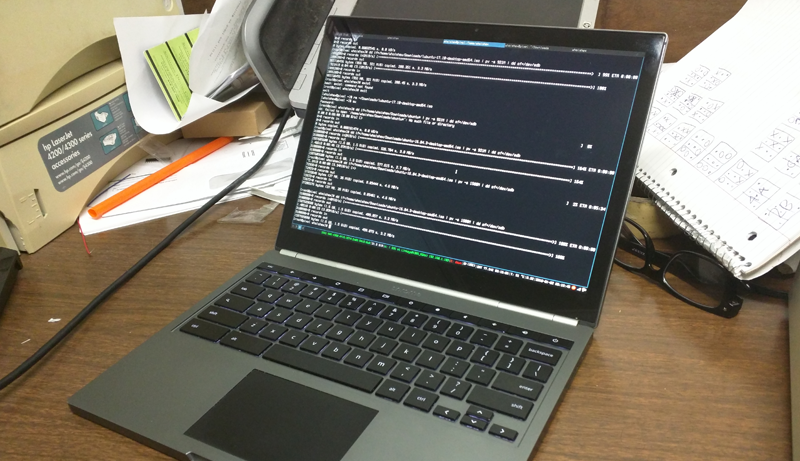
If you’re a power user or developer who thrives on customization and control, Arch Linux is likely already on your radar. Known for its simplicity, flexibility, and rolling-release system, Arch Linux allows users to build their systems from the ground up.
This makes choosing the right hardware—especially a laptop—crucial for ensuring a smooth experience. In this article, we’ll explore some of the best laptops for running Arch Linux efficiently and reliably.
We’ll also touch on the core features of Arch Linux, including its package manager (Pacman), the AUR (Arch User Repository), and the benefits of its minimalist design.
ZenBook 13
ZenBook Duo

Dell XPS 9370
Whether you’re planning to dual-boot or go fully Linux, having the right laptop can make all the difference. Let’s dive into what makes a laptop truly Arch-friendly and highlight the top options for 2025.
1. ASUS ZenBook 13
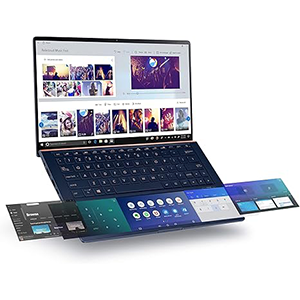
If you’re in search of a laptop that runs Linux flawlessly, the ASUS ZenBook 13 is a standout choice—particularly for Arch Linux users. This ultrathin, lightweight device is highly portable yet packed with impressive performance. Equipped with a 10th Gen Intel Core i7 processor, capable of turbo-boosting up to 4.9 GHz, and supported by an NVIDIA GeForce MX250 discrete GPU, the ZenBook 13 offers more than enough power for both development tasks and creative workloads on Arch Linux.
Its cooling system operates quietly, and the laptop remains cool even under heavy processing loads, making it suitable for prolonged sessions. The 13.3-inch Full HD display boasts a resolution of 1920 x 1080 and features ultra-slim 6.8mm NanoEdge bezels, delivering a wider viewing experience in a compact form. The touchscreen is both responsive and smooth, enhancing usability.
The ZenBook 13’s build quality is another highlight. It features a brushed aluminum chassis with a premium, durable feel. The lid showcases a subtle pattern of concentric circles, inspired by ripples in water—an aesthetic touch reflecting ASUS’s “zen philosophy.” Overall, the ZenBook 13 strikes an excellent balance between portability, design, and power, making it an ideal companion for Arch Linux users seeking reliability and performance.
2. ASUS ZenBook Duo
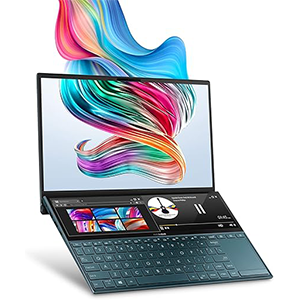
Elevate your productivity and creativity with the innovative ASUS ZenBook Duo, a laptop engineered for efficient workflows and seamless multitasking. Its standout feature is the full-width ASUS ScreenPad Plus—a secondary touchscreen that integrates effortlessly with the main 14-inch Full HD display. This dual-screen setup enables smoother creative processes, from editing and designing to coding and managing complex projects, making it an ideal choice for advanced users and content creators.
Powered by a 10th Gen Intel Core i7 processor with a base clock speed of 1.8 GHz and turbo boost up to 4.9 GHz, the ZenBook Duo handles demanding tasks with ease. Coupled with an NVIDIA GeForce MX250 dedicated graphics card, it delivers solid performance for graphic-intensive workloads and multitasking. Users have consistently reported excellent compatibility with Arch Linux, making this device particularly appealing to Linux power users.
The primary display offers vibrant colors and rich contrast, covering 100% of the sRGB color gamut and earning Pantone validation—ideal for precise color work. The Zen-inspired spun-metal finish gives it a unique, premium aesthetic, while the ErgoLift hinge tilts the keyboard for improved comfort, airflow, and audio clarity. With comprehensive connectivity options and a thoughtful design, the ZenBook Duo redefines mobile productivity.
3. Dell XPS 9370
The Dell XPS 13 (9370), the fifth generation of the XPS 13 series, is an excellent option for users seeking a sleek, powerful laptop that works seamlessly with Arch Linux. Installation is straightforward and similar to any standard PC, and once set up, Arch runs smoothly with full hardware compatibility. This makes the XPS 13 (9370) a reliable and efficient choice for developers, programmers, and power users who prefer a Linux environment.
Under the hood, the XPS 13 (9370) is equipped with an 8th generation Intel Core i7 quad-core processor, offering strong performance for multitasking and demanding applications. Graphics are handled by the integrated Intel UHD Graphics 620, which efficiently manages everyday graphical tasks and helps offload work from the CPU. With 16GB of RAM, the system delivers excellent responsiveness, making it capable of running high-end applications and multitasking without lag.
The design of the XPS 13 is lightweight and elegant, with a sturdy build quality that rivals premium ultrabooks. Its high-resolution display is vibrant and sharp, offering a highly responsive touch experience and an impressive viewing angle. Combined with a comfortable keyboard, accurate trackpad, and overall portability, the Dell XPS 13 (9370) is a compelling choice for Linux users on the move.
4. HP ENVY 13
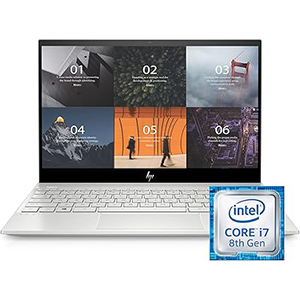
HP has long been a trusted name in the laptop market, and the HP ENVY 13 continues that tradition with a strong blend of performance and design. This convertible laptop is known to work exceptionally well with Arch Linux, making it a solid choice for users who value flexibility and Linux compatibility. With proper setup—such as using the latest Linux kernel and monitoring major package updates—the Envy 13 delivers a reliable and responsive experience.
Powered by an 8th Generation Intel Core i7 processor with four cores, the ENVY 13 operates at a base frequency of 1.8 GHz and can turbo boost up to 4.6 GHz. An 8MB cache further enhances its ability to manage multitasking and demanding applications. This makes it suitable not only for everyday computing but also for more advanced development and creative tasks.
The Envy 13 stands out with its premium design, featuring a sleek aluminum chassis, a brilliant backlit keyboard, and a distinctive geometric speaker grill. Its display is vibrant and crisp, offering a visually pleasing user experience. The touchscreen adds versatility, while the fingerprint sensor ensures added security. Fast boot times, strong build quality, and a portable form factor make the HP Envy x360 a compelling option for Linux users.
5. Acer Aspire 5
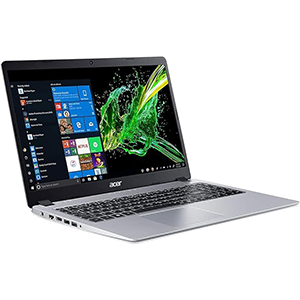
The Acer Aspire 5 strikes a great balance between design, performance, and affordability, making it a strong contender for users seeking a budget-friendly laptop compatible with Arch Linux. Its sleek aluminum lid and matte finish give it a premium look and feel that stands out in its price range. Under the hood, it features a 10th Generation Intel Core i5 processor, capable of turbo-boosting up to 3.6 GHz, which delivers solid performance for everyday tasks and processor-intensive workloads alike.
This model comes with integrated Intel UHD Graphics, suitable for casual use and light graphical tasks. While not built for high-end gaming or rendering, it performs reliably for coding, web development, and even light creative applications. Users have reported smooth performance when running Arch Linux, with no issues during installation or daily use.
The 15.6-inch Full HD IPS display offers sharp visuals and vibrant colors, making it a comfortable screen for extended work sessions or streaming. The backlit keyboard is well-designed with comfortable spacing, improving the typing experience. Although sound output is on the quieter side, the laptop excels in portability and upgradeability. The Acer Aspire 5 is a practical, reliable choice for Linux users looking for performance without a high price tag.
Best Laptops for Arch Linux – Buying Guide & Conclusion
Running Arch Linux on a laptop provides immense customization, control, and performance—perfect for developers, tech enthusiasts, and power users who want to tailor their system from the ground up. However, choosing the right laptop is critical to ensuring a smooth, hassle-free experience. Unlike Windows or macOS, Linux distributions like Arch demand hardware that offers strong compatibility, especially when it comes to drivers and firmware.
What to Look for When Choosing a Laptop for Arch Linux
Processor (CPU)
Arch Linux is lightweight and fast, but the processor still plays a crucial role in multitasking and compiling code. Laptops with at least an Intel Core i5 or Ryzen 5 processor from the latest generations are recommended. For heavier tasks like virtualization, graphics processing, or software development, opt for Intel Core i7 or Ryzen 7 CPUs.
Graphics Compatibility
While integrated Intel UHD or Iris Xe graphics generally work well with Arch Linux, dedicated GPUs like NVIDIA’s MX series or GTX/RTX cards may require proprietary drivers. If you’re doing GPU-accelerated work, ensure that Arch-compatible drivers are available. For simplicity, Intel integrated graphics tend to be the most seamless.
RAM
A minimum of 8GB of RAM is advisable for Arch Linux users. If you’re planning to run multiple virtual machines, compile large projects, or work in creative software, 16GB or more will provide better performance and future-proofing.
Storage (SSD vs. HDD)
Speed matters with Linux systems, especially Arch, which boots and runs extremely fast when paired with an SSD. Look for at least a 256GB SSD, but 512GB or more is recommended if you’re working with larger files or want to dual-boot with another OS.
Display & Build Quality
A Full HD (1920×1080) IPS display ensures clarity and color accuracy, which is important for programming and media use. Consider a touchscreen if you prefer a convertible or hybrid laptop. Additionally, lightweight aluminum or magnesium-alloy builds offer portability without sacrificing durability.
Battery Life
Arch Linux is known for its efficient resource usage, but actual battery performance will depend on the laptop’s hardware and your power management setup. Choosing a model known for good battery life—and learning how to use tools like TLP or Powertop—can make a big difference.
Linux Compatibility
Before purchasing, research Linux compatibility for your desired laptop. Models from Dell (like XPS series), ASUS (ZenBook, VivoBook), Lenovo (ThinkPad series), and HP (Envy, Spectre) are generally more Linux-friendly. Check forums, ArchWiki, or Linux hardware databases for real-world testing results.
Conclusion
If you’re planning to install Arch Linux on your laptop, this guide should help you make an informed decision. While Arch can run on a wide variety of machines, some laptops are far better suited to it due to their hardware compatibility and user support. Choosing a laptop with the right processor, graphics, RAM, and build quality will enhance your Linux experience and reduce configuration headaches.
We hope this article helps you find the perfect laptop to run Arch Linux efficiently. With the right hardware, you’ll enjoy a fast, flexible, and truly personal computing experience. Best of luck—and enjoy the power and simplicity of Arch!


Leave a Reply