

Heading to college means you’ll need a reliable laptop to handle your studies, whether you’re a freshman or returning student. The best laptops for college should balance performance, portability, and price, making them perfect for note-taking, research, essays, and entertainment.
Depending on your program, you might need a simple Chromebook, a sleek MacBook, an ultraportable Windows laptop, or even a powerful workstation. Look for features like long battery life for all-day use, a lightweight design for easy carrying, and a sharp display with a comfortable keyboard and responsive touchpad for a smooth experience. Don’t forget to consider ports for accessories or external displays.
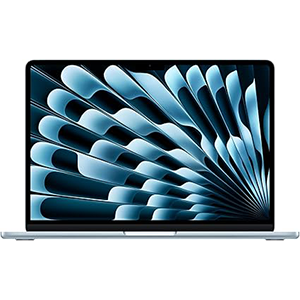
MacBook Air
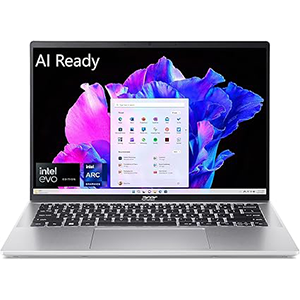
Swift Go 14
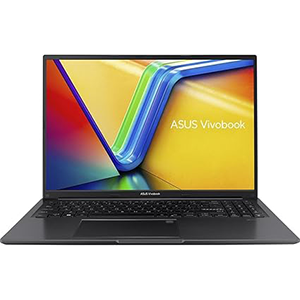
VivoBook 16
Below are our top picks for college laptops that deliver value, performance, and convenience.
1. Apple 2025 MacBook Air
The Apple MacBook Air 13 (M4, 2025) stands out as one of the best laptops for college students thanks to its sleek, ultraportable design and outstanding usability. Built from durable aluminum, it’s designed to handle daily use while remaining light and compact enough to carry effortlessly between classes. Its impressive battery life ensures you can get through a full day of note-taking, research, and media streaming without reaching for a charger.
One of the highlights of this laptop is its excellent display, which is sharp and bright, making reading, writing, and watching videos a pleasure. The keyboard feels comfortable and responsive, while the large haptic touchpad offers smooth and precise navigation. Another advantage is its silent, fanless design, which ensures a distraction-free environment in classrooms, libraries, or study areas.
While it handles everyday tasks like word processing, web browsing, and media playback with ease, it can also manage occasional creative work, such as light video editing or simple design projects. However, its slim profile means it has fewer ports than larger laptops, so students using multiple peripherals may need a USB-C hub. Overall, the MacBook Air 13 delivers a perfect balance of portability, reliability, and performance for students.
2. Acer Swift Go 14
The Acer Swift Go 14 is an excellent mid-range laptop choice for students and professionals seeking a balance of portability, performance, and practicality. With its 14-inch display, this Windows ultraportable offers a compact and lightweight design, making it easy to carry throughout a busy day of classes or meetings. While it may not feel as premium as some high-end laptops, it’s still solidly built and durable enough for everyday use.
Battery life is another strong point, lasting around 11 hours of light use, which is ideal for long study sessions or workdays without constant charging. Convenient USB-C charging adds versatility, removing the need for a dedicated charger. The Swift Go 14 also features a large, smooth touchpad for precise navigation and a comfortable keyboard, which, while slightly soft, provides a good typing experience. Its 1080p webcam ensures clear video quality for virtual meetings and classes, while Wi-Fi 6E support delivers fast and stable connectivity.
One standout feature is its robust port selection, including two Thunderbolt 4 ports and HDMI, making it easy to connect peripherals or external displays. Overall, the Acer Swift Go 14 is a dependable, versatile laptop with a great mix of portability, functionality, and user-friendly features.
3. ASUS VivoBook 16
The ASUS Vivobook 16 (2023) is a solid choice for students or professionals looking for a large-screen laptop on a budget. Despite its affordability, it feels well-built and is surprisingly portable for a 16-inch device, making it easy to carry between classes or the office. Its battery life is reliable, lasting around eight hours of light use, which is enough to get through a full day of work or study without needing a charge.
This laptop offers a comfortable and practical user experience, with a well-spaced keyboard that’s pleasant to type on and a large, responsive touchpad for smooth navigation. The 16-inch screen provides ample space for multitasking, making it ideal for research, document editing, or streaming content, though it can appear slightly dim and washed out compared to premium displays.
Connectivity is another strong point, featuring Wi-Fi 6E for fast and stable wireless performance and a fingerprint sensor for quick and secure logins. The selection of ports is generous, including three USB-A ports, one USB-C, and an HDMI port for external displays. Overall, the ASUS Vivobook 16 delivers great functionality, portability, and versatility, making it a practical choice for everyday productivity and study needs.
4. Apple 2024 MacBook Pro

The Apple MacBook Pro 14 (2024) is an excellent choice for college students in technical fields who need a high-performance laptop capable of running demanding applications. While the exterior design remains unchanged from its predecessor, it continues to impress with its premium all-aluminum build, compact form factor, and excellent overall usability. Its sharp 120Hz Mini LED display offers stunning visuals, while the up-firing speakers provide immersive, well-balanced audio. With strong battery life that lasts a full day and fast charging under two hours, it’s built for productivity on the go.
This model also introduces several upgrades, including increased brightness for SDR content, an optional nano-texture display for reduced glare, and a 12MP webcam with Center Stage support for video calls. The inclusion of Thunderbolt 5 ports (on Pro and Max versions) ensures fast connectivity and compatibility with advanced peripherals, while the base model gains a third USB-C port with expanded external display support.
Performance is exceptional across a wide range of tasks, from video editing and 3D graphics to scientific simulations and color-critical work. With minimal thermal throttling and efficient cooling, the MacBook Pro 14 maintains strong performance without becoming hot or noisy. It’s a powerful, reliable workstation ideal for intensive academic and creative workloads.
5. Acer Aspire 3 (A315-24P)
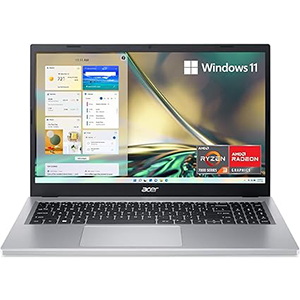
The Acer Aspire 3 is an excellent choice for those seeking a dependable budget laptop that delivers the essentials without too many compromises. Designed with practicality in mind, this 15-inch notebook features a straightforward build and functional design.
It includes a full keyboard with a numeric keypad, a feature not always found on laptops of this size, and rubber pads at the base provide added stability. While it’s not a flashy machine, it focuses on delivering what budget-conscious students or families need most: reliability and ease of use.
The display offers full HD resolution and an anti-glare finish, making it easier to use in bright environments, though color accuracy and vibrancy are limited. Performance is well-suited for everyday computing tasks such as web browsing, writing papers, and streaming media, but it’s not designed for gaming or heavy creative workloads.
Where the Aspire 3 truly shines is its impressive battery life, lasting over 14 hours in testing, making it an excellent companion for long study days or travel without frequent charging. Combined with its up-to-date connectivity options, it offers great functionality for its class. Overall, the Acer Aspire 3 is a practical, long-lasting laptop ideal for students or casual users.
Best Laptop for Students 2025 – Buying Guide
Choosing the best laptop for students in 2025 involves balancing performance, portability, and affordability to meet the diverse needs of school and college life. With technology advancing rapidly, students now have access to laptops that are lighter, faster, and more versatile than ever. Whether you’re pursuing a creative degree, STEM courses, or general studies, the right laptop can significantly impact your productivity and learning experience.
Performance and Power
A laptop’s performance determines how well it handles coursework, multitasking, and demanding applications. Students in technical fields like engineering, programming, or design may require higher processing power, while those in liberal arts or general studies can prioritize a mid-range device for tasks like research, essay writing, and media consumption. Look for laptops with efficient processors, responsive performance, and the ability to handle the software you’ll use most often.
Portability and Design
Since students often carry their laptops between classes, libraries, and dorm rooms, portability is essential. Lightweight designs, thin bezels, and compact chassis make daily transport easier. Durable materials such as aluminum or reinforced plastic add reliability, while ergonomic keyboards and large touchpads improve comfort during long study sessions.
Battery Life
Battery life is one of the most important considerations for students. A laptop that lasts all day without needing to be plugged in provides the flexibility to study anywhere. Aim for at least 8-12 hours of usage on a single charge to avoid being tethered to outlets during lectures or group work.
Display Quality
A good display enhances the overall learning experience, especially for reading, content creation, and entertainment. Full HD resolution is now a standard, but students working in creative fields may benefit from higher resolution screens, color accuracy, and higher refresh rates. Anti-glare coatings are also helpful for reducing eye strain during long hours of study.
Connectivity and Ports
With many students relying on peripherals like external drives, projectors, or monitors, a versatile port selection is vital. USB-C ports are becoming the norm, offering charging and data transfer, while HDMI ports remain essential for connecting to external displays. Support for fast Wi-Fi standards, such as Wi-Fi 6 or Wi-Fi 6E, ensures smooth online learning experiences.
Special Features
Features like biometric login (fingerprint or facial recognition), backlit keyboards, and touchscreen displays can enhance convenience. Students in creative courses may also consider laptops with stylus support or 2-in-1 functionality for note-taking and sketching.
Conclusion
Selecting the best laptop for students in 2025 comes down to identifying the perfect balance of portability, battery life, and performance to support a student’s lifestyle and coursework.
Durability is key for a device that will last through multiple semesters, while strong connectivity options and a comfortable design make daily use easier.
Investing in a laptop that meets your academic needs while leaving room for future demands ensures it won’t become outdated quickly.
A thoughtful choice will provide a seamless, reliable experience for studying, multitasking, and staying productive throughout your entire academic journey.


Leave a Reply