
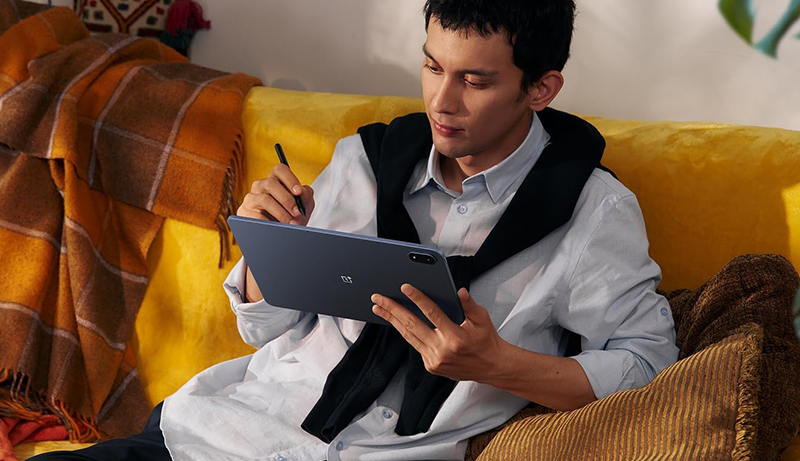
The best Android tablets today cover a wide spectrum—from simple, budget-friendly options perfect for casual use to powerhouse devices that rival high-end laptops. Choosing the right one ultimately depends on your personal needs and how you plan to use it.

OnePlus Pad 3

Galaxy Tab S10+

Pixel Tablet
All of these tablets can easily handle everyday tasks like browsing the web, gaming, and streaming movies. However, each model offers unique strengths, so it’s worth checking out our detailed reviews to see which one fits you best. Keep reading for helpful tips and guidance to make your shopping experience easier.
1. OnePlus Pad 3 Storm Blue
The OnePlus Pad 3 marks a significant step forward for OnePlus in the tablet market, showing that the brand is serious about competing with the biggest names in the industry. Building on the solid foundation of its predecessor, this new release brings refinements that make it an impressive option for both work and entertainment.
One of the most noticeable improvements is its larger display, which not only enhances the viewing experience for movies and games but also provides a more comfortable space for productivity tasks. Paired with thoughtful software upgrades, the tablet feels smooth, responsive, and intuitive, especially when using multitasking tools like Open Canvas.
Design-wise, the Pad 3 carries the same sleek and durable craftsmanship OnePlus is known for. It strikes a balance between lightweight portability and premium feel, making it easy to carry around without sacrificing build quality.
The software experience has also been polished, offering smart features that stay practical without feeling overwhelming. It’s clear that OnePlus has focused on usability, keeping the interface clean while still offering enough power for creative or professional needs.
Altogether, the OnePlus Pad 3 establishes itself as a strong Android tablet that’s ready to stand alongside the top contenders.
2. Samsung Galaxy Tab S10+ Plus
The Samsung Galaxy Tab S10+ stands as one of the most refined Android tablets on the market, offering a premium alternative to Apple’s iPad lineup. Its expansive 12.4-inch display delivers sharp detail and vibrant colors, making it ideal for streaming, reading, or creative work. The immersive screen is further enhanced by slim bezels and smooth responsiveness, creating a truly engaging visual experience.
Beyond the hardware, Samsung has equipped the Galaxy Tab S10+ with excellent multitasking features, allowing users to run multiple apps simultaneously without compromise. Whether it’s managing productivity tasks, editing documents, or jumping between entertainment apps, the tablet handles it all with ease. The device also comes with an IP68 durability rating, meaning it’s resistant to dust and water—an uncommon yet practical addition for a high-end slate.
A standout feature is the included S Pen, which offers precision and fluidity for note-taking, sketching, or professional design work. This makes the tablet particularly appealing to artists, students, and professionals who need a versatile digital canvas. Combined with Samsung’s software optimizations, the Galaxy Tab S10+ blends power, creativity, and durability into one polished package, positioning it as the ultimate choice for those seeking a premium Android experience.
3. Google Pixel Tablet
The Google Pixel Tablet marks the company’s long-awaited return to the tablet market, and it delivers a solid, well-rounded experience for most users. Designed with everyday use in mind, it combines Google’s clean software integration with dependable hardware to create a smooth and intuitive device. Its bright, colorful display makes streaming, browsing, and reading a pleasure, while the battery easily lasts through a full day of use without worry.
One of the most unique aspects of the Pixel Tablet is the included Charging Speaker Dock. More than just a stand, it transforms the device into a smart display, making it a natural fit for use in kitchens, living rooms, or workspaces. With this dock, the tablet doubles as a hub for entertainment, video calls, and even smart home control, seamlessly blending productivity with convenience.
Although the design features thicker bezels than some competitors, the overall build is practical and sturdy. The tablet also supports stylus input with USI 2.0 pens, giving creative users the option for sketching or note-taking. For those already invested in the Pixel ecosystem, the Pixel Tablet feels like a natural extension—an adaptable device that balances portability, performance, and smart functionality in one streamlined package.
4. Lenovo Idea Tab Pro

The Lenovo Idea Tab Pro with Google Gemini is a versatile Android tablet designed to balance productivity and entertainment. Its standout feature is the sharp 12.7-inch LCD display with 3K resolution, offering vivid colors and crisp detail for everything from streaming shows to reading documents. Paired with powerful audio from its speakers, the tablet delivers an immersive multimedia experience that’s equally enjoyable for casual use and creative work.
Lenovo includes a stylus, making it easy to jot down notes, sketch ideas, or annotate files directly on the screen. This addition turns the Idea Tab Pro into a practical tool for students, professionals, and artists who value digital handwriting or creative expression. Beyond media and creativity, the device is capable of handling demanding tasks, whether it’s productivity apps, multitasking, or editing large images.
Software refinements with Google Gemini add another layer of usefulness, providing smart tools and a polished Android experience. Combined with reliable battery performance, the Idea Tab Pro is well-equipped for a day of work, study, or entertainment without constant recharging. With its balance of display quality, performance, and thoughtful extras, it positions itself as a strong choice for anyone seeking a modern, feature-rich Android tablet.
5. Samsung Galaxy Tab A9+ Plus

The Samsung Galaxy Tab A9+ is designed as an approachable entry-level tablet that delivers a familiar and reliable Android experience. It offers a sleek metal body, giving it a premium look and feel despite its simplified feature set. Unlike more limited alternatives, it runs the full version of Android complete with Google Play support, making it easy to download and enjoy all your favorite apps.
With its 11-inch display, the Galaxy Tab A9+ strikes a balance between portability and viewing comfort. It’s large enough to enjoy movies, videos, and books, yet lightweight enough to carry around the house or slip into a bag. The tablet also comes with stereo speakers, which enhance the multimedia experience by delivering more immersive sound for streaming or casual gaming.
While it doesn’t support Samsung’s S Pen, a defining feature of higher-end models, the A9+ is clearly positioned as a tablet for everyday entertainment and light productivity rather than professional work. Its long-lasting battery makes it a dependable companion for reading, browsing, or video playback throughout the day. For users who want a straightforward Android tablet without unnecessary complexity, the Galaxy Tab A9+ is a smart, accessible choice that fits seamlessly into daily routines.
How to Choose the Best Android Tablet
Choosing the right Android tablet can feel overwhelming, given the wide range of devices available today. The first step is to consider what you plan to use the tablet for. Are you looking for a casual media device, something to replace your laptop, or a tool for creative work? Understanding your primary use case will guide you toward the features and specifications that matter most.
Price and Value
While price is often the first consideration, it should be weighed alongside value. More expensive tablets aren’t always the best choice. For instance, flagship models like the Galaxy Tab S11 Ultra offer impressive performance and large displays, but many mid-range devices provide everything most users need without breaking the bank. If you want a tablet for simple tasks like browsing, streaming, or reading, you can find excellent options that are affordable, reliable, and well-built.
Size and Display
Screen size is another crucial factor. Tablets with screens under 10 inches are ideal for casual media consumption, reading, or portability, while larger tablets, often over 12 inches, work better for productivity, multitasking, or creative work. A larger screen allows for a more comfortable keyboard experience and a better canvas for drawing or note-taking. Display quality also matters—look for tablets with high-resolution screens and vibrant colors, as this will impact your viewing and creative experience.
Additional Features
Beyond size and display, consider other features like battery life, camera quality, and design. Some tablets include a stylus or support detachable keyboards, enhancing productivity and creativity. Others offer smart features, like docks or AI-assisted tools, which can turn your tablet into a versatile hub for entertainment or work. Software is equally important; tablets with a clean, stable Android interface and ongoing updates will provide a smoother experience over time.
Popular Choices
Samsung dominates the premium and mid-range Android tablet market, with models like the Galaxy Tab S11 Ultra providing a laptop-like experience, especially when used with Samsung DeX. For casual users, Samsung’s Galaxy Tab A series offers an affordable, lightweight, and fully functional Android experience, ideal for watching movies, browsing, or reading. OnePlus has also entered the market with the OnePlus Pad 3, offering a larger screen and improved performance while remaining a solid value. Meanwhile, Google’s Pixel Tablet combines Android functionality with a smart display dock, making it a unique option for users looking for both tablet and smart home features. Amazon’s Fire tablets serve as a budget-friendly alternative, though they are limited to the Amazon ecosystem rather than full Android functionality.
Wi-Fi vs. Cellular Tablets
Another consideration is whether you want a Wi-Fi-only tablet or one with cellular capabilities. Cellular models provide constant connectivity, making them ideal for travel or working away from Wi-Fi networks, but they may have slightly shorter battery life and require an additional data plan. Wi-Fi tablets rely on available networks or mobile hotspots, which can be sufficient for home or office use. Your choice should depend on whether you need connectivity on the go or are comfortable with occasional internet access via hotspots.
Is a Tablet Worth It?
Ultimately, the question isn’t just whether tablets are worth buying—it’s whether they fit your lifestyle. Tablets are versatile devices that can serve multiple purposes: media consumption, productivity, creative work, or smart home control. If you don’t have a clear use case, the device may end up underused. However, the wide range of options means there is a tablet for nearly every need, from casual streaming to high-powered multitasking.
Conclusion
Selecting the best Android tablet comes down to understanding your needs, balancing size, features, and connectivity, and choosing a model that aligns with your budget and lifestyle. Whether you prioritize a premium device with advanced features, a mid-range tablet for work and media, or an affordable option for casual use, there are plenty of capable Android tablets available today. By considering factors like display quality, portability, software support, and extras like stylus or keyboard compatibility, you can confidently choose the tablet that’s right for you.


Leave a Reply