

Finding a reliable tablet that works flawlessly without WiFi can make all the difference when you’re traveling, working outdoors, or simply prefer staying productive without depending on a hotspot. The best offline-friendly tablets offer strong performance, beautiful displays, dependable battery life, and intelligent software features that work seamlessly even when you’re completely disconnected.
Whether you need a device for content creation, reading, drawing, video playback, note-taking, or handling everyday tasks on the go, the right tablet ensures smooth usage anytime, anywhere. Many modern models also support cellular connectivity, built-in tools for offline editing, advanced cameras, and accessories that elevate productivity.
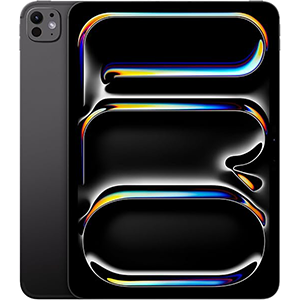
iPad Pro (M4)
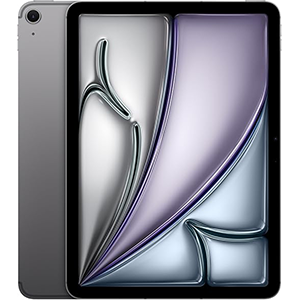
iPad Air (M3)
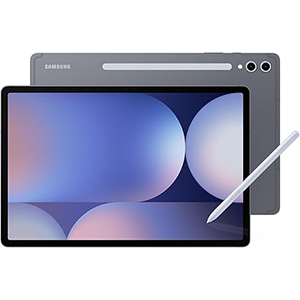
Galaxy Tab S10+
In this guide, we break down some exceptional options designed to deliver a complete experience even without internet access. These tablets stand out for their premium build quality, intuitive interfaces, bright screens, creative toolsets, and strong offline capabilities like document editing, high-resolution photography, entertainment playback, and multitasking. No matter your lifestyle—traveling light, working remotely, or enjoying your hobbies off-grid—you’ll find a tablet here that fits your needs perfectly.
1. Apple iPad Pro 11-Inch (M4)
The 11-inch iPad Pro stands at the top of the performance category, designed for those who need full computer-level power in a compact form. The Ultra Retina XDR display delivers exceptional brightness, contrast, and clarity, making everything—from offline editing to downloaded entertainment—look lifelike and immersive. With advanced imaging capabilities and LiDAR support, it’s well-suited for content creation on the go, whether it’s video work, photography, or design.
The M4 chip guarantees fluid responsiveness across demanding apps, making offline multitasking seamless. Pairing it with the latest Pencil and Magic Keyboard elevates the productivity experience, allowing the tablet to function as a notebook, sketchpad, or laptop alternative without the need for an internet connection. Battery life varies depending on workload, but its rapid charging ability helps keep downtime to a minimum.
iPadOS enhances offline usability with efficient multitasking tools like Stage Manager, enabling resizable windows and external display support even without Wi-Fi. The suite of pre-installed productivity tools, combined with millions of compatible apps, ensures users have everything they need when offline. Whether for creative work, entertainment, or professional tasks during travel, this tablet offers one of the most complete untethered digital experiences available.
Pros
- Exceptional display quality
- Ultra-fast performance for demanding tasks
- Ideal for productivity and creative work
- Advanced camera system and LiDAR support
- Smooth multitasking even offline
- Premium build and accessory ecosystem
Cons
- Battery life can fluctuate depending on workload
- Accessories increase total investment
- May be excessive for casual users
2. Apple iPad Air 11-inch (M3)
The 11-inch iPad Air offers a perfect balance of portability, power, and versatility, making it a strong option for those who want reliable offline performance without moving to the highest-end tier. Its Liquid Retina display produces excellent clarity and color accuracy, ideal for movies, sketching, reading, and productivity in environments without Wi-Fi.
Powered by the M3 chip, it handles multitasking and intensive apps with ease. Whether you’re editing videos, annotating documents, or using creativity tools, the experience remains fluid. The compact profile and lightweight build make it travel-friendly, while cellular support keeps users connected when Wi-Fi isn’t available. The battery is capable of lasting through a workday depending on usage, making it dependable for commutes and trips.
With the latest Pencil support and Magic Keyboard compatibility, it transforms into an efficient workstation or digital notebook. iPadOS features like Stage Manager and Scribble enhance offline workflow efficiency. The camera setup performs strongly for scanning documents, video calls, and casual recording. This model strikes a sweet spot between functionality and mobility, making it suitable for professionals, students, and creators who don’t want to compromise speed when working offline.
Pros
- Fast and responsive performance
- Portable and lightweight design
- Vibrant and sharp display
- Efficient offline productivity features
- Great accessory compatibility
- Smooth for creativity and multitasking
Cons
- Battery performance varies
- Full productivity potential depends on accessories
- Not suited for highly intensive workloads compared to Pro model
3. Samsung Galaxy Tab S10+ Plus
The Galaxy Tab S10+ positions itself as one of the most powerful Android tablets available, delivering a sizable 12.4-inch display ideal for offline productivity and entertainment. The Dynamic AMOLED 2X screen enhances visibility across lighting conditions, making travel-based or outdoor usage visually comfortable. The included S Pen adds bonus value, enabling drawing, handwriting, and note-taking without needing to purchase accessories separately.
With a high-performance processor and refined software optimization, this tablet handles gaming, content creation, and multitasking smoothly. For those who frequently work without Wi-Fi, its built-in AI tools—such as transcription, summarization, and search—help organize information without relying on cloud features. The large battery ensures extended usage during long workdays and offline media sessions.
The notebook-style interface and multitasking design bring desktop-style convenience, allowing multiple windows and smooth switching between apps. The camera quality, supplemented with superior microphones and speakers, creates an immersive media and video-calling experience whether connected or offline. Durability upgrades also make it a secure companion outdoors and in demanding situations.
Ultimately, this model is ideal for digital artists, media lovers, and productivity-focused users who want a big screen, strong processing ability, and advanced stylus functionality without compromising mobility.
Pros
- Large, brilliant AMOLED display
- Strong performance for creativity and multitasking
- Rugged construction for travel and outdoor use
- S Pen included
- Excellent audio quality
- Works well for offline drawing and content creation
Cons
- Performance may vary between apps
- Value perception depends on user needs
- Limited carrier compatibility for cellular connectivity
4. Apple iPad mini (A17 Pro)
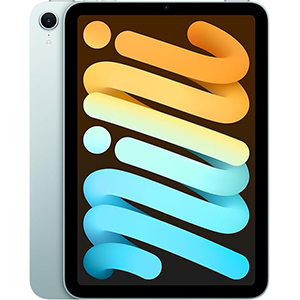
The iPad mini delivers a full premium tablet experience in an incredibly portable frame, making it a standout choice for offline use during travel, fieldwork, or commutes. Its 8.3-inch Liquid Retina display maintains strong visual quality, ensuring reading, sketching, note-taking, and watching downloaded content remains enjoyable.
With the A17 Pro chip, the tablet delivers desktop-grade responsiveness in a small chassis. It handles creativity tools, multitasking, gaming, and productivity apps effortlessly, making it suitable for both leisure and professional use away from Wi-Fi. Battery life performance is reliable and charges quickly when needed, minimizing downtime.
The compact footprint enables one-hand usage, and its compatibility with the latest Pencil turns it into a sketchpad or digital notebook on the go. The cameras are surprisingly capable for its size, performing well for document capture, casual photography, and high-quality video calls. Touch ID keeps access fast and secure without relying on an internet connection.
This model is optimal for people who want maximum portability without sacrificing pro-level speed. Whether it’s for education, business travel, or creative sessions away from Wi-Fi, the iPad mini excels as a powerful small-form offline companion.
Pros
- Extremely portable and lightweight
- Very fast performance for its size
- Reliable battery with quick charging
- Great screen for reading and note-taking
- Highly responsive with Apple Pencil
- Suitable for both work and travel
Cons
- Small display not ideal for heavy editing or multitasking
- Accessory purchases add to long-term cost
5. SAMSUNG Galaxy Tab A9+
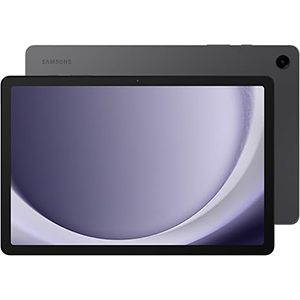
The Galaxy Tab A9+ budget-friendly tablet is designed for everyday productivity at home, on the road, or in the workplace—especially where Wi-Fi isn’t consistently available. Its 11-inch screen delivers clarity and vivid colors, ideal for entertainment, study, and basic design work. The lightweight frame makes it practical to carry in backpacks and travel bags.
With fast 5G connectivity, downloaded media, emails, documents, and apps remain accessible even without Wi-Fi. The updated chipset provides smooth performance for daily multitasking, web browsing, note-taking, reading, and streaming saved content. The quad-speaker setup powered by Dolby Atmos enhances the viewing and listening experience in offline environments.
The tablet supports multi-window usage, particularly helpful for students and workers who need to reference multiple apps or documents offline. Battery efficiency varies, but generally offers extended performance for note-taking, reading, and video playback. Storage expansion through microSD support provides flexibility to store large files, movies, coursework, and offline resources.
This device is best suited for everyday use and multitasking rather than intensive creative work. Still, it delivers excellent usability and functionality for media, productivity, and casual entertainment without relying on Wi-Fi.
Pros
- Lightweight and easy to carry
- Clear and bright display
- Strong multitasking support
- Expandable storage for offline media
- Dolby Atmos quad speakers for rich audio
- Solid offline usability for everyday tasks
Cons
- Performance varies based on workload
- Battery consistency may decline during heavy use
- Occasional functional issues may appear over time
Comparison Table — Best Tablets to Use Without WiFi
When choosing a tablet that performs well without WiFi, focus on how you plan to use it. The iPad Pro provides the most advanced offline experience with superior visuals and pro-level tools. The Galaxy Tab S10+ offers a big screen and an included stylus, making it great for entertainment and creativity.
For a mix of performance and portability, the iPad Air stands out, while the iPad mini remains the best compact choice for travel. If you’re looking for an affordable tablet for offline essentials, the Galaxy Tab A9+ 5G is a practical pick. Each option supports smooth, flexible usage even when fully disconnected.
| Feature | iPad Pro 11″ (M4) | iPad Air 11″ (M3) | Samsung Galaxy Tab S10+ | iPad mini (A17 Pro) | Samsung Galaxy Tab A9+ 5G |
|---|---|---|---|---|---|
| Display Type | Ultra Retina XDR | Liquid Retina | Dynamic AMOLED 2X | Liquid Retina | LCD |
| Display Size | 11 inches | 11 inches | 12.4 inches | 8.3 inches | 11 inches |
| Best For | Professional work, creative tasks | Balanced productivity & portability | Large-screen entertainment & creativity | Travel, portability & daily use | Everyday tasks & budget-friendly offline use |
| Stylus Support | Apple Pencil Pro / USB-C | Apple Pencil Pro / USB-C | S Pen (included) | Apple Pencil Pro / USB-C | Supports compatible stylus |
| Keyboard Support | Magic Keyboard | Magic Keyboard (new version) | Optional keyboard | Smart Folio keyboards | Optional keyboard |
| Build Quality | Premium, ultra-thin | Lightweight & sleek | Durable, splash-resistant | Compact & strong | Slim, simple design |
| Camera Setup | 12MP front + 12MP wide rear + LiDAR | 12MP front + 12MP wide rear | High-quality AF camera | 12MP front + 12MP rear | Basic but functional cameras |
| Battery Performance | All-day (varies by use) | All-day (mixed feedback) | Long-lasting | Excellent for size | Mixed feedback |
| Best Offline Features | Advanced editing, creative tools, AR | Smooth multitasking, creative use | Big display, strong offline art tools | Offline reading, note-taking, travel tasks | Basic entertainment & productivity |
| Unique Advantage | Highest performance & pro tools | Best balance of power and portability | Included S Pen + large display | Ultra-portable powerhouse | Affordable and practical |
Buyer’s Guide — How to Choose a Tablet to Use Without WiFi

Choosing a tablet that performs well without WiFi involves focusing on the features that matter most when you’re completely offline. Whether you travel frequently, work outdoors, commute in areas with limited connectivity, or simply prefer offline productivity, the right device can dramatically improve your experience. Here are the key factors to consider before choosing the best offline-friendly tablet for your needs.
1. Display Quality and Size
A high-quality display is essential for offline tasks such as watching movies, reading ebooks, drawing, editing photos, or reviewing documents. Look for screens with rich color accuracy, good brightness, and low reflectivity so you can use the device comfortably in different environments. Compact tablets (8–11 inches) are easier to carry, while larger screens (12 inches and above) are better for multitasking and creative work.
2. Battery Life Performance
When WiFi isn’t available, a tablet with dependable battery life becomes crucial. Activities like video playback, sketching, and document editing can drain power. Choose a tablet known for long-lasting performance so you can stay productive throughout the day without constantly searching for a charger.
3. Portability and Build Quality
Offline use often means mobility—traveling, fieldwork, or working in places where you can’t always set up a workstation. A lightweight, slim, and durable build ensures the tablet can handle daily wear and tear. If you’re frequently on the move, prioritize compact models that easily fit in a bag or even a small pouch.
4. Stylus and Keyboard Compatibility
If note-taking, drawing, planning, or editing is part of your workflow, stylus support adds tremendous value. A responsive pen allows for precise sketches, handwritten notes, and efficient marking of documents. A detachable keyboard transforms the tablet into a mini laptop, perfect for writing long texts or organizing offline files.
5. Camera and Offline Tools
Good cameras matter more than you might think when using a tablet offline. Tasks like scanning documents, capturing images for projects, or recording offline content benefit from a capable front and rear camera. Additionally, check whether the device supports robust offline apps—PDF editors, drawing programs, video players, photo editors, and file managers.
6. Storage Flexibility
Although not mentioned directly, having flexibility for offline media—like videos, photos, documents, and large apps—makes a big difference. Tablets with expansion options give you more freedom to store content without relying on cloud storage.
7. Optional Cellular Connectivity
Even if your main focus is offline use, choosing a model with optional cellular access can help in emergencies or when you need occasional data without WiFi.
With these factors in mind, you’ll be well-equipped to choose a tablet that performs reliably and efficiently wherever you go.
How to Get Internet on a Tablet Without WiFi

If you need internet on your tablet but don’t have access to WiFi, there are several reliable methods to stay connected. Modern tablets offer flexible connectivity options, allowing you to get online almost anywhere—whether you’re traveling, commuting, or working outdoors.
1. Use Mobile Data With a SIM Card
The most direct method is using a tablet that supports cellular connectivity. By inserting a SIM card from your mobile carrier, your tablet can access the internet using 4G, LTE, or 5G networks. This works the same way a smartphone connects to mobile data. Simply activate a data plan, turn on cellular data in the settings, and you’re online without needing WiFi.
2. Use Your Phone’s Hotspot
If your tablet doesn’t support SIM cards, you can still connect using your smartphone. Most phones allow you to create a mobile hotspot, which turns your phone into a portable WiFi router. On your phone, enable the hotspot feature, set a password, and connect your tablet to it just like normal WiFi. This is convenient, but keep in mind it uses your phone’s mobile data and may drain battery quickly.
3. Use a Portable Hotspot Device
A portable hotspot (also called a MiFi device) is a small gadget that provides internet using mobile data. It’s great for travel or for people who want a dedicated internet source without relying on a phone. Simply turn it on, choose a data plan, and connect your tablet to the hotspot’s WiFi signal.
4. Use USB Tethering From Your Phone
Some tablets support USB tethering if they have a compatible port. You can connect your phone to your tablet using a cable and share mobile data through USB. This method is more stable and saves battery compared to wireless hotspot use.
5. Public or Paid Hotspot Networks
Cafes, transport hubs, hotels, and co-working spaces often offer public or paid hotspots. If WiFi is unavailable at home, these can be temporary alternatives.
With these methods, you can easily stay online even when traditional WiFi isn’t available.
Frequently Asked Questions (FAQ)
1. Can you use a tablet without WiFi?
Yes, absolutely.
A tablet can function perfectly fine without WiFi. You can use it for many offline tasks such as reading ebooks, watching downloaded movies, playing offline games, drawing, writing notes, viewing photos, using offline apps, and editing documents. As long as the apps or files are already stored on the device, the tablet works normally without an internet connection.
2. Do all tablets have WiFi?
Yes. All modern tablets come with built-in WiFi.
WiFi connectivity is a standard feature on every tablet. Some tablets also offer cellular versions (4G/5G models), but WiFi is included regardless of the model. You do not need a data plan to use basic tablet functions.
3. Can you use a tablet without a service provider?
Yes, you don’t need a service provider to use a tablet.
A service provider (like a mobile carrier) is only required if you want a cellular data connection. Otherwise, you can:
- Use WiFi only
- Use the tablet fully offline
- Watch downloaded content
- Use offline apps
- Transfer files using USB or Bluetooth
So, a service provider is completely optional.
4. How can I watch movies on my tablet without WiFi?
You can watch movies offline in several ways:
a. Download movies beforehand
Use apps like Netflix, Amazon Prime Video, YouTube Premium, or Disney+ to download movies while you’re online, then watch them later without WiFi.
b. Transfer videos from a computer
Copy movies from your PC or laptop to your tablet using a USB cable.
c. Use a microSD card (if your tablet supports it)
Store movies on an SD card and play them using a video player app.
d. Use offline streaming app features
Most entertainment apps offer an “Offline Download” or “Save for Offline Viewing” option.
Conclusion
Choosing the best tablet to use without WiFi depends on how you plan to use it—whether for travel, entertainment, work, or outdoor activities. Tablets with cellular connectivity, strong battery life, and plenty of storage offer the most flexibility for offline use.
Features like GPS support, expandable memory, and durable build quality also make a big difference when you’re away from a network. No matter your budget, there are reliable options that let you stay productive and entertained without needing WiFi. With the right tablet, you can enjoy seamless offline access, anytime and anywhere.


Leave a Reply