

Recently, eGPUs have surged in popularity due to their ability to significantly enhance a laptop’s GPU performance. With an eGPU, even a laptop with a mediocre GPU can rival the capabilities of a dedicated gaming laptop. If you’re on the hunt for the top laptops optimized for eGPU utilization in 2024, it’s crucial to understand the key criteria and specifications that ensure compatibility and efficiency.
To discern the cream of the crop, it’s essential to grasp the diverse factors and specifications that render a laptop suitable and optimal for eGPU integration. This article delves into these aspects to assist you in selecting the most suitable laptop for your eGPU requirements.
Top pick
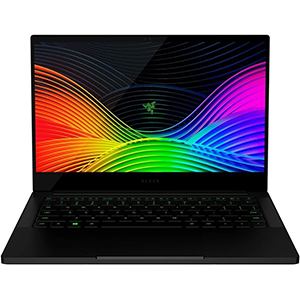
Blade Stealth 13
The Razer Blade Stealth 13, with its potent specs and eGPU compatibility via Thunderbolt 3, delivers smooth gaming experiences and enhanced graphical capabilities.
Editor’s choice
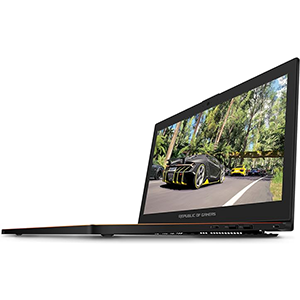
ASUS ROG Zephyrus
The ASUS ROG Zephyrus, paired with an eGPU, delivers unrivaled gaming performance, seamless integration, and enhanced visual fidelity for immersive gaming experiences.
Best value
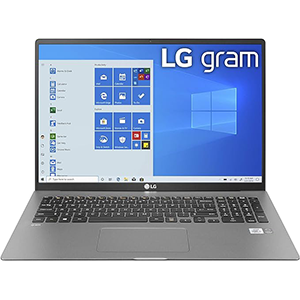
LG Gram 17Z90N
The LG Gram, with its lightweight design and robust specifications, suits gamers seeking portable gaming. Its graphic limitations can be overcome with external GPUs.
The process of selecting the perfect laptop for eGPU deployment can pose challenges. To streamline your decision-making, we’ve curated a selection of ultra-portable yet robust laptops primed for your eGPU needs. Irrespective of your workload or tasks at hand, these chosen devices guarantee top-notch performance and deliver the desired outcomes effectively.
1. Razer Blade Stealth 13
The Razer Blade Stealth 13 stands out as a sleek and potent laptop capable of effortlessly handling AAA titles, effectively rendering it a portable gaming powerhouse. Moreover, its compatibility with eGPUs further enhances its graphical capabilities, enabling seamless gaming experiences even at ultra-high settings.
Equipped with a 10th gen Intel Core i7 processor, 16 GB of RAM, and a formidable NVIDIA GeForce GTX 1650 graphics card, the Razer Blade Stealth 13 already boasts impressive performance levels, ensuring smooth gameplay across a wide array of AAA titles.
However, for those seeking to push the boundaries and indulge in resource-intensive AAA titles at their highest graphical fidelity, integrating an external GPU becomes an enticing option. By harnessing the Thunderbolt 3 port, users can effortlessly connect their laptop to an external GPU, unlocking real-time rendering and accelerating graphics processing.
With this setup, users can immerse themselves in lifelike visuals while enjoying the portability and versatility of the Razer Blade Stealth 13, seamlessly transitioning between gaming sessions and productivity tasks with unparalleled ease and efficiency.
2. ASUS ROG Zephyrus
The ASUS ROG Zephyrus, renowned for its sleek design and powerful performance, offers an exceptional gaming experience with its integrated hardware components. However, for those seeking even greater graphical prowess, an external GPU (eGPU) can elevate gaming capabilities to unprecedented heights.
Compatible with Thunderbolt 3 technology, the ASUS ROG Zephyrus seamlessly integrates with an eGPU enclosure, allowing users to augment their gaming setup with a dedicated graphics card of their choice. Whether it’s for pushing visual boundaries in the latest AAA titles or enhancing rendering speeds for creative endeavors, an eGPU offers versatility and scalability.
By harnessing the power of NVIDIA GeForce GTX 1070 8GB GDDR5 graphics with Max Q Technology, the eGPU unleashes unparalleled gaming performance, rendering lifelike visuals and ensuring smooth gameplay even in the most demanding scenarios. Coupled with the 7th Gen Intel Core i7 processor, the eGPU setup delivers blistering speeds and responsiveness, elevating gaming sessions to new heights of immersion and excitement.
Furthermore, the high refresh rate 120Hz Full-HD display with NVIDIA G-SYNC technology ensures tear-free visuals, while the ASUS Aura RGB Gaming Keyboard allows for personalized lighting customization, enhancing the overall gaming ambiance.
With the ASUS ROG Zephyrus and an eGPU, gamers can unlock a realm of possibilities, pushing the boundaries of performance and immersing themselves in the captivating worlds of modern gaming with unparalleled fluidity and detail.
3. LG Gram 17Z90N
The LG Gram serves as an ideal solution for gamers seeking to play graphics-intensive games on a laptop lacking a dedicated GPU. While it may lag in graphical performance, its robust specifications make it highly compatible with external graphics cards.
External GPUs thrive when paired with lightweight, portable laptops lacking dedicated graphics cards, making the LG Gram an optimal candidate. Despite its graphic limitations, its featherweight design at 2.98 pounds and slim profile exemplify its commitment to portability.
Powered by a 10th gen Intel Core i7 processor, 16 GB of RAM, and a spacious 1 TB SSD, the LG Gram delivers formidable performance capable of handling various games and resource-intensive applications. Its only shortfall lies in the absence of a dedicated graphics card.
Fortunately, this deficiency can be remedied by integrating an external graphics card, transforming the LG Gram into a potent gaming machine. While it may lack multiple Thunderbolt 3 ports for seamless compatibility, its reliance on external GPUs compensates for its graphical limitations, ensuring gamers can enjoy immersive gaming experiences on-the-go.
4. Apple MacBook Pro
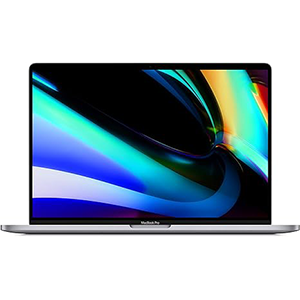
The latest Apple MacBook Pro stands as a powerhouse, poised to leverage the graphics acceleration offered by eGPUs for seamless operation of graphics-intensive programs like video games and editors.
Sporting impressive specifications, including a potent Intel Core i7 processor, 16GB of RAM, and expansive SSD storage, coupled with a stunning 1920 x 3072 FHD display, the MacBook Pro delivers exceptional performance.
Enhanced by the AMD Radeon Pro 5300M graphics card, this laptop boasts the capability to handle a plethora of resource and graphics-heavy applications. However, for those seeking an additional graphics boost, integrating an eGPU can significantly accelerate rendering speeds, doubling or even tripling performance.
With a substantial battery life exceeding 11 hours, the MacBook Pro ensures convenient usage on-the-go. Moreover, its compatibility with eGPUs is further augmented by multiple Thunderbolt 3 ports, facilitating the use of multiple external eGPUs if desired.
Nevertheless, while the MacBook Pro can accommodate multiple eGPUs, such a setup may prove excessive, considering the already robust performance. Moreover, the versatility of Thunderbolt 3 ports allows for various other peripheral connections, optimizing the laptop’s functionality beyond just graphics enhancement.
5. Dell XPS 13 7390
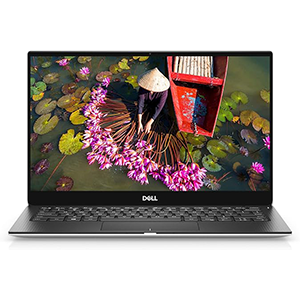
The Dell XPS 13 7390 emerges as a top choice among 13-inch laptops, particularly benefiting from the inclusion of an eGPU to compensate for its sole shortfall: the integrated graphics card. Leveraging the Thunderbolt 3 port, connecting to a capable eGPU device, such as the Razer Core X, drastically enhances its graphical capabilities.
Renowned for its impeccable design, vibrant display, and extensive connectivity options including USB and Thunderbolt 3 ports, the Dell XPS 13 7390 epitomizes Dell’s excellence in laptop engineering.
Despite its compact size, this laptop packs a punch with its 10th gen Intel Core i7 processor, 16 GB of RAM, and exceptional battery life exceeding 12 hours, ensuring seamless performance on-the-go.
Maintaining Dell’s signature sleek and modern aesthetic with its aluminum silver and rose gold construction, the XPS 13 7390 offers a timeless design.
Port-wise, users are spoilt for choice with USB 3.0 ports, an SD card reader, and a Noble lock slot, alongside the indispensable Thunderbolt 3 port, fulfilling diverse connectivity needs.
However, the inclusion of an Intel UHD Graphics card limits its capacity for running graphics-intensive programs. Fortunately, the integration of an eGPU addresses this deficiency, empowering the laptop to handle such tasks effortlessly.
The Dell XPS 13 7390 stands out as one of the premier choices for eGPU utilization, especially when paired with a high-performance eGPU solution like the Razer Core X, ensuring unparalleled graphical performance and versatility.
Essential Considerations When Choosing the Best Laptop for eGPU
Selecting the optimal eGPU-compatible laptop in 2024 requires careful consideration of several key factors
Processor
The processor plays a pivotal role in determining a laptop’s compatibility and performance with an eGPU. A quad-core processor is generally the minimum requirement to effectively utilize today’s eGPUs. However, aiming for higher-tier processors, such as Intel Core i5 or i7, ensures superior overall performance. Laptops like the LG Gram, HP Spectre 360, and Dell XPS 13 exemplify this balance, featuring powerful processors that complement eGPU usage.
Connectivity
Connectivity, particularly Thunderbolt 3 ports, is essential for seamless eGPU integration. The real-time rendering demands of eGPUs necessitate robust connectivity for optimal performance. Laptops lacking Thunderbolt 3 ports are incompatible with eGPU usage, as alternative methods pose significant risks, requiring technical expertise. Therefore, prioritizing laptops with Thunderbolt 3 ports ensures hassle-free eGPU connectivity.
Compatibility
Ensuring compatibility between the laptop and eGPU model is paramount. While most combinations work seamlessly, some laptops and eGPU models may encounter compatibility issues. Thorough research regarding compatibility concerns is crucial before making a purchase. Given the significant investment involved, it’s prudent to verify compatibility online to avoid potential compatibility issues.
Selecting the best eGPU-compatible laptop involves assessing the processor capability, connectivity features, and compatibility with the chosen eGPU model. By prioritizing these factors, users can ensure optimal performance and compatibility, maximizing the benefits of eGPU usage while minimizing potential issues and risks.


Leave a Reply