

Anyone familiar with the evolution of personal computers knows how dramatically things have changed. Gone are the days of bulky desktop towers dominating office desks. Today, compact and powerful laptops are leading the way—especially the new generation of 11-inch laptops that perfectly blend portability with performance.
As we continue to embrace mobile computing, the demand for ultra-slim, lightweight laptops has never been higher. Whether you’re a student, a frequent traveler, or simply someone who values convenience, an 11-inch laptop can be the perfect solution. These compact machines are ideal for everyday tasks, offering just the right balance between functionality and mobility.
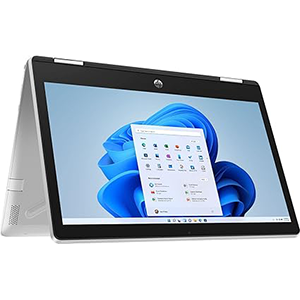
Pavilion X360
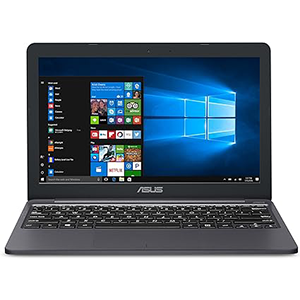
VivoBook L203MA
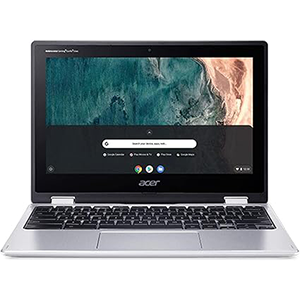
acer spin 311
To help you make the right choice, we’ve carefully selected and reviewed the top 5 best 11-inch laptops you can buy in 2025. Each one stands out for its design, performance, and value. So, if you’re in the market for a small yet capable laptop, read on—your ideal pick may be just a scroll away.
1. HP Pavilion X360
If you’re looking for a versatile secondary laptop with touch support and a flexible design, the HP Pavilion x360 is a solid budget-friendly option. This 2-in-1 notebook features an 11.6-inch HD touchscreen display with 1366 x 768 resolution, IPS technology, and a 360-degree flip-and-fold hinge—perfect for students or casual users on the go.
Powering the Pavilion x360 is the Intel Pentium Silver N5000, a quad-core processor capable of reaching up to 2.7GHz. While it lacks hyper-threading, its four cores and Intel UHD integrated graphics are adequate for basic multitasking, streaming, and web browsing. It includes 4GB of RAM and a 128GB SSD, which offers quicker boot times and overall smoother performance compared to HDD-based laptops.
The laptop runs Windows 10 Home, with the option to switch to S-Mode for better energy efficiency. Connectivity is solid with USB Type-C, USB 3.0 Type-A, HDMI, and Wi-Fi AC. The battery life averages around 7 hours, which is decent for a compact convertible.
Overall, the HP Pavilion x360 stands out for its convertible design, responsive touch display, and affordable price, making it a practical choice for light, everyday tasks.
Pros:
- Quad-core processor
- 360° convertible touchscreen
- Fast SSD storage
- Good port selection
Cons:
- Average battery life
- Display could be brighter
2. ASUS VivoBook L203MA
Technology has drastically transformed computing, moving from bulky machines to sleek, portable notebooks. ASUS, known for its innovation, delivers a compact yet capable solution in the VivoBook L203MA, an 11.6-inch laptop designed for everyday tasks and mobility.
Powered by the Intel Celeron N4000, a dual-core processor with speeds up to 2.6GHz, this laptop handles daily activities like web browsing, document editing, and media playback with ease. Paired with Intel UHD 600 graphics, it supports smooth HD video playback. The system includes 4GB DDR4 RAM and 64GB eMMC storage, ensuring fast boot times and responsive performance for light workloads.
Running Windows 10 in S-Mode, it offers better security and efficiency, though users can switch to the Home edition if needed. The 11.6-inch HD display, paired with a full-sized keyboard and a responsive touchpad, enhances usability. Weighing just 2.1 lbs, the VivoBook is ultra-portable with a clean matte black design that resists smudges.
Connectivity is generous: USB 3.1 Type-C, USB 3.0 Type-A, HDMI, SD card reader, and Wi-Fi 5/Bluetooth support. With up to 10 hours of battery life, the ASUS L203MA offers impressive value and portability for a budget laptop.
Pros:
- Lightweight and compact
- 180° hinge design
- Great battery life
- Budget-friendly
- Includes Microsoft 365
Cons:
- Limited upgradability
- No Ethernet port
3. Acer Chromebook Spin 311
The Acer Spin 311 stands out as an ultra-portable and budget-friendly 11.6-inch convertible laptop, offering impressive battery life and practical performance for casual users. Powered by the Intel Celeron N4020 processor with a burst speed of up to 2.8GHz and Intel UHD 600 graphics, it’s capable of handling light productivity tasks, web browsing, media playback, and basic multitasking.
Equipped with 4GB of RAM and 32GB of flash storage, the Spin 311 delivers fast boot times and smooth operation, though storage is limited. It runs on Chrome OS, making it a great choice for students and anyone using Google’s ecosystem for everyday work. The 11.6-inch IPS touchscreen display is reasonably bright and responsive, suitable for media consumption and schoolwork.
Despite its compact size, the Spin 311 includes a comfortable keyboard, smooth touchpad, front-firing speakers, a webcam, and a microphone. At just 2.62 lbs, it’s ideal for on-the-go use, and connectivity options include USB 2.0, USB 3.0, and Wi-Fi AC.
With a 10-hour battery life and Microsoft 365 compatibility, the Acer Spin 311 offers excellent value for users seeking a portable, no-fuss laptop for basic tasks.
Pros:
- Lightweight and compact
- Excellent battery life
- Convertible touchscreen
- Fast RAM
Cons:
- Limited storage
- Not for demanding applications
4. Dell Inspiron 11 3195
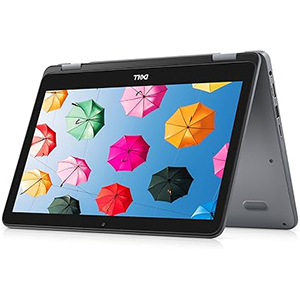
The Dell Inspiron 11 3195 is a compact 2-in-1 laptop designed with portability and battery efficiency in mind—perfect for users who need dependable performance on the go. Weighing just 2.57 lbs, it’s ideal for travel, school, or light office work.
At its core, this notebook is powered by an entry-level AMD A9 processor, with speeds up to 2.5GHz, paired with Radeon R5 integrated graphics. While not built for heavy-duty tasks, it handles everyday computing like web browsing, document editing, and streaming smoothly. Passive cooling ensures quiet operation and energy efficiency.
The system includes 4GB of high-speed DDR4 RAM, allowing for responsive multitasking. Storage is handled by 64GB eMMC, which is upgradeable if more space is needed. The Windows 10 Home OS comes pre-installed, offering a familiar interface and wide software compatibility.
The 11.6-inch LED-backlit display is bright and vibrant, while the keyboard and touchpad offer a comfortable input experience. Ports include USB 3.1 Gen 1, USB 2.0, HDMI 1.4, and an SD card reader. Connectivity is solid with Wi-Fi 5 and Bluetooth 4.0.
With an impressive 14-hour battery life, the Inspiron 11 3195 excels in mobility and day-long productivity.
Pros:
- Fast DDR4 RAM
- LED-backlit display
- Good port selection
- Lightweight and compact
- Excellent battery life
Cons:
- Basic processor
- Limited built-in storage
5. Lenovo IdeaPad 3 11
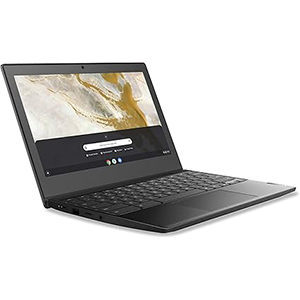
The Lenovo IdeaPad 3 11 Chromebook is a compact and budget-friendly laptop, ideal for students—particularly those in high school. Featuring an 11.6″ HD display, Intel Celeron processor, 4GB RAM, and 64GB of storage, it provides a reliable setup for online classes, web browsing, and basic productivity. The Intel UHD Graphics 600 supports smooth video streaming and simple graphics tasks.
Users appreciate its lightweight and compact design, which easily fits into backpacks, making it highly portable for school or travel. Setup is straightforward, and the system boots up quickly thanks to Chrome OS. It also boasts long battery life, making it convenient for all-day use without frequent recharging.
However, feedback on the build quality and long-term reliability is mixed. While many users find it responsive and easy to use, others report issues such as crashes or performance decline after several months. Some also note occasional glitches during multitasking.
Despite its limitations, the IdeaPad 3 11 offers good value for money, especially for students who need a basic, no-frills device for schoolwork and media consumption. It scores well on battery life, ease of use, and portability, though buyers should be mindful of potential durability concerns.
Pros:
- Affordable
- Portable
- Fast startup
- Long battery
Cons:
- Mixed build quality, not ideal for heavy multitasking
Frequently Asked Questions
Why do 11.6-inch laptops come with lower-powered processors?
Most 11.6-inch laptops feature processors like the Intel Celeron, Pentium N5000, or Core m3, which are designed with low thermal design power (TDP) to suit their compact form factors. These processors generate less heat, require less space, and conserve battery life, making them ideal for lightweight, portable devices.
What screen specs should you look for in an ultraportable notebook?
For an 11.6-inch notebook, an IPS panel is highly recommended, as it offers better color accuracy and viewing angles. While Full HD resolution is ideal, an HD display can still offer a good experience—especially if it includes touch support and anti-glare coating for added usability in various lighting conditions.
Why do most 11.6-inch laptops use passive cooling?
Due to their compact size, 11.6-inch laptops often lack space for active cooling systems like fans or heat sinks. Instead, they rely on passive cooling, which involves throttling the CPU’s performance to maintain safe operating temperatures without additional hardware.
Is eMMC storage reliable for small laptops and Chromebooks?
eMMC storage is a cost-effective flash storage solution, offering data transfer speeds up to 400MB/s. While not as fast or upgradeable as SSDs, eMMC is well-suited for tasks like file storage, media playback, and general browsing—especially in Chromebooks and budget laptops.
Should you choose a Chromebook over a Windows laptop at the same price?
If your work is largely web-based—like using Google Docs, cloud storage, or online platforms—a Chromebook is often the better choice. Chromebooks usually offer better performance and longer battery life at the same price, as they don’t require as much hardware overhead as Windows devices.
Conclusion
Every 11.6-inch laptop on our list brings a unique set of features to the table. Choosing the right one depends on your work needs, preferred OS, and overall expectations from a compact device. Be sure to evaluate your requirements carefully before making a purchase.


Leave a Reply