
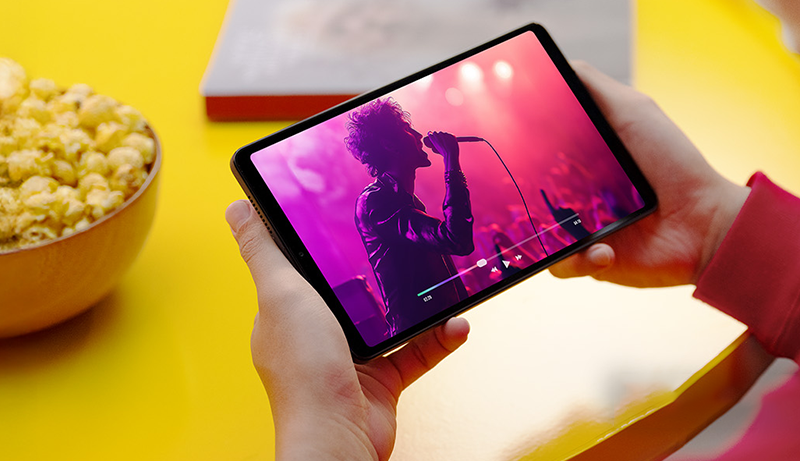
Tablets in the 8.7 to 9-inch range have become an excellent middle ground for those who want a device that combines portability with functionality. They strike a perfect balance—compact enough to be easily carried while still offering a generous screen size for work, study, or entertainment. This category of tablets is particularly appealing to users who find larger tablets too bulky and smaller devices too limiting.
These tablets often come equipped with vibrant HD displays, making them great for streaming, reading, or browsing. Long-lasting batteries are another highlight, ensuring extended use without constant recharging. Many of them are built with lightweight designs, ideal for travel and daily commuting. Additionally, modern 9-inch tablets frequently support multitasking features, allowing users to switch between apps seamlessly.
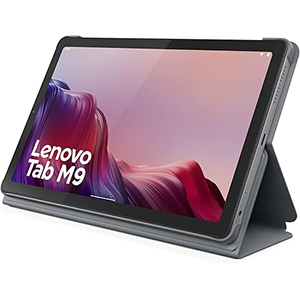
Lenovo Tab M9
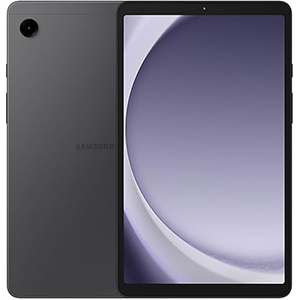
Galaxy Tab A9
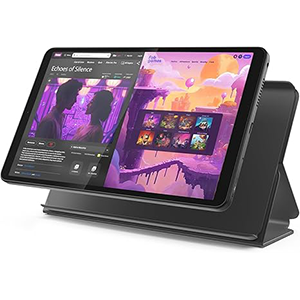
Lenovo Tab One
Camera functionality, expandable storage options, and durable build quality also add value, making these devices versatile for personal and professional use. With advanced connectivity such as Wi-Fi, LTE, or even 5G, users stay connected wherever they go. Whether you’re a student, professional, or casual user, these tablets provide just the right mix of performance and convenience. In this article, we’ll explore some of the top tablets in this size category to help you make an informed decision.
1. Lenovo Tab M9 (2023)
The Lenovo Tab M9-2023 is a sleek and reliable 9-inch tablet designed for everyday use. It features a clear HD display that provides enjoyable visuals for streaming videos, browsing the web, or reading eBooks. The device comes with a front 2MP and rear 8MP camera setup, making it suitable for basic photography and video calls. Its strong point lies in its battery performance, offering extended usage that keeps you going throughout the day without interruption.
One standout feature of this model is the inclusion of a folio case, which not only provides protection but also enhances usability with hands-free viewing angles. Running on Android 12 or later, the tablet ensures access to the latest apps, smooth navigation, and a secure user experience. The system interface is user-friendly and optimized for both casual entertainment and productivity tasks.
Lightweight and portable, the tablet is ideal for travel or everyday mobility. Whether you are catching up on your favorite shows, attending virtual classes, or simply staying connected with friends and family, this device offers a dependable performance. The Lenovo Tab M9-2023 strikes a fine balance between durability, style, and functionality, making it a strong choice within the 9-inch tablet range.
Pros:
- Easy to use
- Good value for money
- Clear screen suitable for streaming and gaming
- Quick charging battery
- Included folio case
Cons:
- Mixed performance; some experience crashes
- Some describe it as very laggy
- Battery life varies
- Very limited storage space
2. Samsung Galaxy Tab A9 LTE
The Samsung Galaxy Tab A9 LTE is an 8.7-inch tablet that delivers excellent usability in a compact form factor. Its HD display offers vivid colors and sharp visuals, making it well-suited for watching movies, gaming, or browsing online. With dual speakers, the audio experience feels immersive, enhancing entertainment across different activities.
This tablet comes with LTE connectivity, providing the flexibility to stay online even when Wi-Fi isn’t available. That makes it a dependable option for those who need mobility and seamless access to the internet on the go. Its slim and lightweight design allows easy carrying, whether you’re traveling, commuting, or using it around the home.
The interface is intuitive, offering smooth multitasking and quick access to a wide range of applications. Its performance ensures stable functionality, making it a great companion for learning, light work, or entertainment. The durable build and elegant design reflect Samsung’s reputation for creating stylish yet practical devices.
Overall, the Galaxy Tab A9 LTE provides a balanced experience that suits both students and professionals. With reliable connectivity, quality visuals, and a portable design, it stands out as one of the top picks in the under-9-inch tablet segment.
Pros:
- Smooth and responsive performance
- Works well in the US
- Good screen quality
- Strong battery life
- Convenient size; can act like a mini-laptop
- Good value
Cons:
- Not compatible with some networks, including Verizon
3. Lenovo Tab One
The Lenovo Tab One is a compact 8.7-inch tablet designed with efficiency and entertainment in mind. Featuring a crisp HD display, it provides a smooth visual experience for streaming videos, playing games, or reading digital content. The display is well-suited for extended use, reducing strain while maintaining clarity and brightness.
One of its highlights is the impressive battery life, offering up to 12.5 hours of YouTube streaming. This makes it ideal for long commutes, travel, or binge-watching sessions without needing frequent recharges. Its slim and lightweight design adds to its appeal, making it easy to carry around in a backpack or handbag.
The tablet’s performance supports everyday multitasking, allowing users to switch between apps, browse the web, and stay connected with ease. Its camera system is suitable for video calls and casual photography, making it a versatile tool for both communication and entertainment.
Running on Android, the interface remains intuitive and user-friendly, with access to a vast library of apps through the Play Store. The Lenovo Tab One is well-suited for students, casual users, and families who need a device that balances affordability, durability, and everyday functionality in a compact package.
Pros:
- Easy to use and set up
- Vibrant display
- Reasonable battery life
- Good value for money
- Works well for many users
Cons:
- Some report slow or faulty performance
- Described as very slow by certain users
- Weight opinions vary: light to heavy
4. Zuleisy E8A Android 15 Tablet

The Zuleisy Android 15 Tablet is an 8.7-inch device that offers a blend of modern design and powerful features. Its HD IPS display with a resolution of 1340×800 ensures sharp and vivid visuals, making it enjoyable for gaming, streaming, or browsing. The wide-angle viewing capability adds an immersive touch for videos and online content.
This tablet comes with dual cameras—5MP on the front and 8MP on the back—allowing clear video calls and decent everyday photography. Connectivity is a key advantage, as it supports 5G Wi-Fi, Bluetooth 5.0, and GPS, making it versatile for online use, wireless pairing, and navigation. A Type-C port and headphone jack add to its practicality, ensuring compatibility with both modern and traditional accessories.
With its sleek build and lightweight body, the device is travel-friendly and convenient for daily use. The expandable storage option further enhances usability, making it suitable for those who like to store large media libraries or offline content.
Running on the latest Android 15 system, the tablet offers a secure and responsive user experience with access to updated features and applications. The Zuleisy Android 15 Tablet is ideal for users seeking a compact device with modern connectivity and flexibility.
Pros:
- Well-built and comfortable to hold
- Bright, crisp display
- Good performance for streaming and games
- No typing lag for some users
- Fast charging and impressive battery life
- Considered good for the price
Cons:
- Some users experience issues with Google Messages
5. BNCF T615 2025

The BNCF Android 15 Tablet is a modern 8.7-inch device that combines style, performance, and innovation. Its HD IPS display with 800×1340 resolution delivers sharp visuals and fluid motion, further enhanced by a 90Hz refresh rate. This ensures smooth scrolling, responsive gaming, and an enjoyable experience while watching videos or browsing content.
The tablet is designed with convenience in mind, offering 350 nits of brightness for clear visibility indoors or outdoors. Widevine L1 certification ensures support for high-quality streaming on popular platforms, a feature that enhances the entertainment value of the device. Equipped with a 5MP camera, it handles video calls with ease, making it suitable for virtual meetings or connecting with loved ones.
Connectivity options are extensive, with support for 4G LTE, dual-band Wi-Fi, and Bluetooth 5.0. This ensures users remain connected in diverse situations, whether at home, work, or on the move. A 5500mAh battery powers the device, delivering ample uptime for day-to-day usage without frequent recharging.
Running the latest Android 15, the interface is smooth, secure, and future-ready. Compact, lightweight, and practical, the BNCF Android 15 Tablet is a great option for those who want a portable device with modern features and dependable everyday performance.
Pros:
- Good value for money
- Solid build quality
- Great battery life
- Clear and sharp display for many users
Cons:
- Mixed picture quality feedback
- Some performance and speed issues
- Wireless connectivity problems reported
- A few users say it fails to boot
How to Choose from the Best 9 Inch Tablets
Selecting the right 9-inch tablet requires balancing performance, portability, and functionality to suit your lifestyle. The first factor to consider is display quality. A high-definition screen ensures sharp visuals for reading, streaming, and browsing. Look for tablets with good brightness levels and wide viewing angles, as this enhances usability in different environments. Some devices also offer higher refresh rates, which are excellent for smooth scrolling and gaming.
Battery life is another essential aspect. A reliable tablet should last through your daily routine, whether it’s for studying, traveling, or entertainment. Always check the manufacturer’s estimated battery performance to avoid frequent recharging.
Connectivity options play a vital role in how versatile a tablet is. Models with Wi-Fi, LTE, or even 5G allow users to stay online in different situations. Additional features such as Bluetooth compatibility, GPS, or a headphone jack can also add convenience.
For those who multitask, software and interface should be taken into account. Devices running the latest versions of Android provide smoother experiences, access to new features, and enhanced security.
Finally, consider portability and design. A lightweight tablet with a slim profile is easier to carry and handle during long sessions. Durable builds, protective accessories, and included cases add extra value.
By carefully evaluating these factors—display, battery, connectivity, software, and portability—you can find a 9-inch tablet that perfectly matches your needs, whether for work, study, or leisure.
Why 9-inch Tablets Hit the Sweet Spot
A tablet in the 8.7–9 inch (roughly “medium”) size finds a very comfortable middle ground between smartphones and larger 10–12-inch tablets/laptops. On one side you get a screen significantly larger than a phone’s (for reading, watching, browsing), yet the device remains fairly portable, light, and easy to carry — unlike bulky tablets that demand a big bag or dedicated space.
This balance — between screen-real estate and portability — means 9-inch tablets are particularly appealing for those who want a versatile device that can travel easily and still deliver a comfortable viewing or light-work experience.
Best-Fit Users for a 9-Inch Tablet
Students and Learners
If you’re a student or someone handling e-books, PDFs, lecture slides, notes, or reading materials, a 9-inch tablet offers a “just right” size: large enough to display documents clearly yet small enough to carry between classes, libraries, or cafes. Tablets support features like adjustable brightness, text size, annotation, and note-taking — far more comfortable than a smartphone for long reading or study sessions.
Moreover, because many of these tablets remain lightweight, they’re easy to hold for extended periods without wrist/hand strain — useful if you read or take notes while commuting or lying in bed.
Frequent Travelers and Commuters
For people who travel often — on public transport, flights, or even daily commutes — a 9-inch tablet can be a convenient “travel companion.” It fits comfortably in a bag or backpack, is light enough to handle one-handed, and offers enough screen space for entertainment (videos, ebooks), navigation, chatting, or light work on the go.
Because of its portability, it can be used comfortably in tight spaces: on airplanes, trains, buses, or cafés — something a bulky laptop often fails at.
Casual Users, Entertainment Seekers, and Everyday Browsers
If your primary tablet use revolves around streaming shows, watching videos, browsing the web, reading news, social media, or light gaming, 9-inch tablets offer a compelling mix of portability and screen comfort. The screen is large enough for a decent immersive media experience, while the device remains discrete and easy to handle.
Also, for reading e-books, comics or digital magazines, or casually watching content lying on the couch or bed — a 9-inch device tends to feel much more comfortable than a larger tablet or a cramped smartphone screen.
Older Users or People Preferring Light, Manageable Devices
For seniors or users who value ease of holding and comfortable viewing without overwhelming size or weight, a 9-inch (or 8–10 inch) tablet may hit the right balance. The screen is large enough to comfortably display text and icons, but the overall device remains light enough to hold or carry easily — avoiding the bulkiness and heaviness of larger tablets.
Those Who Want a Secondary Device (Hybrid between Phone and Laptop)
For folks who want something more capable than a smartphone — but don’t need the full power or size of a laptop — a 9-inch tablet can be a useful “in-between” device. It’s great for lightweight productivity: reading documents, note-taking, browsing, video calls, and casual multitasking.
It can also act as a companion device: good for quick tasks, media consumption, or reading, while reserving a laptop for heavy work.

When a 9-Inch Tablet May Not Be Ideal
That said, 9-inch tablets have limitations. If your primary need is heavy productivity — such as extensive document editing, complex spreadsheets, professional creative work (graphic design, video editing), or side-by-side multitasking — the screen may feel a bit cramped compared to larger tablets or laptops.
If you often watch media together with others, or prefer a large display (e.g., for group video calls, collaborative work, drawing/graphic work, or editing), you might miss the extra screen real estate.
Also, if you require a very powerful device — akin to a laptop — you might find the hardware limitations (compared to full PCs or large tablets) restrict what you can do comfortably.
Summary: Ideal Candidate Profiles
In short — you should get a 9-inch tablet if you fit one of these profiles:
- You’re a student needing portability, reading access, note-taking or PDF handling on the go.
- You travel or commute often and want a portable device for entertainment, reading, browsing, or light work.
- You mostly consume media — videos, ebooks, social apps — and value comfort and convenience over power.
- You prefer a light, manageable device — maybe you’re older or want something easy to hold for long sessions.
- You want a handy “middle” device: more capable than a phone, but more portable than a laptop.
If you mostly do heavy productivity, professional creative work, or multitasking with many windows/apps — you might be better served with a larger tablet or a laptop.
Tips to Maximize Value
When choosing a 9-inch or larger tablet, the goal is to get the most out of your investment, not just in terms of hardware power but also long-term usefulness. One practical way to maximize value is to focus on a balanced combination of performance, display quality, and battery efficiency. These factors tend to determine how well a tablet handles everyday tasks such as browsing, streaming, productivity work, or light gaming. While specifications vary across brands, it’s generally helpful to select a model that offers enough processing strength to stay responsive over time, rather than choosing based solely on price.
Another way to increase value is by optimizing the features you already have. Many tablets include built-in tools—multitasking modes, reading comfort settings, digital pen support, and cloud integration—that users often overlook. Making use of these can significantly expand what the device can do without requiring extra purchases. Accessory choices also matter. A protective case, screen cover, or keyboard attachment can extend durability and improve usability. These aren’t essential for every user, but they tend to enhance long-term satisfaction.
App management also impacts value. Overloading the device with unnecessary apps can slow performance, while organizing storage and keeping software updated typically improves stability. For users who rely on streaming or cloud gaming, ensuring a stable internet connection often delivers more noticeable improvements than hardware changes.
Lastly, consider how the tablet fits into your broader digital ecosystem. Syncing across devices—when supported—helps maintain a smooth workflow and prevents unnecessary duplication of tasks. Although the best setup varies from person to person, approaching the tablet as part of a larger system rather than a standalone gadget often leads to better long-term value.
Future Trends
Looking ahead, tablets with 9-inch screens or larger are expected to evolve in areas that reflect general industry movement rather than specific predictions. One likely trend is the continued shift toward thinner, lighter designs without compromising structural strength. Manufacturers have already been pushing in this direction, and it is reasonable to expect further progress as materials and engineering techniques improve.
Display technology is also moving toward higher brightness, improved color accuracy, and more advanced refresh-rate optimization. While exact specifications vary by brand, the overall direction suggests that larger tablets may gradually adopt features once limited to premium devices, including more refined HDR performance and better outdoor visibility.
Performance improvements are another expected trend. Chipmakers have been releasing more efficient processors each generation, focusing on low power consumption with higher computational ability. Although the exact pace of progress can vary, it is generally consistent that newer tablets provide smoother multitasking, enhanced graphics capabilities, and longer battery life compared to older models.
Another area of development is software experience. Tablets are increasingly being positioned as productivity tools rather than just entertainment devices. This means more emphasis on multitasking layouts, stylus support, and desktop-like interfaces. Cloud-based applications are also expanding, which may reduce the need for heavy on-device storage in the future.
Connectivity trends may influence how these tablets are used. Wider availability of faster wireless standards typically improves streaming, video calls, and cloud gaming. Accessories may also evolve, with detachable keyboards, digital pens, and modular add-ons becoming more refined.
While specific details depend on manufacturers and future releases, the overall trend suggests that larger tablets will continue to merge portability with capability, gradually narrowing the gap between lightweight mobile devices and full desktop computing environments.
Frequently Asked Question (FAQ)
1. Are 9-inch tablets good for reading and studying?
Yes, the screen size offers a balance between portability and comfort, making it ideal for eBooks, PDFs, and note-taking apps.
2. Do 9-inch tablets support multitasking?
Most modern tablets in this size range support split-screen or multi-window functions, allowing smooth multitasking.
3. Can I use a 9-inch tablet for video calls?
Yes, many come with front-facing cameras designed for clear video calling experiences.
4. Are these tablets suitable for children?
They are lightweight and compact, making them a good choice for kids, especially for educational apps and entertainment.
5. Do 9-inch tablets support offline media storage?
Yes, many offer expandable storage options, allowing you to save movies, music, or documents for offline use.
Conclusion
The best 8.7 to 9-inch tablets provide an excellent balance of performance, portability, and convenience. Their compact size makes them easy to carry, while still offering immersive displays for entertainment, learning, and productivity. With features like long battery life, reliable connectivity, and modern software, they adapt well to various user needs.
Whether you’re a student, traveler, or professional, these tablets deliver versatility in a sleek form. By considering display quality, battery performance, connectivity, and design, you can confidently choose a tablet that fits seamlessly into your daily lifestyle.


Leave a Reply