

Boosting your laptop’s performance, whether for gaming or improving render speeds in Premiere Pro, can be significantly enhanced by investing in the best external GPU enclosures. These enclosures house a desktop graphics card and provide it with the necessary power, allowing you to leverage the full graphics capabilities of powerful desktop GPUs even when using a sleek and lightweight laptop.
While Thunderbolt 3 and Thunderbolt 4 ports are commonly found on the latest laptops, eGPU docks are becoming increasingly scarce. The eGPU industry is dwindling, with major manufacturers having not released new models in years. Additionally, older models are often out of stock, leaving few options available.
Top pick
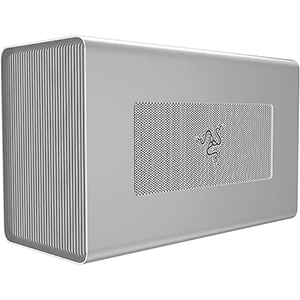
Razer Core X
Editor’s choice
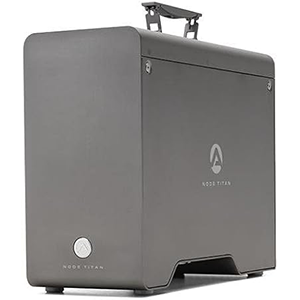
Akitio Node Titan
Best value
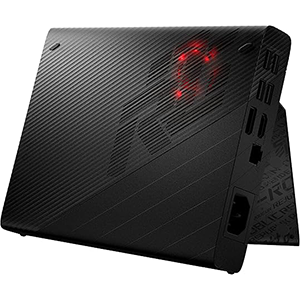
ASUS ROG XG
Despite these challenges, we’ve curated a list of the best eGPU enclosures currently available, so you can give your laptop the extra horsepower it needs for gaming or professional tasks.
1. Razer Core X
The Razer Core X is a solid choice for those who need a powerful PSU and the capacity to fit a 3-slot GPU. Positioned just below the flagship Core X Chroma eGPU enclosure, the Core X boasts a design that resembles a compact Mini-ITX case, which we find highly appealing. Its sleek and minimalist look ensures it pairs well with any laptop, NUC, or other PC unable to house a desktop GPU.
In terms of specifications, the Core X features a 650W internal PSU capable of powering any GPU on the market, although the two PCIe 8-pin power connectors do place some limitations on compatible graphics cards. Fortunately, the Core X can accommodate up to three-slot GPUs measuring up to 330mm in length, allowing for most modern GPUs as long as they can be powered by the included PSU. If needed, the PSU can be replaced to support high-end cards with greater power demands and GPUs with a 12VHPWR connector. While the Razer Core X does not offer additional connectivity, its Thunderbolt 3 port can deliver up to 100W of power to your laptop.
Installing a GPU in the Razer Core X is simple, thanks to its rear sliding mechanism. Just pull out the folding handle, slide out the PCIe slot and cables, install and connect the graphics card to the PSU, and slide the assembly back into the enclosure. This sliding design also allows the use of GPUs longer than 330mm, although the assembly won’t fully slide into the enclosure in such cases.
Pros:
- Attractive design
- Straightforward GPU installation procedure
- 650W PSU
- Supports triple-slot GPUs
Cons:
- Expensive
2. Akitio Node Titan
If you’re searching for a budget-friendly eGPU enclosure, the Akitio Node Titan is an excellent option. While it may not have the simplest GPU installation process, it excels in other areas.
The Akitio Node Titan stands out among budget eGPU enclosures due to its practical design, which includes a handle for easy portability, a 650W power supply with two 8-pin PCIe power connectors, and Thunderbolt 3 power with 85W power delivery.
However, the Akitio Node Titan only supports GPUs up to two-and-a-half slots, which can be limiting as many high-end graphics cards now require up to four slots. The maximum supported length of 320mm is sufficient for most graphics cards, though it may not accommodate flagship models like the NVIDIA RTX 4090 or AMD Radeon RX 7900 XTX.
Overall, the Akitio Node Titan is ideal for mid-range and low-end GPUs. While it can fit older high-end GPUs, you might face clearance issues due to the 2.5-slot GPU compatibility.
Pros:
- Handy handle for portability
- 650W PSU
- Competitive price
Cons:
- Potential clearance issues with high-end GPUs
3. ASUS ROG XG
The Asus ROG XG Mobile may not be compatible with all laptops due to its proprietary connector, but its impressive performance and compact form factor earn it a spot on this list.
Although it’s generally not advisable to purchase an eGPU enclosure with a proprietary connector, the Asus ROG XG Mobile is an exception. Unlike other enclosures, it does not use Thunderbolt for connectivity and does not include a desktop-grade graphics card. Instead, it is specifically designed for use with certain Asus laptops and performs exceptionally well in that context.
The Asus ROG XG Mobile is intended for use with Asus’s Flow X13, Flow Z13, and Flow X16 laptops. Its compact size is due to the use of mobile GPUs. Available options include the RX 6800M, RX 6850M XT, or RTX 3080 mobile GPU, with an RTX 4090 version planned for the future. The unit connects to the laptop via a proprietary connector, which means it can only be used with Flow-branded laptops that support the XG Mobile.
The proprietary connector offers several advantages. The XG Mobile unit includes numerous ports at the back, such as four USB Type-A ports, an SD card reader, a gigabit Ethernet jack, an HDMI 2.0a output, and a DisplayPort 1.4 jack. This allows the XG Mobile to function as a hub for connecting your laptop to external displays and other peripherals. With 280W of power, the XG Mobile can also charge a Flow laptop and doesn’t require its own power brick, simplifying cable management.
While the XG Mobile may not match the performance of eGPU units with full-sized desktop GPUs, it is more than capable of pushing a Flow laptop to its limits. However, its high price and relatively lower performance compared to other eGPU options make it a poor value. This seems to be the trade-off for an eGPU designed to work seamlessly with specific laptops.
Pros:
- Custom, compact design
- Plenty of I/O ports
- Features modern GPUs
Cons:
- Extremely expensive
- Only compatible with certain Asus laptops
4. SoNNeT Breakaway Box 750ex
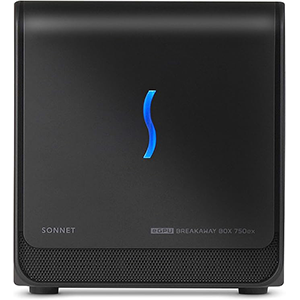
The Sonnet eGPU Breakaway Box 750ex is a top choice for laptop owners seeking an eGPU enclosure with ample extra connectivity options. It features a robust PSU, support for dual-slot GPUs, and four high-speed USB ports alongside a Gigabit Ethernet port.
If your laptop has limited USB ports that are always in use, the Sonnet eGPU Breakaway Box 750ex is an excellent solution. This enclosure comes with four USB-A 5Gbps ports, a Gigabit Ethernet port, a 750W PSU with two 8-pin PCIe power connectors, and a Thunderbolt 3 port with 85W PD.
However, it’s important to note potential issues with GPU clearance. The Sonnet eGPU enclosure supports dual-slot cards up to 312mm in length, which means it cannot accommodate flagship GPUs that are often longer and wider than this limit.
Despite this limitation, if your GPU fits within these dimensions, the Sonnet eGPU Breakaway Box 750ex is an excellent choice due to its competitive price, sleek design, additional connectivity options, and powerful PSU.
Additionally, keep in mind that M1 and M2 MacBooks do not support external graphics cards. If you’re planning to use this eGPU enclosure with a MacBook, ensure it’s an Intel-based model.
Pros:
- Ample high-speed USB ports
- Gigabit Ethernet port
- 750W PSU
- Attractive price
Cons:
- Cannot fit most high-end and flagship graphics cards
5. GIGABYTE AORUS RTX 4090
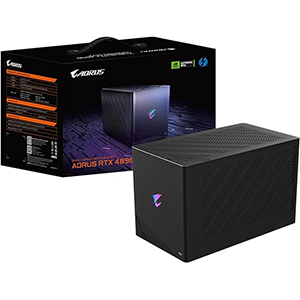
Our final pick is not an empty eGPU enclosure that requires you to install a dedicated graphics card. Gigabyte’s Gaming Box series of eGPUs offer a complete solution, providing an integrated GPU within the enclosure. All you need to do is connect it to your computer.
The flagship model from the Gaming Box lineup is the Gigabyte AORUS RTX 4090 Gaming Box, which features the most powerful consumer-grade graphics card available, the RTX 4090. This powerhouse includes a liquid-cooled, desktop-grade RTX 4090 that ensures flawless performance in any game, provided your CPU can keep up.
The back of the unit includes a Thunderbolt 3 port, two USB-A 10Gbps ports, and a Gigabit Ethernet port. The GPU itself offers three DisplayPort 1.4 and a single HDMI 2.1 video output. Additionally, there is a USB-C 10Gbps port on the front for added convenience.
The main drawback is the astronomical price. The Gigabyte AORUS RTX 4090 Gaming Box is also quite large, bigger than many small form factor (SFF) cases. Moreover, replacing the pre-installed GPU is challenging due to the custom liquid cooling system, which is likely incompatible with standard graphics card designs.
Despite these drawbacks, the Gigabyte AORUS RTX 4090 Gaming Box delivers unparalleled performance, making it the ultimate choice in the eGPU market.
Pros:
- Includes the fastest GPU available
- Three 10Gbps USB ports
- 10Gbps USB-C port on the front
- Superb cooling solution
- Gigabit Ethernet port
Cons:
- Very expensive
- Most likely stuck with the pre-installed GPU
- Bulky
What to Look for in an External GPU Enclosure
If you own a laptop, NUC, or any other PC that lacks a dedicated graphics card or a PCIe port, an external GPU enclosure allows you to connect a desktop-class GPU to your system. Simply install a GPU into the enclosure and connect it to your PC via a Thunderbolt port.
External GPU enclosures are relatively straightforward devices, consisting of a few key components. The primary element is the enclosure itself, essentially an empty box that houses a power supply unit (PSU) and several other parts.
In addition to the enclosure and PSU, you’ll find a PCIe slot for installing the GPU, power cables for the GPU, and a Thunderbolt 3 port for connecting the enclosure to your laptop or slotless PC. Many eGPU enclosures also offer extra connectivity options, such as USB ports, and sometimes include cooling systems with one or more case fans.
When selecting an eGPU enclosure, the most crucial factor to consider is graphics card clearance. Ensure that the enclosure supports the GPU you plan to use by checking the list of supported graphics cards or the maximum GPU dimensions on the store listing or manufacturer’s website. Given that some of the best graphics cards are nearly as large as certain small form factor (SFF) enclosures, it’s vital to confirm that the eGPU enclosure can accommodate your chosen GPU before making a purchase.
Once you’ve verified that the enclosure can house your graphics card, check the PSU to ensure it provides sufficient power for the GPU. Focus not only on the PSU wattage but also on the number of PCIe power connectors available. For example, high-end graphics cards may require three 8-pin PCIe power connectors. If the enclosure’s PSU offers enough wattage but only includes two connectors, you won’t be able to power the GPU properly.
By considering these factors, you can find the right eGPU enclosure to enhance your PC’s graphics capabilities efficiently and effectively.


Leave a Reply