
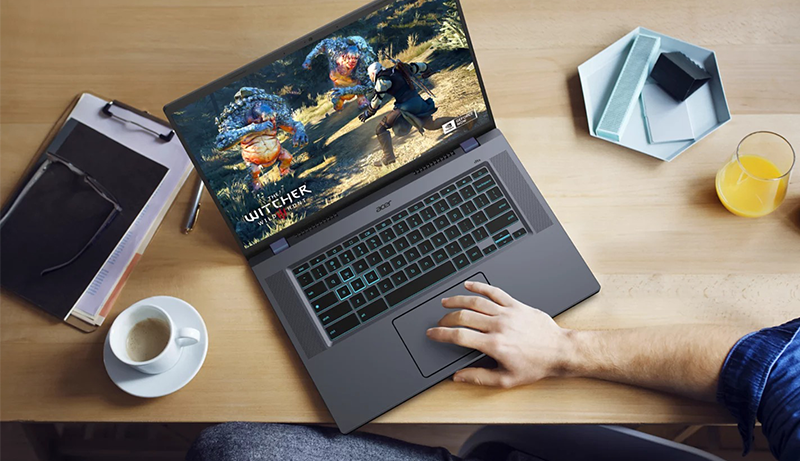
The Chromebook has evolved into the ultimate all-in-one device, offering exceptional value. While you might not immediately think of it as a gaming machine, Chromebooks from brands like Acer, Asus, and Lenovo are changing that perception. These versatile devices are capable of running top-tier Android games and even Triple-A titles with ease.
Thanks to services like Xbox Cloud Gaming and Nvidia GeForce Now, you can enjoy the latest and greatest games without relying heavily on the Chromebook’s internal power. The newest generation of Chromebooks designed for gaming are equipped with features like 120Hz displays and RGB-lit keyboards, making them a solid choice for gamers of all kinds.
Whether you’re seeking a top-performing Chromebook that also handles gaming or a Chromebook specifically optimized for gaming, this guide will help you find the perfect match. It highlights some of the best Chromebooks for gaming on the go, ensuring smooth gameplay whether you’re streaming or playing on-device.
Top pick
Chromebook 516 GE
Editor’s choice
Vibe CX55 Flip
Best value
IdeaPad Flex 5i
When it comes to gaming Chromebooks, the models featured in this section are among the best you can find.
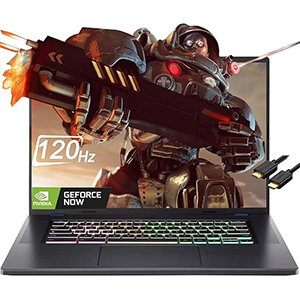
1. Acer Chromebook 516 GE
Acer’s Chromebook 516 GE is a gaming powerhouse designed from the ground up. It features a 120Hz display, modern Intel Core performance, an RGB keyboard, and support for cloud gaming services and Steam.
The Chromebook 516 GE is one of the first of its kind, engineered specifically for cloud streaming and local gaming. Its high-end build quality, stunning display, and fast processor also make it a top choice among Acer Chromebooks. The most common configuration includes a 12th-gen Intel Core i5-1240P CPU with integrated Intel Iris Xe graphics.
The laptop boasts four speakers with DTS Audio and a smart amp for enhanced sound quality; two speakers are upward-facing from the keyboard, and the other two are downward-facing from the base. The keyboard features customizable RGB lighting and anti-ghosting properties, perfect for intense gameplay. The large 16-inch display with a 120Hz refresh rate ensures smooth visuals, and the 2560×1600 resolution with 100% sRGB color accuracy provides an excellent viewing experience.
For game streaming, the Chromebook is equipped with a 2.5Gbps Ethernet port for fast wired connections and Wi-Fi 6E for stable wireless performance. It’s also one of the models supported by the Steam for Chrome OS beta. If you’re seeking a versatile Chromebook that excels in both cloud and local gaming, the 516 GE is a great choice.
Pros:
- 16-inch display with QHD+ resolution, 120Hz refresh rate
- 12th Gen Intel Core P-series CPUs
- RGB keyboard
Cons:
- No Thunderbolt 4 ports
- No touch display
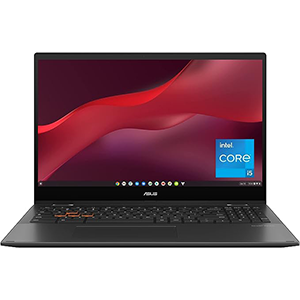
2. ASUS Chromebook Vibe CX55 Flip
Prefer a convertible design for gaming? The Asus Chromebook Vibe CX55 Flip offers just that, featuring 11th Gen Intel Core CPUs, an FHD touch display, and a sleek overall design.
The Asus Chromebook Vibe CX55 Flip is a stunning convertible laptop perfect for cloud gaming, and it’s also on the Steam beta compatibility list. Although its 11th-gen Intel Core CPUs aren’t as fast as the latest 12th-gen chips, they still provide a solid local gaming experience. For the best performance, opt for a Core i5 or Core i7 chip with Intel Iris Xe integrated graphics, especially if you plan to enjoy local Steam titles. The CPUs are paired with up to 16GB of LPDDR4x RAM and up to 512GB of storage.
The laptop features 360° convertible hinges and a 15.6-inch touch display with a 1920×1080 resolution. It has a 16:9 aspect ratio, up to 250 nits brightness, and slim bezels for a modern look. The highlight is its 144Hz refresh rate, ensuring a smooth gaming experience. The keyboard is comfortable for both typing and gaming, with minimal 1.4mm travel and anti-ghosting properties for accurate input. While it lacks customizable RGB lighting, it does have a backlight and highlighted WASD keys.
Although it doesn’t have a native Ethernet port, you can rely on Wi-Fi 6 or add an Ethernet adapter via USB-C. This sleek and versatile laptop offers various performance levels, making it one of the best Asus Chromebooks for gaming and other tasks.
Pros:
- Convertible design
- 11th Gen Intel Core CPUs
- FHD touch display
- 144Hz refresh rate
- Up to 16GB RAM
- Wi-Fi 6
Cons:
- No customizable RGB
- No Thunderbolt 4
- Screen brightness could be higher
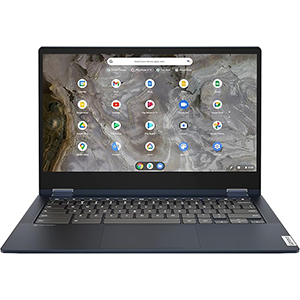
3. Lenovo IdeaPad Flex 5i
Lenovo’s 13-inch Chromebook Flex 5i is a popular choice due to its affordable price and well-rounded features. While its performance hardware may not be ideal for local Steam titles, it is more than capable of handling cloud gaming at a budget-friendly price.
In our review of the 13-inch Lenovo Flex 5i Chromebook, we noted that “it even doubles up as a decent way to consume content and play mobile games.” This still holds true, and the device remains as affordable as ever, generally available for budget friendly. Its 11th-gen Intel Core i3-1115G4 CPU and 8GB of RAM are sufficient for local Steam gaming, but the best experience will come from cloud gaming.
The 13.3-inch display features a crisp 1080p resolution and is touch-enabled, complementing the convertible design. It has top-firing speakers for clear sound, Wi-Fi 6 for reliable streaming, and USB-C ports that can be used for a wired internet connection with the right adapter. While it may not offer the fastest performance or the highest display quality, it remains an excellent option for those needing a reliable Chromebook for work and play without breaking the bank.
Unless you are looking to future-proof your device and have a larger budget, the 13-inch Flex 5i from 2021 remains a solid choice.
Pros:
- Top-firing speakers and comfortable keyboard
- 1080p touch display
- Good battery life
Cons:
- Best suited for cloud gaming
- Becoming harder to find as it ages
- Some models have slow eMMC storage
4. Acer Chromebook Vero 514

The Acer Chromebook Vero 514 is a standout in the Chromebook market, offering a blend of performance and sustainability. Powered by the Intel Core i5 12th Gen processor, this device ensures smooth multitasking and rapid program loading. The 14-inch Full HD touchscreen provides vibrant visuals, making it ideal for both work and entertainment.
One of the key highlights is its eco-friendly design. The Vero 514 is part of Acer’s Vero line, which focuses on sustainability. It features a chassis made from recycled materials, reducing its environmental footprint. Additionally, the Chromebook’s energy-efficient components contribute to longer battery life, allowing up to 10 hours of use on a single charge1.
With 8 GB of RAM and a 256 GB SSD, the Vero 514 offers ample storage and quick access to files and applications. The inclusion of Iris Xe Graphics enhances the visual experience, whether you’re streaming videos or working on graphic-intensive tasks1.
Overall, the Acer Chromebook Vero 514 is a compelling choice for eco-conscious users seeking a powerful and reliable Chromebook1. Its combination of performance, sustainability, and design makes it a noteworthy option in today’s market.
Pros:
- Eco-friendly design
- Intel Core i5 12th Gen processor
- 14-inch Full HD touchscreen
- 8 GB RAM, 256 GB SSD
- Iris Xe Graphics
Cons:
- Limited to Chrome OS
- Higher price point than basic Chromebooks
- Heavier than some alternatives
5. Acer Chromebook Spin 13

The Acer Spin 13 is a robust and powerful gaming Chromebook, featuring a high-quality screen that stands out with its vivid colors and excellent visibility in various lighting conditions. It’s well-made with a tough shell, ensuring durability.
Internally, the Spin 13 offers solid specs, including 128GB of internal storage and various ports. The 10-hour battery life allows for gaming on the go without the worry of running out of power. Additionally, the stylish, modern design adds to its appeal.
However, the speakers are a notable downside. While the audio is serviceable, it lacks the crispness and power found in other designs, making headphones a recommended accessory.
Pros:
- High-quality screen with vivid colors
- Durable, tough shell
- 128GB of internal storage
- Various ports
- 10-hour battery life for gaming on the go
- Stylish and modern design
Cons:
- Audio quality is not as crisp or powerful as other designs; headphones recommended
Conclusion
If you’re looking for a Chromebook that’s both portable and suitable for gaming, any of the options mentioned above are excellent choices.
While they may not have the power of a full-sized, expensive PC, they should be more than capable of handling the games you want to play.
Do you know of any other great Chromebooks for gaming? If so, please let us know in the comments below.



Leave a Reply