
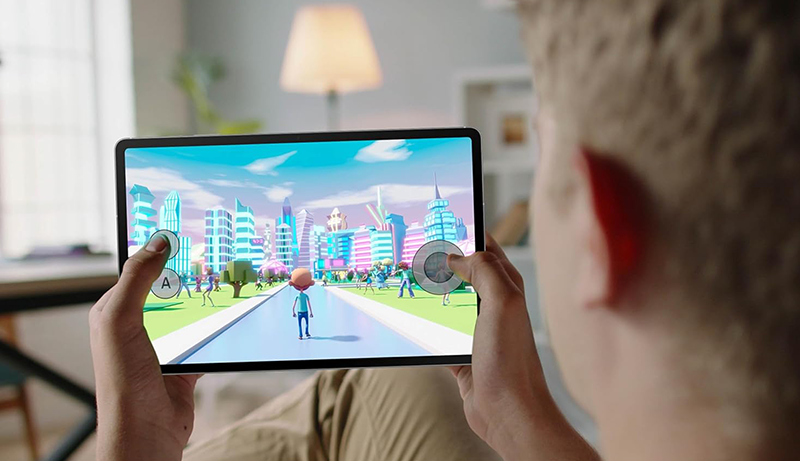
Finding the best tablet under $500 has become easier—and more exciting—than ever. This price range now includes devices powerful enough for work, school, entertainment, creative projects, and even light gaming. Whether you need a tablet for productivity, streaming movies, taking notes, reading, drawing, or staying connected on the go, today’s mid-range tablets deliver premium experiences without the premium cost.
What makes this category impressive is how much versatility you get. Many tablets now feature vibrant high-brightness displays that elevate movie watching and digital art. Performance has also taken a major leap, with processors capable of smooth multitasking, fast app launches, and stable gameplay. Long battery life is another essential benefit—perfect for students, travelers, and anyone who prefers to stay unplugged for hours.
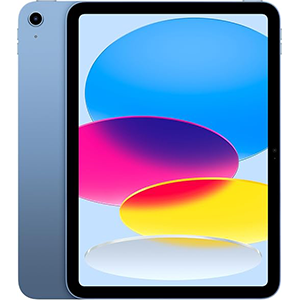
Apple iPad (A16 Chip)
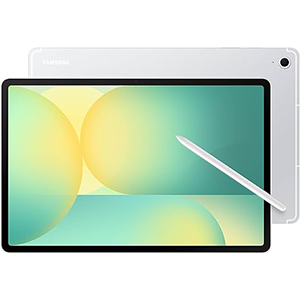
Galaxy Tab S10 FE
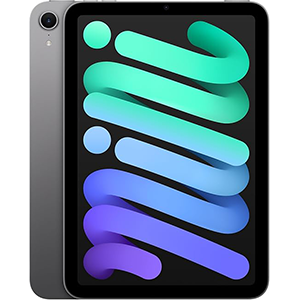
iPad mini (A17 Pro)
You’ll also find improved camera systems, impressive AI-powered tools, intuitive operating systems, and accessories such as styluses and keyboard folios that help transform a tablet into a mini laptop. Whether you’re a professional looking for a portable workstation or a casual user who just wants a smooth, reliable device, the under-$500 segment offers multiple options that balance performance, portability, and functionality.
Now, let’s dive into detailed reviews of the top picks.
1. Apple iPad (A16 chip)
The Apple iPad 11-inch stands out as a sleek, powerful, and well-balanced tablet designed for productivity, entertainment, and creativity. It delivers a premium experience through its sharp and color-accurate Liquid Retina display, which makes gaming, streaming, browsing, and note-taking feel exceptionally smooth and enjoyable. The responsive interface and fast processor ensure effortless multitasking, whether you’re editing photos, switching between work apps, or sketching with a stylus.
The device offers a lightweight build that feels comfortable for long sessions of reading, watching content, or drawing. The front and back cameras enhance video calling and scanning clarity, while Touch ID adds quick and secure access. The operating system provides strong optimization, intuitive multitasking tools, and access to a vast ecosystem of apps optimized specifically for tablet use.
Its battery endurance makes it dependable for the entire day, and the USB-C port makes charging and connecting accessories extremely convenient. Whether for students, designers, office users, or casual everyday use, this model balances performance and portability effectively, making it a strong contender in the mid-range tablet category.
Pros
- Sharp, vibrant display suitable for media, design, and browsing
- Fast, responsive performance for multitasking and creative work
- Excellent camera setup for video calls and scanning
- Lightweight and comfortable to hold for long periods
- Touch ID integration for secure and quick access
- Wide app ecosystem optimized for tablet use
Cons
- Accessories sold separately
- Limited customization options compared to other platforms
- No flash on the front camera
2. Samsung Galaxy Tab S10 FE
The Samsung Galaxy Tab S10 FE is a feature-rich Android tablet built for versatility, creativity, and entertainment. Its large display with a smooth 90 Hz refresh rate makes everything—from streaming to note-taking—feel fluid and immersive. Paired with the included S Pen, this tablet shines for handwritten notes, sketching, marking documents, and productivity tasks.
One of its standout strengths is its combination of durability and portability. With an IP68 water-resistant rating, it’s designed to withstand splashes, spills, and accidental outdoor exposure, making it reliable for students, travelers, and professionals. The interface supports smart features such as Circle to Search, Math Solver, and handwriting optimization tools, enhancing the overall user experience.
Performance remains stable and responsive during everyday tasks, multitasking, and light gaming, while the dual speakers help enrich entertainment. However, battery life can vary depending on usage intensity. Some users may find it lasts long enough, while others may notice quicker power drain during heavy streaming or gaming.
The device’s software ecosystem adds productivity tools, AI-enhanced features, and strong integration with Google services. Combined with its large display, stylus support, and durable build, it’s an excellent pick for learning, drawing, browsing, and entertainment.
Pros
- Large and smooth display with 90 Hz refresh rate
- Water-resistant build for everyday durability
- S Pen included for writing and drawing
- Useful smart features like Circle to Search and Math Solver
- Good performance for daily tasks and multitasking
- Dual speakers enhance entertainment quality
Cons
- Battery life may feel inconsistent
- Slightly heavier compared to smaller tablets
- Charging speed could be faster
3. Apple iPad mini (A17 Pro)
The Apple iPad mini with the A17 Pro chip is an ultra-portable powerhouse designed for those who want full performance in a small, lightweight form. Its compact size makes it perfect for travel, commuting, or handheld use, yet it doesn’t compromise on capability. The bright and sharp 8.3-inch Liquid Retina display brings movies, games, and creative apps to life with stunning clarity and color accuracy.
The A17 Pro chipset delivers exceptional speed and responsiveness, capable of handling creative software, productivity apps, and even high-performance games smoothly. Combined with all-day battery life, the tablet becomes a reliable companion whether you’re sketching on the go, working remotely, reading, or attending video calls with its high-quality cameras.
Its operating system enhances multitasking, supports advanced stylus features, and provides a vast selection of optimized apps. The device also integrates Apple Intelligence features, offering smart writing help, organization tools, and enhanced privacy. Its USB-C connectivity ensures fast data transfer and compatibility with modern accessories.
Despite its smaller frame, the iPad mini provides robust performance and excellent usability for professionals, students, creators, and casual users looking for power in a compact design.
Pros
- Extremely portable and lightweight
- Bright and color-rich 8.3-inch display
- Powerful performance suitable for gaming and creative tasks
- Great battery life for all-day mobility
- Excellent camera system for video calls
- Strong stylus support for digital writing and drawing
Cons
- Smaller display may not suit multitasking-heavy users
- Accessories cost extra
- Not ideal for laptop-style productivity
4. Google Pixel Tablet
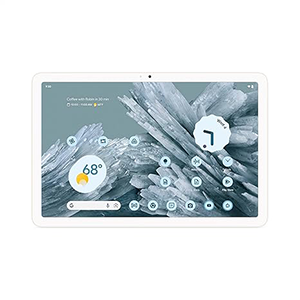
The Google Pixel Tablet is designed as both a home hub and a productivity device, combining a clean Android experience with Google’s AI-powered tools. Its 11-inch display is bright, vivid, and great for streaming movies, viewing photos, browsing, or working across multiple apps. The adaptive brightness keeps viewing comfortable throughout the day, while the front-facing speakers enhance clarity during movies, calls, and music playback.
Performance feels smooth across everyday use—apps open quickly, navigation is fluid, and multitasking tools like Split Screen add convenience for work and study. Google AI tools elevate the device by enabling Circle to Search, smart editing features, content optimization, and voice-driven controls that make it exceptionally user-friendly.
One of its unique strengths is seamless integration with other Google devices, enabling quick transfers, synchronized audio switching, and easy ecosystem pairing. It’s also well-optimized for controlling smart home devices, making it ideal for users who rely on connected home setups.
Its long battery life ensures plenty of usage between charges, and the supporting accessories—especially the Charging Speaker Dock—expand its functionality significantly. Whether used for entertainment, multitasking, or smart home control, this tablet delivers strong value in daily use.
Pros
- Bright and immersive 11-inch display
- Strong AI features for search, editing, and productivity
- Great battery life for all-day use
- Excellent sound quality from front-facing speakers
- Smooth performance with optimized apps
- Seamless integration with other Google devices
Cons
- Dock sold separately for full functionality
- Bezels may feel slightly thick
- Not suited for heavy gaming workloads
5. Lenovo Idea Tab Pro
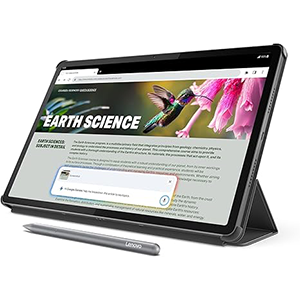
The Lenovo Idea Tab Pro is a versatile, student-friendly tablet that blends performance, productivity tools, and entertainment features into one well-rounded package. Its large 12.7-inch 3K display delivers exceptional sharpness and clarity, making it ideal for drawing, streaming, studying, and reading. The quad JBL Dolby Atmos speakers elevate sound quality to create an immersive multimedia experience.
It comes with a powerful processor that handles multitasking, note-taking, browsing, and creative work with ease. Paired with Wi-Fi 6E support, it ensures fast, reliable connections for downloading files, attending online classes, or streaming videos. The included stylus and folio case add excellent value by offering everything needed for writing, sketching, and on-the-go productivity right out of the box.
Gamers benefit from its smooth touch response and high frame-rate capabilities, making it suitable for fast-paced mobile games. The tablet also features helpful AI-powered tools, including Google Gemini, which assists with studying, planning, and brainstorming.
Battery life is generally strong, though it can vary with heavy tasks. Fortunately, fast charging helps recover power quickly during busy days. Overall, this tablet achieves an excellent balance of creativity, education, and entertainment features.
Pros
- Large 3K display with vibrant visuals
- Quad speakers provide immersive sound
- Stylus and folio case included
- Fast, responsive performance for work, study, and gaming
- AI-powered tools enhance productivity
- High touch sampling rate for gaming precision
Cons
- Battery life may vary based on workload
- Slightly heavier than smaller tablets
- Back design can pick up fingerprints
How to Choose from the Best Tablets Under $500
Selecting the best tablet under $500 requires understanding which features matter most for your daily needs. This price range offers impressive performance, excellent displays, and strong battery life, but choosing wisely ensures you get maximum value.
Start by identifying your primary use case. If you plan to stream movies, read, browse, or attend online classes, prioritize a bright, high-resolution display with accurate colors and comfortable viewing angles. A larger screen helps with multitasking and media consumption, while smaller models offer better portability for travel, commuting, or handheld use.
Performance is another essential factor. Look for a modern processor that can handle multitasking, creative work, light gaming, and everyday tasks smoothly. While you don’t need flagship-level power, a balanced processor ensures apps launch quickly and run without frustration.
Battery life is especially important in this category. A good tablet should comfortably last through a full day of mixed use—streaming, browsing, note-taking, or attending video calls. Fast-charging support is a bonus if you often use your device on the go.
Consider the tablet’s ecosystem and software features. Some models offer advanced multitasking, stylus support, handwriting features, AI-powered tools, and seamless integration with other devices. If you plan to take notes, edit documents, or draw, ensure the tablet supports a responsive stylus and productivity-friendly apps.
Camera quality also matters if you frequently join video meetings or scan documents. Look for a tablet with a clear front camera and a reliable rear camera for basic photography or scanning needs.
Durability is another point to check. Water resistance, strong build quality, and a premium design can add long-term value. Finally, consider the accessories available—such as keyboard cases, styluses, and docks—which can expand your tablet’s capabilities into a lightweight laptop replacement.
By focusing on display quality, performance, battery life, software ecosystem, durability, and accessory support, you can confidently choose a tablet that delivers exceptional versatility and long-lasting value without exceeding the $500 budget.

Which tablet should I buy under $500
If you’re shopping for a tablet under $500, start by pinpointing what you need it for. If your focus is on watching movies, browsing the web, and reading, go for one with a large, high-resolution display and good speakers.
If you mostly study, write notes, or plan to work on documents, pick a model that supports a stylus or keyboard, with responsive performance and multitasking features. For travel, commute, or portability, a compact and lightweight tablet may suit you best.
For a balanced mix—media, productivity, creativity, and casual gaming—look for a tablet with a capable processor, solid battery life, stylus or accessory support, and a vibrant screen. In short: choose a tablet that matches your lifestyle and primary use.
Under $500, you’ll find options that excel in different areas — just decide whether portability, performance, display size, or creative flexibility matters most to you.
Tablet Buying Guide 2026
In 2026, tablets under $500 remain a sweet spot for many users. When buying, first consider display quality: sharpness, color accuracy, and refresh rate make a big difference for media, reading, and drawing.
Next, ensure the processor and internal software are modern enough to handle multitasking, apps, streaming, and light creative work smoothly. Battery life remains critical — aim for a model that easily lasts a full day under mixed use.
Check stylus or keyboard accessory support if you plan to take notes, sketch, or do productivity tasks. Camera quality and speakers matter too, especially if you use the tablet for video calls or watching content. Don’t forget about build quality and — if important to you — durability or water resistance.
Also consider software support and future updates: a tablet with longer update lifespan will stay useful longer. Finally, evaluate what accessories are available and whether they add real value. By weighing display, performance, battery, features, software support, and accessories, you can pick a tablet that will serve you well for years ahead.
Pros and Cons of Mid-Range Tablets
Mid-range tablets (under about $500) come with a mix of strong advantages and some trade-offs. On the plus side: they often offer sharp, vibrant displays that are more than adequate for watching movies, reading, browsing, and creative apps. Their processors are usually capable of smooth multitasking, light to moderate gaming, and productivity tasks.
Battery life is often solid enough for a full day’s use. Many also support accessories like styluses or keyboards, making them flexible for note-taking, drawing, or work on the go. They strike a balance between performance, portability, and price — giving much of the core tablet experience without high-end cost.
On the downside: they may not match premium tablets in raw performance — heavy gaming, demanding creative work, or very intensive multitasking can stretch them. Build materials or display brightness might be slightly less refined. Some models may have shorter software-update lifespans.
Accessory support can vary, and optional accessories often add to the cost. Their cameras, speakers, or refresh rates may lag behind flagship models. In short: mid-range tablets offer great value for mainstream tasks, but they’re not ideal for power users needing cutting-edge performance or high-end creative and gaming capabilities.
What to Expect from Tablets Under $500
With tablets under $500, you can expect a solid core experience. Most will deliver vivid displays and decent audio, suitable for video streaming, browsing, reading, or casual entertainment. You’ll get enough processing power for everyday tasks: note-taking, email, social media, document editing, light photo editing, and even casual gaming.
Many models support styluses or keyboard accessories — enabling writing, drawing, and productivity work. Battery life is generally good, often enough for a full day of mixed usage. You can also expect basic cameras, good connectivity (Wi-Fi, sometimes modern wireless standards), and an app ecosystem that covers most common needs.
However, don’t expect flagship-level performance or premium build quality. Heavy-duty gaming, professional-grade video editing, or 3D rendering will likely lag. Cameras and speakers will be functional but not top-tier. Software update support may be shorter compared to expensive tablets.
Accessories such as stylus, keyboard, or protective case may not be included. In short: these tablets deliver a balanced mix of display, performance, and versatility — enough for most users — but come with sensible compromises compared to premium devices.
Battery Life in Budget Tablets
Battery life is one of the most important aspects of budget and mid-range tablets. Because these devices aim to deliver a balance of portability and functionality, a long-lasting battery can make or break the experience.
In many tablets under $500, battery performance is often optimized to give a full day of mixed usage — browsing, streaming, note-taking, and light productivity — on a single charge. This means you can comfortably use the tablet for classes, commuting, casual work, or leisure without constantly worrying about finding a charger.
That said, battery endurance depends heavily on how the tablet is used. Streaming videos, gaming, or using high brightness and multitasking will drain battery faster; in those cases, runtime will shorten significantly. A tablet with fast charging support adds convenience, especially if you often use it on the go.
For portability and travel, battery longevity becomes more critical: a dependable battery ensures the device remains useful throughout flights, long commutes, or study sessions. Overall, in budget tablets you should expect decent battery life — but realistic expectations mean you’ll want to manage screen brightness, background tasks, and heavy workloads to get the most out of each charge.
Software Support for Budget Tablets

One of the often-overlooked aspects of budget or mid-range tablets is software support. While the hardware might perform decently out of the box, the long-term value of a tablet depends heavily on whether it receives regular updates. Good software support means bug fixes, security patches, new features, and compatibility with evolving apps — all of which help keep a tablet functional and secure for years.
In the sub-$500 bracket, some tablets come from manufacturers who offer reliable update schedules, making them good long-term investments. Others may lag behind, offering limited OS updates or fewer feature improvements over time. Before buying, check whether the manufacturer has a reputation for timely updates and for supporting older models. Also consider how many years of update support they promise — a tablet receiving updates for 3–5 years will handle new apps and security protocols longer.
Even if a budget tablet performs well today, poor software support can shorten its useful life. On the other hand, a modestly featured tablet with strong update support may outlast a more powerful device that becomes obsolete due to outdated software. Therefore, when choosing a budget tablet, software support deserves as much attention as hardware specs.
Productivity Features in Budget Tablets
Budget tablets have become significantly more capable when it comes to productivity tasks. Many support styluses for handwritten notes, drawing, and mark-ups — a great feature for students, professionals, or creatives.
Some tablets allow split-screen multitasking, letting you run a browser while editing documents or viewing notes side by side. With appropriate accessories (keyboard covers or folios), a tablet can double as a lightweight laptop replacement for writing, emails, presentations, or remote work.
Modern tablets often include note-taking and annotation apps optimized for stylus use, as well as support for document editing software, which boosts their usefulness for academic or office work. Combined with a decent display and responsive performance, these tablets are well suited for classwork, report writing, brainstorming, sketching, or planning.
Connectivity—Wi-Fi or modern standards—allows syncing files, cloud backups, or collaborative work easily. For many users, a sub-$500 tablet now delivers more than casual browsing: it becomes a genuine productivity tool capable of supporting work, study, and creative tasks.
Gaming Performance on Mid-Range Tablets
When it comes to gaming, mid-range tablets under $500 offer a respectable but balanced experience. For casual games, puzzle titles, and simpler 2D or light 3D games, these tablets perform smoothly, thanks to capable processors and optimized graphics. For moderately demanding games — mobile shooters, strategy titles, or action-adventure apps — performance remains stable, especially on models with good refresh rates and responsive touch input.
That said, you shouldn’t expect flagship-level gaming performance. Extremely graphic-intensive games, heavy 3D rendering, or long high-frame-rate sessions may lead to dropped frames, longer load times, or noticeable slowdowns. Also, thermal throttling and battery drain can appear during extended gaming sessions, which may affect performance and comfort.
Nevertheless, for casual to mid-level gaming, these tablets deliver more than enough power. Games load quickly, graphics look good, and touch responsiveness remains intact. For most users who enjoy mobile games without demanding console-grade performance, mid-range tablets offer a solid and enjoyable gaming experience — striking a fair balance between price and playability.
Frequently Asked Question (FAQ)
1. Are tablets under $500 good for productivity?
Yes. Many tablets in this range support multitasking, keyboard cases, stylus tools, split-screen modes, and stable performance suitable for work or study.
2. Can I play games on a mid-range tablet?
Absolutely. Most tablets under $500 handle casual and moderately demanding games smoothly, especially models with modern processors and high-refresh displays.
3. Are tablets in this price range suitable for students?
Yes. They offer strong battery life, note-taking features, lightweight designs, and reliable performance for online classes, research, and assignments.
4. Do tablets under $500 support styluses for writing and drawing?
Many models do. Look for tablets that offer low-latency stylus compatibility, palm rejection, and apps designed for handwriting or digital art.
5. How long should a good tablet under $500 last?
With proper care, these tablets usually last 3–5 years thanks to efficient processors, long software support, and modern build quality.
Conclusion
Choosing the best tablet under $500 is easier when you focus on performance, display quality, battery life, and the overall software experience. This segment now offers impressive value, giving users access to powerful processors, vibrant screens, productivity tools, AI features, and smooth everyday performance.
Whether you need a device for entertainment, work, studying, or creative tasks, a well-selected mid-range tablet can deliver a premium experience without a premium price. With the right balance of features and accessories, these tablets offer long-term reliability and versatility for all types of users.





Leave a Reply