
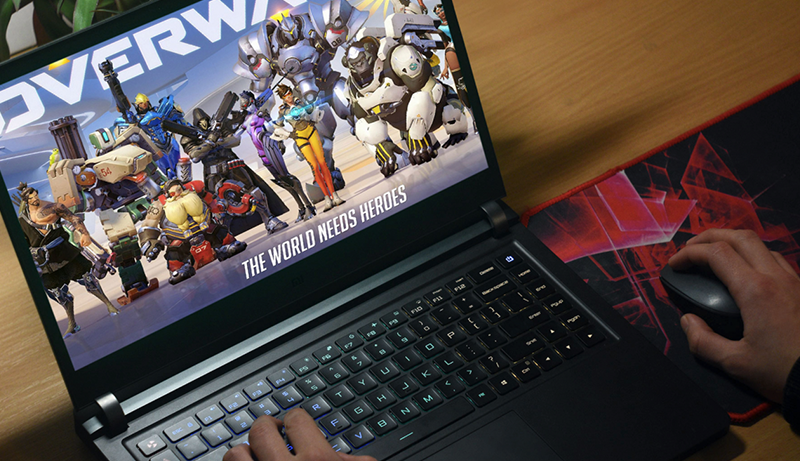
Laptops for Overwatch are generally gaming laptops, as these systems pack the punch needed to run the game. However, they don’t need to be extreme gaming rigs, since Overwatch doesn’t require the best graphics card or the fastest processor. Instead, it’s about providing an immersive experience and ensuring your laptop can handle a high frame rate without stuttering.
If you’re frustrated by your search for the best laptops for Overwatch and haven’t found one that meets your needs, we’re here to help. This ultimate guide will present the best available brands in a concise, easy-to-understand format.
Top pick
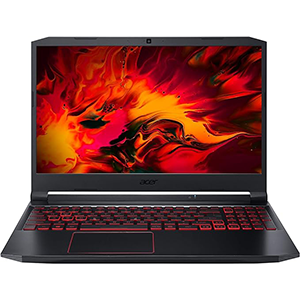
Acer Nitro 5
The Acer Nitro 5 Gaming Laptop offers smooth gameplay with a 144Hz display, powerful specs, and ample connectivity, making it a top choice for budget-conscious gamers.
Editor’s choice
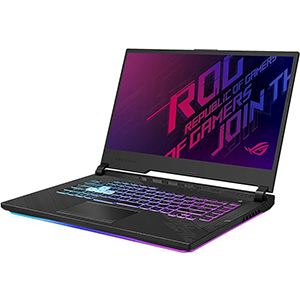
ROG Strix G15
The ASUS ROG Strix G15 offers formidable gaming performance with its high-FPS display, Intel Core CPU, and GeForce RTX GPU, enhanced by advanced cooling and stunning RGB keyboard.
Best value

Predator Helios 300
The Acer Predator Helios 300 offers exceptional Overwatch gaming with its powerful specs, including an Intel Core i7 processor and GeForce RTX 2060 graphics, at a reasonable price.
Here, we provide an overview of the 5 best laptops for Overwatch, with all the details you need to choose the perfect device for you.
1. Acer Nitro 5
The Acer Nitro 5 Gaming Laptop is an excellent choice for gamers. It features a 15.6-inch display with an IPS panel and a 144Hz refresh rate, offering smooth gameplay and a resolution of 1920×1080 pixels.
This sleek black laptop combines affordability, robust features, and powerful specs, making it one of the best value options on the market.
Powered by a 10th generation Intel Core i5 processor, the Acer Nitro 5 can handle any game with ease. It comes with 8GB of RAM, 256GB of storage, and a GeForce GTX 1650 Ti graphics card.
Additionally, it includes upgraded Wi-Fi 6 connectivity for seamless wireless networking and a backlit keyboard for easy typing in low-light conditions.
The red-backlit membrane keyboard and chiclet style design provide plenty of options for ports and connections, allowing you to plug in external hard drives and other peripherals. The laptop’s edges are sleekly cut, adding to its aesthetic appeal.
The arrow keys and touchpad are outlined in red, ensuring they stand out in any lighting situation. This solid laptop is ideal for casual gamers seeking mid-tier performance at a reasonable price.
Pros:
- Solid specs for a budget laptop.
- Various ports for peripherals.
- Customizable fan for heat control.
Cons:
- Weak audio.
- Finicky trackpad.
2. ASUS ROG Strix G15
The ROG Strix G15 embodies a streamlined design, delivering a formidable core experience for serious gaming and multitasking on Windows 10 Pro.
Featuring the latest 10th Gen Intel Core CPU and a GeForce RTX GPU, it offers high-FPS power to fully utilize its high refresh rate display. Intelligent cooling innovations, like liquid metal, elevate performance further. Ultrafast Wi-Fi 6 connectivity and space for a third SSD mean you can carry your entire collection wherever you go.
The ROG Strix G15 is equipped with the latest 10th Generation Intel Core i7 CPU. The new architecture brings significant performance improvements, especially in multithreaded applications.
Users appreciate the laptop’s performance, especially considering the price-to-specs ratio. However, some have noted a backlight leak issue, which seems to be a minor inconvenience rather than a deal-breaker. The absence of a webcam might deter some, but it contributes to a more budget-friendly price point.
The laptop’s cooling system, while effective, does emit a consistent sound. Yet, it fades into the background, becoming white noise during use. The RGB keyboard adds a customizable aesthetic touch, although some may find it excessive.
Overall, the ASUS ROG Strix G15 is a solid choice for gamers looking for high performance on a budget, with trade-offs that are manageable and do not significantly detract from the gaming experience
Pros:
- Bright screen
- Affordable and solid
- Outstanding speaker quality
- Stunning RGB keyboard
- Advanced cooling system with noiseless fans
Cons:
- Small touchpad
- Poor battery life
3. Acer Predator Helios 300
If you are looking for a great Overwatch gaming experience, the Acer Predator Helios 300 is an excellent option. With up to 6 hours of battery life, this machine can be your true gaming companion.
Powered by a 10th Gen Intel Core i7 processor and GeForce RTX 2060 graphics, you can enjoy excellent gaming performance on its 15.6″ Full HD 144Hz display. The Predator Helios 300 supports up to 16GB of Dual-Channel DDR4 memory, with one slot open for expansion.
The 512GB NVMe SSD offers quick boot and load times, and there’s also space for an additional 2.5″ HDD or SSD alongside the M.2 drive. The laptop features two USB 3.1 Type-A ports, one USB 3.1 Type-C port with DisplayPort support, and one USB 2.0 port on the right side for connecting peripherals such as external storage drives or a mouse and keyboard.
On the left side, there are two audio jacks and an Ethernet jack for fast wired connections. The laptop is equipped with 802.11ax Wi-Fi 6 (Gig+) for faster wireless speeds compared to previous generations, and Bluetooth 5 for pairing additional compatible peripherals wirelessly.
Pros:
- Reasonable price and stunning performance
- Superb cooling mechanism
- Exceptional graphics
- Not bulky
- Excellent 1080p gaming performance
Cons:
- Sharp corners of metal chassis
- Heating issue
4. Dell XPS 15
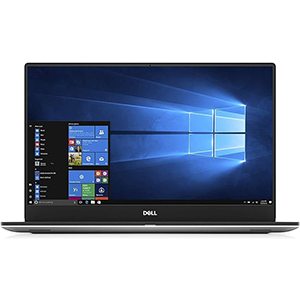
Consider the Dell XPS 15 if you are looking for a larger productivity machine. This device offers great performance in a slim package.
Powered by Intel 9th Generation processors and NVIDIA GeForce GTX 1650 graphics, the XPS 15 delivers 8% more performance than the previous generation and up to 2 hours more battery life.
With a stunning HDR 400 certified display and next-generation graphics, the Dell XPS 15 7590 is engineered for high performance on the go.
It features an optional 4K UHD OLED display with 100% DCI-P3 color coverage and a 6% higher contrast ratio than sRGB, delivering brighter, more vivid colors. Certified HDR 400 displays are designed to handle 4K content at the highest quality, resulting in a more lifelike and authentic viewing experience.
Pros:
- Decent battery life
- Beautiful design
- Various configurable options
- Robust speakers
Cons:
- GPU may fall short for hardcore gamers
5. Razer Blade 15
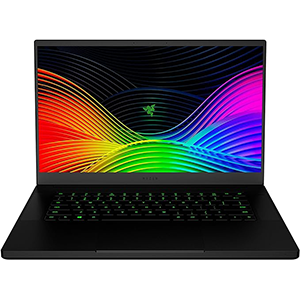
This machine is the world’s smallest gaming laptop, featuring premium construction and components that are hard to fault.
The new Razer Blade 15 Gaming Laptop comes in two different models, both with a matte black finish and a sleek chassis. The base model features an all-black aluminum build with green Razer logos on the lid and below the keyboard, while the advanced model offers a black and mercury white finish with RGB lighting effects.
The Razer Blade 15 Advanced Model elevates the experience with individually-lit keys designed to register every keystroke. You can use any of the 16.8 million colors to create customized profiles for your games or sync your laptop with Chroma-enabled accessories like mice, keyboards, and headsets.
Powered by a 6-core Intel Core i7 processor and NVIDIA GeForce GTX 1660 Ti graphics card, the Razer Blade 15 handles serious tasks like live streaming and video editing with ease. Its advanced vapor chamber cooling system ensures you can game for hours without overheating.
Pros:
- Thin display bezel
- Long battery life
- Various ports
- Attractive chassis
- Strong overall performance
Cons:
- Runs hot quickly
- Pricey
Conclusion
Overwatch has million of users in worldwide, and these gamers prefer laptops that support the game efficiently with high resolution.
The game’s minimum system requirements are 4GB RAM, a minimum resolution of 1024 x 768, an Intel Core or AMD Phenom X3 8650 processor, and a graphics card such as the Nvidia GeForce GTX 460, Intel HD Graphics 4400, or ATI Radeon HD 4850.
If you’re tired of searching for the best laptop for Overwatch without finding one that suits your needs, we can help.
You can easily evaluate the performance of a gaming laptop by considering the type of CPU and its speed in GHz, the model of the computer’s graphics card, the amount of RAM (GB), and the amount of RAM that the graphics card has on board.




Leave a Reply