
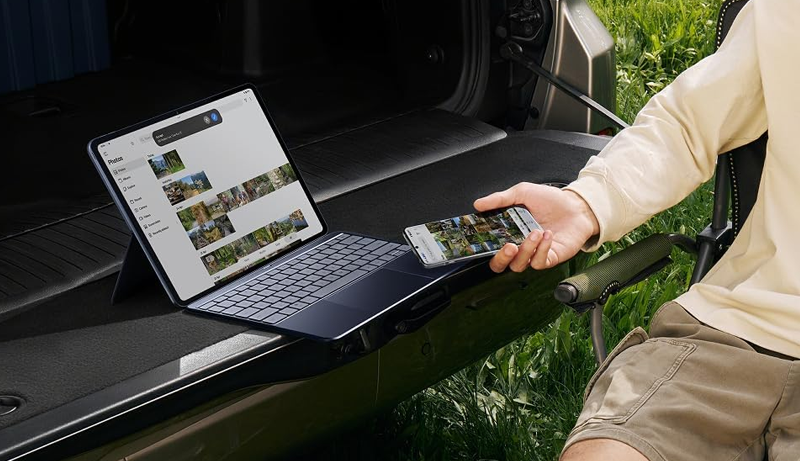
If you’re searching for the perfect Android tablet that bridges the gap between entertainment and productivity, a tablet with a detachable keyboard is your ideal companion. These devices offer the flexibility of a tablet and the functionality of a laptop, making them suitable for students, professionals, and creative users alike. Whether you’re writing reports, sketching ideas, or streaming your favorite content, a keyboard-equipped tablet provides comfort and convenience in one compact package.
Modern Android tablets now come with powerful processors, stunning displays, and AI-driven features that boost creativity and efficiency. Many even include stylus support for note-taking, drawing, and precise control. Beyond that, you’ll find enhanced battery life, faster connectivity, and lightweight builds that make them easy to carry anywhere.
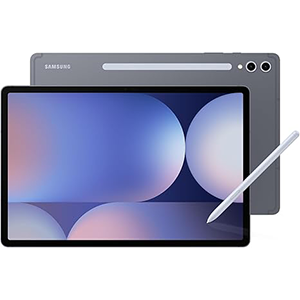
Galaxy Tab S10+

OnePlus Pad 3
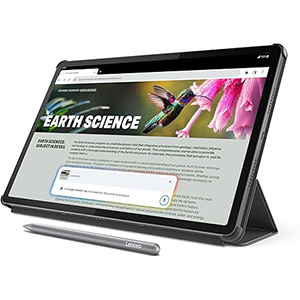
Idea Tab Pro
In this review, we’ve selected the best Android tablets that come with or support keyboards, combining versatility, performance, and premium design. Each model has been evaluated based on its display quality, build, productivity tools, and multimedia experience. No matter your lifestyle — whether working on the go, attending classes, or managing creative projects — these top Android tablets with keyboards are ready to transform how you work and play.
1. Samsung Galaxy Tab S10+ Plus
The Samsung Galaxy Tab S10+ Plus redefines what an Android tablet can do by combining advanced AI features with an immersive display experience. Designed for professionals, creators, and students alike, this tablet delivers fluid performance with minimal lag and smooth multitasking. The expansive AMOLED display offers stunning visuals with lifelike colors and reduced glare, making it ideal for both work and entertainment.
Its AI-powered tools enhance productivity — from automatically summarizing notes to transforming sketches into works of art. Features like Circle to Search simplify your workflow, allowing you to find information quickly without leaving your current app. Paired with the responsive S Pen, it’s perfect for taking notes, drawing, or navigating with precision.
Built to withstand bumps and splashes, this tablet combines sleek design with durability. Its long-lasting battery ensures uninterrupted performance throughout the day, while Dolby Audio speakers create an immersive cinematic sound experience. Whether used for meetings, creative projects, or casual streaming, this tablet adapts effortlessly to any environment. The addition of keyboard support makes it a true productivity powerhouse, offering a seamless transition from tablet to laptop mode whenever you need it.
2. OnePlus Pad 3

The OnePlus Pad 3 delivers an impressive blend of performance and visual excellence, designed for users who demand both speed and versatility. Its ultra-clear 13.2-inch display produces exceptional clarity and vibrant color reproduction, perfect for watching videos, gaming, or content creation. The high refresh rate ensures fluid motion, providing a smooth and engaging visual experience.
With its sleek aluminum design, this tablet feels premium and durable, yet remains light enough for effortless portability. Its user interface allows multitasking with ease — you can run multiple apps simultaneously, boosting productivity without compromising speed. This feature makes it ideal for both creative professionals and multitasking users.
The integrated audio system offers an immersive experience with rich, directional sound, whether you’re streaming, conferencing, or enjoying your favorite playlist. Long battery endurance and fast charging keep you going without long downtime, ensuring productivity wherever you are.
Paired with a detachable keyboard, the tablet transforms into a lightweight workstation suitable for document editing, presentations, or online meetings. Combined with its stylish aesthetics and intelligent software features, the OnePlus Pad 3 is an all-rounder device built for modern work-life balance — equally capable of handling your entertainment and productivity needs.
3. Lenovo Idea Tab Pro
The Lenovo Idea Tab Pro is crafted for learners, professionals, and entertainment enthusiasts who value balanced performance and smart functionality. It delivers a vibrant 12.7-inch display that brings every image, video, and lecture to life with crisp detail and accurate color. Supported by AI integration, it enhances your workflow with intelligent assistance, whether you’re studying, writing, or browsing.
Audio quality is another highlight, thanks to the quad-speaker system tuned with Dolby Atmos technology. Whether watching movies or attending virtual classes, sound remains rich and immersive. The tablet also features an adaptive reading mode that reduces eye strain, making it comfortable for long study or reading sessions.
Its slim, modern design ensures portability, while extended battery life allows you to stay connected all day. The included pen and folio case make note-taking, sketching, and productivity effortless. With smooth connectivity and low-latency responsiveness, it’s an ideal companion for everyday multitasking.
Paired with a detachable keyboard, it offers the flexibility of a laptop while maintaining the simplicity of a tablet. For users seeking a well-rounded Android device for both work and play, this model strikes the perfect balance between practicality, performance, and creativity.
4. Amazon Fire Max 11
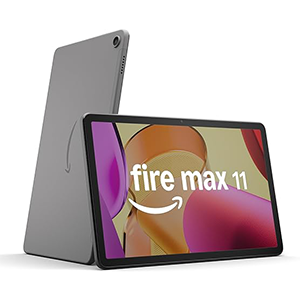
The Amazon Fire Max 11 stands out as an affordable yet capable tablet for entertainment, productivity, and everyday use. Its vivid 11-inch display produces sharp details and rich colors, offering an enjoyable viewing experience for streaming, reading, or browsing. With a durable aluminum design, it’s built to withstand daily wear and tear while remaining lightweight for easy portability.
Equipped with an efficient processor and Wi-Fi 6, this tablet ensures responsive performance for multitasking and smooth app navigation. It’s perfect for users who value simplicity and reliability in a compact device. The 14-hour battery life allows you to enjoy content throughout the day without frequent charging interruptions.
The Fire Max 11 supports an optional keyboard and stylus, turning it into a productive workstation for note-taking, writing, or managing tasks. For communication, the front and rear cameras deliver clear video calls, while integrated Alexa support makes managing your smart home effortless.
Whether for streaming your favorite shows, handling schoolwork, or casual productivity, this tablet is versatile enough for the whole family. With built-in parental controls and access to educational and entertainment apps, it’s a smart choice for those seeking an all-in-one Android tablet experience.
5. Suicoey P80 11-Inch Tablet
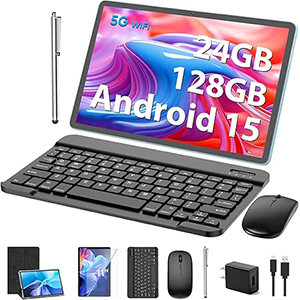
The Suicoey P80 11-inch tablet combines modern performance and affordability in one versatile package. Its sleek design and responsive IPS touchscreen deliver sharp visuals and immersive experiences, making it suitable for entertainment, work, and education. The display provides excellent brightness and clarity for reading, gaming, and video playback.
Built with the latest Android operating system, it offers improved privacy settings and seamless multitasking for everyday use. The inclusion of the detachable keyboard, stylus, and case turns it into a true 2-in-1 device, giving users the flexibility to switch from typing to touch input instantly.
Its built-in cameras capture clear photos and videos, making it useful for video calls and online meetings. The tablet supports dual-band Wi-Fi, ensuring fast and stable connections whether you’re working remotely or streaming content. The long-lasting battery enhances mobility, while quick charging gets you back to work faster.
Certified for Google Play access, it lets you download your favorite apps without restrictions. Easy to set up and beginner-friendly, this tablet suits students, professionals, and families alike. Offering a balanced mix of power, portability, and value, it’s a reliable Android option that performs well in both productivity and entertainment tasks.
Choosing from the Best Android Tablet with Keyboards
Selecting the right Android tablet with a keyboard depends on your needs, lifestyle, and how you plan to use it. Here are key factors to consider when choosing the ideal device:
1. Display Quality:
The display is the heart of any tablet. Look for high-resolution panels with vibrant color accuracy and good brightness levels. AMOLED or high-refresh LCD screens deliver sharper visuals for movies, gaming, and productivity. Larger displays are great for multitasking, while smaller ones are better for portability.
2. Keyboard Comfort and Compatibility:
Ensure the keyboard is comfortable for long typing sessions. Some models include detachable keyboards with built-in touchpads, while others offer optional accessories. A responsive keyboard enhances efficiency for writers, students, and professionals alike.
3. Battery Life:
For on-the-go users, battery longevity is crucial. Choose a tablet that lasts at least 10–12 hours on a single charge. Fast-charging support is also important for reducing downtime between uses.
4. Connectivity and Accessories:
Wi-Fi 6, Bluetooth 5.0, and optional 5G connectivity make a huge difference in performance and speed. Also, check for stylus support if you plan on sketching or note-taking. USB-C ports, expandable storage, and compatible accessories further enhance productivity.
5. Build and Design:
A slim, lightweight tablet with a durable body ensures easy handling. Metal or aluminum finishes tend to feel more premium and last longer.
6. Software and Features:
Choose a tablet with the latest Android version for improved multitasking, security, and app compatibility. Additional features like split-screen, AI-powered tools, or smart assistants can further streamline your workflow.
7. Purpose and Budget:
Finally, consider how you’ll use the tablet. Students might prioritize note-taking and affordability, while professionals may seek top-tier performance and display quality. Evaluate your priorities and pick a model that fits your daily routine.
With these factors in mind, finding the best Android tablet with a keyboard becomes much simpler — ensuring you invest in a device that enhances both productivity and entertainment.
Best Android Tablets with Keyboards: Find the Perfect Match for Your Needs
Comparing today’s top Android tablets with keyboards reveals how each caters to a different type of user. The first model shines with its superior display and advanced AI tools that turn it into a creative powerhouse. Its responsive stylus and productivity features make it ideal for professionals and artists who rely on precision and versatility.
The second model, on the other hand, focuses on immersive visuals and exceptional speed. Its large, ultra-clear display and multitasking features cater to users who value cinematic experiences and seamless app management. Meanwhile, the third model blends performance and practicality with intelligent tools designed for students and multitaskers, offering a balance between functionality and affordability.
For those who want an all-round tablet for everyday tasks, the fourth model offers simplicity and excellent value. It’s perfect for streaming, reading, and casual productivity, while still supporting optional accessories like a keyboard and stylus. Lastly, the fifth model brings flexibility and complete packages for those who want everything included — from the keyboard and mouse to stylus and protective case — without compromising on core performance.
Ultimately, your ideal choice depends on how you use your tablet: creative professionals may prefer high-end performance, while students and families might lean toward user-friendly options with all-in-one accessories.
FAQ – Best Android Tablet with Keyboards
1. Why choose an Android tablet with a keyboard?
It provides laptop-like functionality while maintaining the flexibility and portability of a tablet.
2. Can I use any Bluetooth keyboard with an Android tablet?
Yes, most Android tablets support external Bluetooth keyboards, though official or compatible ones offer better integration.
3. Are tablets with keyboards good for students?
Absolutely. They’re lightweight, support note-taking, multitasking, and online learning, making them perfect for academic use.
4. Do Android tablets support stylus input?
Many modern Android tablets include stylus support for drawing, writing, or editing documents.
5. How long do Android tablet batteries typically last?
Most offer 10–14 hours of mixed-use battery life, depending on the model and usage.
6. Can Android tablets replace laptops?
For many users, yes. With a keyboard and productivity apps, they can handle writing, browsing, and even creative work efficiently.
Conclusion
The best Android tablets with keyboards combine the convenience of touch navigation with the productivity of a laptop. From high-end creative tools to budget-friendly all-rounders, there’s a model to fit every user’s needs.
Whether you prioritize display quality, AI features, or long-lasting battery life, these tablets deliver a perfect balance of versatility and performance. Designed for work, study, and entertainment, they make switching between tasks seamless and efficient.
Choose the one that matches your lifestyle, and you’ll unlock a more flexible, portable, and productive digital experience.



Leave a Reply